|
VOOZH | about |
|
VOOZH | about |
Choosing the right location for a retail store is crucial for its success. Location analysis involves examining various factors such as demographics, foot traffic, competition, and accessibility to determine the most favorable sites. In this article, we will explore how to perform retail store location analysis using R Programming Language a powerful tool for statistical analysis and data visualization.
The main objectives of this article are:
Location analysis in R involves several steps:
To start with, we need a dataset that includes information relevant to retail store locations. This can include data on potential locations, demographic information, competition, foot traffic, and other relevant variables. For this example, we'll create a synthetic dataset with the following variables:
Here is a code snippet to create such a dataset in R:
Output:
# A tibble: 100 × 7
 location_id latitude longitude population median_income competitor_count
 <int> <dbl> <dbl> <dbl> <dbl> <dbl>
 1 1 40.3 -73.4 15743 84920 10
 2 2 40.8 -73.7 48306 30660 1
 3 3 40.4 -73.5 32061 84535 9
 4 4 40.9 -73.0 28176 81057 6
 5 5 40.9 -73.5 23116 74109 4
 6 6 40.0 -73.1 44611 63664 4
 7 7 40.5 -73.1 21384 40965 7
 8 8 40.9 -73.4 17971 30575 1
 9 9 40.6 -73.6 12679 61672 3
10 10 40.5 -73.9 12748 64461 7
Visualization is key to understanding the geographical and statistical aspects of potential retail locations. We will use several visualization techniques to explore our dataset.
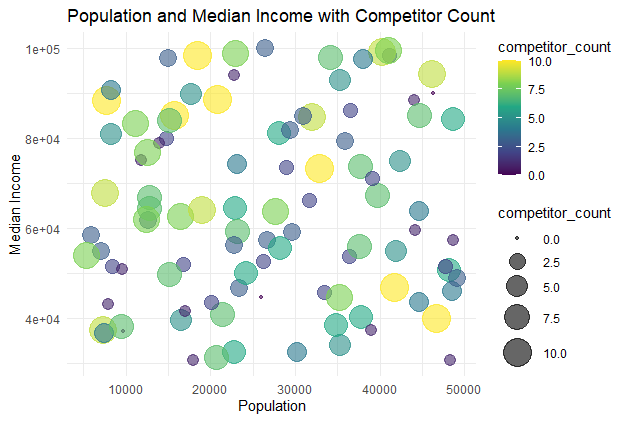
A bubble chart showing the relationship between population, median income, and competitor count.
Output:
The bubble chart visualizes the relationship between population and median income, with bubble sizes and colors representing competitor count. Larger and darker bubbles indicate locations with more competitors.
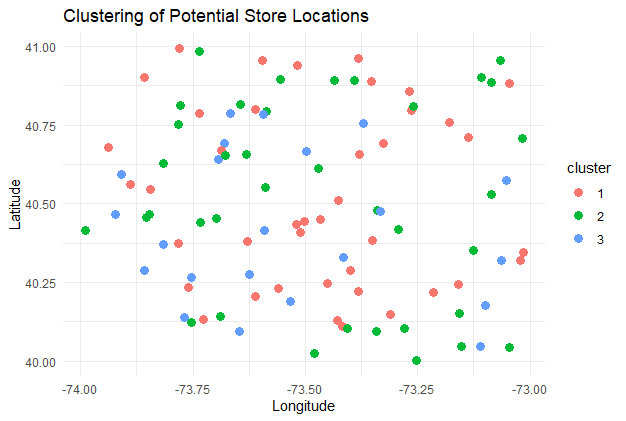
Clustering helps to group locations based on their characteristics.
Output:
Each color represents a cluster of locations with similar characteristics. This can help identify areas with similar potential for retail success, facilitating targeted strategies for different regions.
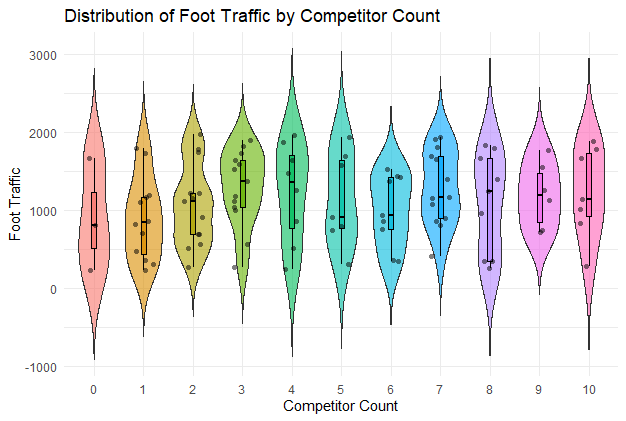
A violin plot showing the distribution of foot traffic by competitor count.
Output:
The violin plot shows the distribution of foot traffic for different competitor counts, with embedded box plots and jittered points providing detailed data insights.
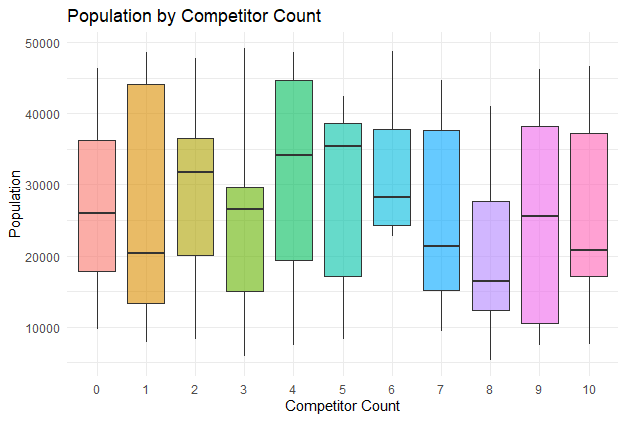
A box plot showing the population distribution across different competitor counts.
Output:
The box plot displays the population distribution for each competitor count, highlighting medians, quartiles, and outliers for comparison.
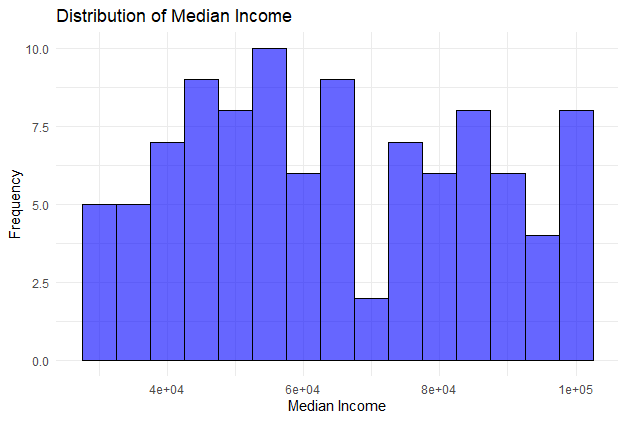
A histogram showing the distribution of median income.
Output:
The histogram illustrates the frequency distribution of median income values, allowing for easy identification of income ranges and central tendencies.
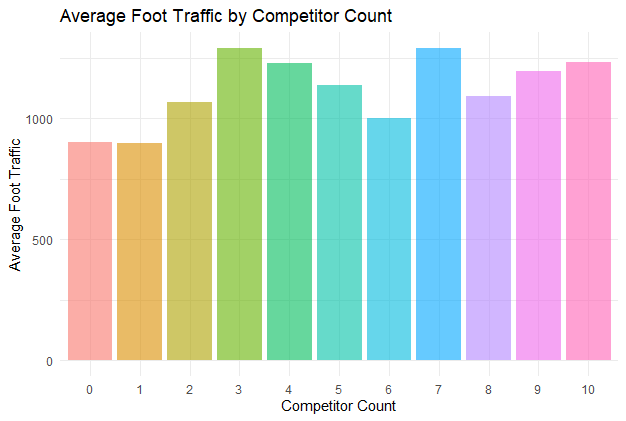
A bar chart showing the average foot traffic for different competitor counts.
Output:
The bar chart displays the average foot traffic for each competitor count, providing insights into how competition affects foot traffic at different locations.
Advanced data visualization techniques in R provide powerful tools for retail store location analysis. By creating and visualizing datasets with various types of charts, businesses can gain deep insights into potential store locations. These visualizations help in understanding geographical distribution, population density, income levels, competitor presence, and foot traffic, enabling informed decision-making for optimal store placement.