|
VOOZH | about |
|
VOOZH | about |
Random Forest is an machine learning algorithm which is used for both regression and classification tasks. It is an ensemble method that creates multiple decision trees and combines their outputs to improve model performance.
The result is concluded either by:
The Random Forest algorithm operates on two key principles:
This combination of decision trees helps to reduce overfitting and improves model accuracy.
Consider a Fruit Box consisting of three fruits Apples, Oranges, and Cherries in training data (n = 3). We are predicting the fruit which is maximum in number in a fruit box. A random forest model using the training data with a number of trees, k = 3.
The model is judged using various features of data like diameter, color, shape and groups. Among orange, cheery, and orange, orange is selected to be maximum in fruit box by random forest.
We will now implement a Random Forest model using the famous iris dataset. This will help us understand how to build and evaluate a Random Forest model in R.
To implement Random Forest in R, we first need to install the randomForest package. This package provides a simple interface for training and evaluating Random Forest models.
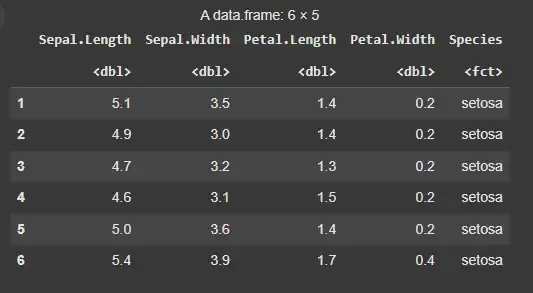
We will use the iris dataset which contains data on three species of iris flowers, with measurements of sepal length, sepal width, petal length, and petal width. It is an in-built dataset in R. We will then display some of its first few rows using the head() function.
Output:
We will now split the data into training and testing sets. The sample() function is used to split the data into training and testing sets.
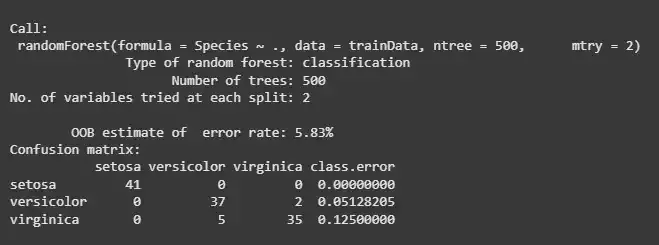
Now, we will build the Random Forest model using the training data. The randomForest() function creates a Random Forest model. It takes the formula target ~ features and a data frame as input. In this case, the model based on the Species as the target variable and all other variables as features.
Output:
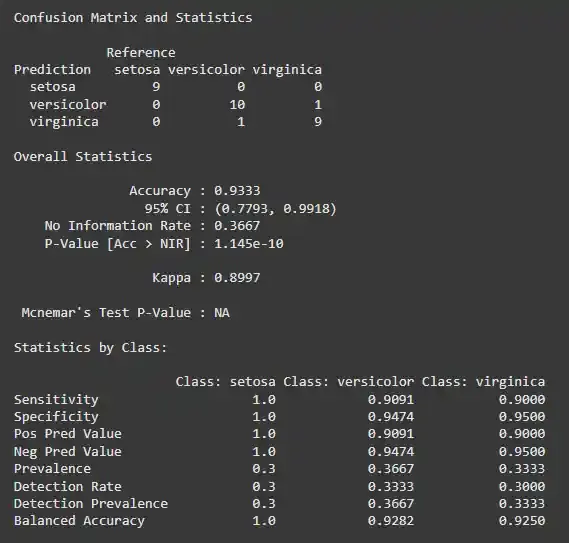
We can evaluate the model’s performance by making predictions on the test data and comparing them to the true values.
The confusion matrix will show how well the model performed, providing metrics such as accuracy, precision, recall and F1 score. We will use caret library to plot the confusion matrix for our model.
Output:
The performance of Random Forest can be improved by tuning hyperparameters. We will now explore how to tune the key hyperparameters of the Random Forest model to improve its performance.
Example:
In this example, we’ve set the number of trees (ntree) to 500 and used 2 features (mtry) at each split.
Output:
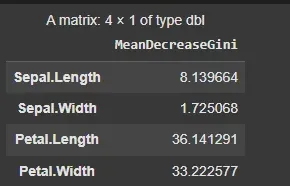
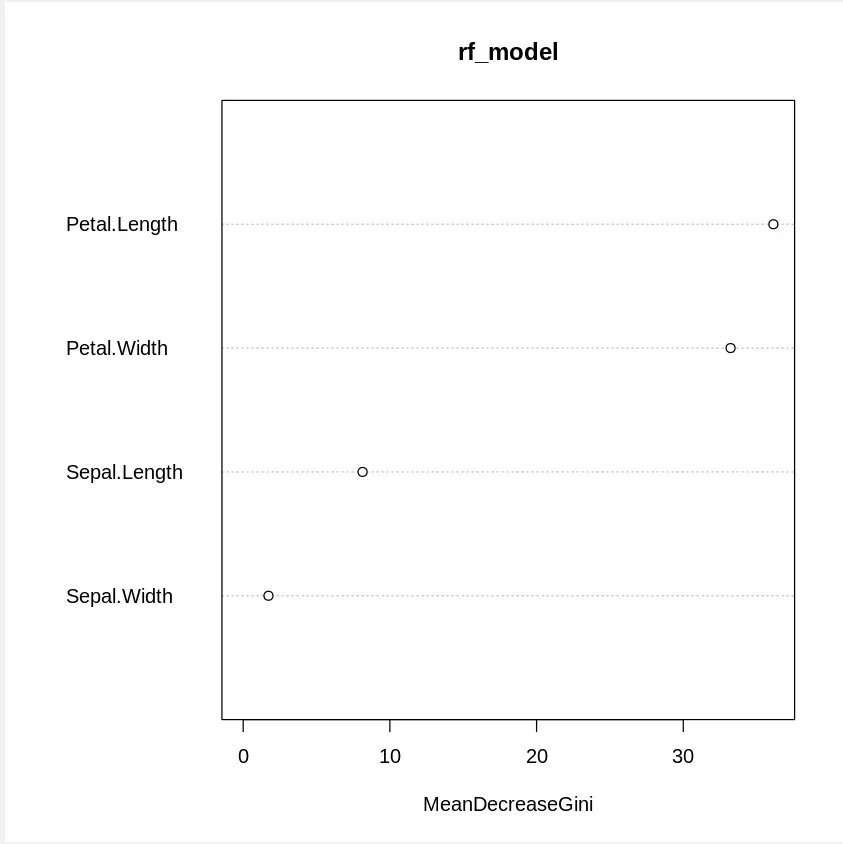
We will now interpret the results of the Random Forest model. One useful feature of Random Forest is feature importance, which shows how important each feature is in predicting the target variable.
importance(): This function shows the importance of each feature used in the model. It provides a numerical ranking of each feature’s importance.varImpPlot(): It creates a plot to visually represent the importance of each feature, helping us understand which features contribute the most to the model’s decision-making process. This helps in identifying which features contribute the most to the model’s decision-making process.
Output:
In this article, we explored the Random Forest and learned how it works by constructing multiple decision trees and aggregating their predictions to enhance accuracy.