|
VOOZH | about |
|
VOOZH | about |
In R programming, handling files (such as reading, writing, creating, and renaming files) can be done using built-in functions available in the base R package. These operations help in managing data stored in files, which is essential for tasks like data analysis, data manipulation, and automation. In this article we will cover various file handling tasks in R, including creating files, writing to them, reading from them, checking file existence, renaming files, and more.
In R, we can create a new file using the file.create() function. If the file already exists, it will be truncated (emptied). This function returns a logical value: TRUE if the file is created successfully, and FALSE otherwise.
file.create("file_name")
TRUE
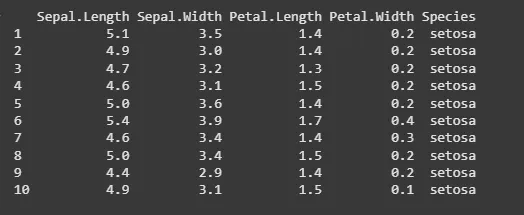
To write data into a file, we can use the write.table() function in R. This function is part of the utils package and allows we to write a data frame or matrix to a file.
write.table(x, file)
Output:
To rename a file, use the file.rename() function. It returns a logical value: TRUE if the file is successfully renamed, and FALSE otherwise.
file.rename(from, to)
TRUE
We can check if a file exists in the current working directory using the file.exists() function. It returns TRUE if the file exists, and FALSE otherwise.
file.exists("file_name")
FALSE
TRUE
To read a file into R, use the read.table() function. This function reads files and returns the data as a data frame, which can then be used for further computations.
read.table(file)
We can list all files in the current working directory (or a specified path) using the list.files() function.
list.files(path)
[1] "Bandicam" "Bluetooth Folder" "GFG.txt" "newGFG.txt" "My Music" "Documents"
The file.copy() function allows we to copy files from one location to another.
file.copy(from, to)
[1] "newGFG.txt" "Documents"
We can create a new directory using the dir.create() function. If no path is specified, the directory is created in the current working directory.
dir.create(path)
[1] "Bandicam" "GFG" "Documents" "My Music"