|
VOOZH | about |
|
VOOZH | about |
Arrays are important data storage structures defined by a fixed number of dimensions. Arrays are used for the allocation of space at contiguous memory locations.
In R Programming Language Uni-dimensional arrays are called vectors with the length being their only dimension. Two-dimensional arrays are called matrices, consisting of fixed numbers of rows and columns. R Arrays consist of all elements of the same data type. Vectors are supplied as input to the function and then create an array based on the number of dimensions.
An R array can be created with the use of array() the function. A list of elements is passed to the array() functions along with the dimensions as required.
Syntax:
array(data, dim = (nrow, ncol, nmat), dimnames=names)
where:
Otherwise, a list has to be specified which has a name for each component of the dimension. Each component is either a null or a vector of length equal to the dim value of that corresponding dimension.
A vector is a uni-dimensional array, which is specified by a single dimension, length. A Vector can be created using c() function. A list of values is passed to the c() function to create a vector.
Output:
[1] 1 2 3 4 5 6 7 8 9
Length of vector : 9
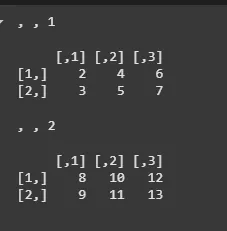
A two-dimensional matrix is an array specified by a fixed number of rows and columns, each containing the same data type. A matrix is created by using array() function to which the values and the dimensions are passed.
Output:
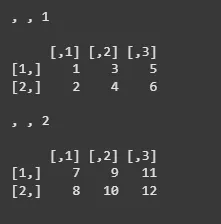
Vectors of different lengths can also be fed as input into the array() function. However, the total number of elements in all the vectors combined should be equal to the number of elements in the matrices. The elements are arranged in the order in which they are specified in the function.
Output:
We will use dim function to find out the dimension of the R array.
Output:
[1] 2 3 2
This specifies the dimensions of the R array. In this case, we are creating a 3D array with dimensions 2x3x2. The first dimension has size 2, the second dimension has size 3, and the third dimension has size 2.
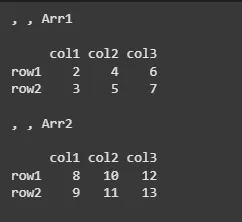
The row names, column names and matrices names are specified as a vector of the number of rows, number of columns and number of matrices respectively. By default, the rows, columns and matrices are named by their index values.
Output:
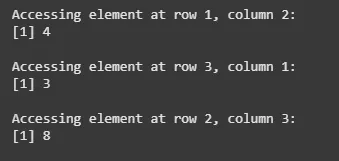
The R arrays can be accessed by using indices for different dimensions separated by commas. Different components can be specified by any combination of elements' names or positions.
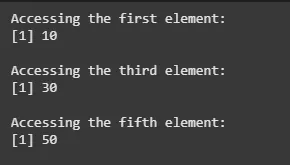
The elements can be accessed by using indexes of the corresponding elements.
Output:
The elements can be accessed by using indexes of the corresponding elements.
Output:
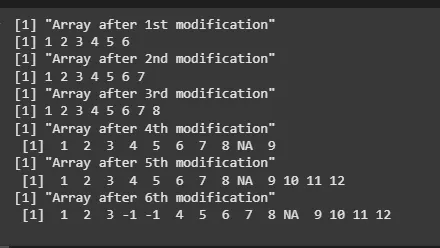
Elements can be appended at the different positions in the array. The sequence of elements is retained in order of their addition to the array. The time complexity required to add new elements is O(n) where n is the length of the array. The length of the array increases by the number of element additions. There are various in-built functions available in R to add new values:
Output:
The original length of the array was 7, and after third modification elements are present till the 8th index value. Now, at the fourth modification, when we add element 9 at the tenth index value, the R’s inbuilt function automatically adds NA at the missing value positions. At 5th modification, the array of elements [10, 11, 12] are added beginning from the 11th index. At 6th modification, array [-1, -1] is appended after the third position in the array.
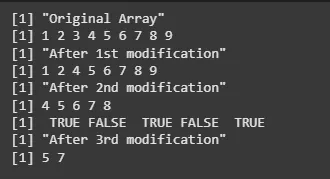
Elements can be removed from arrays in R, either one at a time or multiple together. These elements are specified as indexes to the array, where in the array values satisfying the conditions are retained and rest removed. We can
Output:
At 1st modification, all the element values that are not equal to 3 are retained. At 2nd modification, the range of elements that are between 2 and 8 are retained, rest are removed. At 3rd modification, the elements satisfying the FALSE value are printed, since the condition involves the NOT operator.
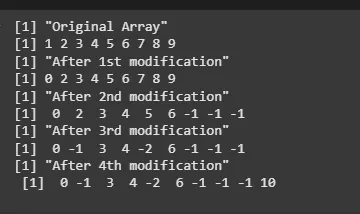
The elements of the array can be updated with new values by assignment of the desired index of the array with the modified value. The changes are retained in the original array. If the index value to be updated is within the length of the array, then the value is changed, otherwise, the new element is added at the specified index. Multiple elements can also be updated at once, either with the same element value or multiple values in case the new values are specified as a vector.
Output:
At 2nd modification, the elements at indexes 7 to 9 are updated with -1 each. At 3rd modification, the second element is replaced by -1 and fifth element by -2 respectively. At 4th modification, a new element is added since 10th index is greater than the length of the array.