|
VOOZH | about |
|
VOOZH | about |
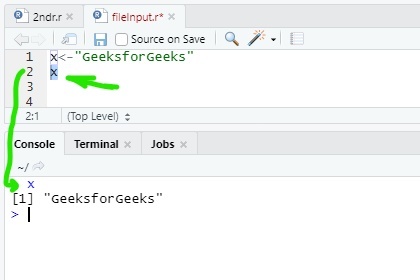
In R there are various methods to print the output. Most common method to print output in R program, there is a function called print() is used. Also if the program of R is written over the console line by line then the output is printed normally, no need to use any function for print that output. To do this just select the output variable and press run button. Example:
Output:
[1] "GeeksforGeeks"
Using print() function to print output is the most common method in R. Implementation of this method is very simple.
Syntax: print("any string") or, print(variable)
Example:
Output:
[1] "GFG"
[1] "GeeksforGeeks"
R provides a method paste() to print output with string and variable together. This method defined inside the print() function. paste() converts its arguments to character strings. One can also use paste0() method.
Note: The difference between paste() and paste0() is that the argument sep by default is " "(paste) and ""(paste0).
Syntax: print(paste("any string", variable)) or, print(paste0(variable, "any string"))
Example:
Output:
[1] "GeeksforGeeks is best (paste inside print())"
[1] "GeeksforGeeksis best (paste0 inside print())"
sprintf() is basically a C library function. This function is use to print string as C language. This is working as a wrapper function to print values and strings together like C language. This function returns a character vector containing a formatted combination of string and variable to be printed.
Syntax: sprintf("any string %d", variable) or, sprintf("any string %s", variable) or, sprintf("any string %f", variable)) etc.
Example:
Output:
> sprintf("%s is best", x)
[1] "GeeksforGeeks is best"
> sprintf("%d is integer", x1)
[1] "255 is integer"
> sprintf("%f is float", x2)
[1] "23.140000 is float"Another way to print output in R is using of cat() function. It's same as print() function. cat() converts its arguments to character strings. This is useful for printing output in user defined functions.
Syntax: cat("any string") or, cat("any string", variable)
Example:
Output:
GeeksforGeeks is best
This is R language
Another way to print something in R by using message() function. This is not used for print output but its use for showing simple diagnostic messages which are no warnings or errors in the program. But it can be used for normal uses for printing output.
Syntax: message("any string") or, message("any string", variable)
Example:
Output:
GeeksforGeeks is best
This is R language
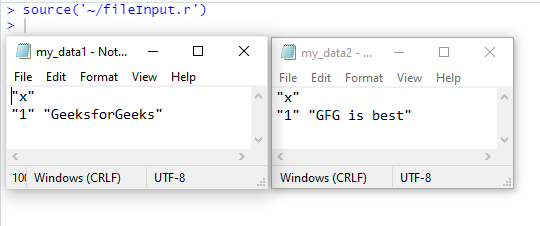
To print or write a file with a value of a variable there is a function called write(). This function is used a option called table to write a file.
Syntax: write.table(variable, file = "file1.txt") or, write.table("any string", file = "file1.txt")
Example:
Output: 👁 output-of-R-program