|
VOOZH | about |
|
VOOZH | about |
R has a simple and readable syntax that makes it easy to start programming. Understanding the basic structure of R code helps you write clean and correct programs. R executes commands line by line and provides immediate output in the console.
R code can be written in:
Example:
[1] "Hello, World!"
An R program mainly consists of:
These components form the basic structure of any R script.
Variables are used to store values so they can be reused later in the program. In R, assignment can be done in three ways:
Example:
[1] "Simple Assignment"
[1] "Leftward Assignment!"
[1] "Rightward Assignment"
The rightward assignment is less common and can be confusing for some programmers, so it is generally recommended to use the <- or = operator for assigning values in R.
Comments are used to explain code and improve readability. They are ignored by the R interpreter during execution.
Example:
[1] "This is fun!"
From the above output, we can see that both comments were ignored by the interpreter.
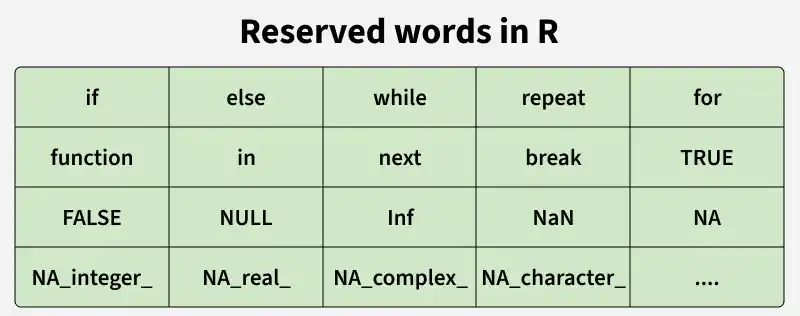
Keywords are reserved words in R that have special meaning. They cannot be used as variable names or function names.
You can write multiple statements in one line using a semicolon ;
[1] 11
However, writing each statement on a new line improves readability.
Curly braces {} are used to group multiple statements together, especially in control structures and functions.
[1] "This is a block of code"
[1] "Multiple lines inside braces"
R provides different functions to display output.
[1] "Using print function"
Using cat function