 |
VOOZH | about |
|
VOOZH | about |
Packages in R Programming language are a set of R functions, compiled code, and sample data. These are stored under a directory called "library" within the R environment. By default, R installs a group of packages during installation. Once we start the R console, only the default packages are available by default. Other packages that are already installed need to be loaded explicitly to be utilized by the R program that's getting to use them.
A repository is a place where packages are located and stored so we can install R packages from it. Organizations and Developers have a local repository, typically they are online and accessible to everyone. Some of the most popular repositories for R packages are:
The .libpath() method handles the management of library paths, which are directories where a program searches for external libraries or modules required for execution.
Example Output:
[1] "C:/Users/GFG19565/AppData/Local/Programs/R/R-4.3.1/library"
We load a package using library(), the functions and objects in that package become available in the global environment.
Output:
There are multiple ways to install R Package, some of them are,
For installing R Package from CRAN we need the name of the package and use the following command
install.packages("package name")
Installing Package from CRAN is the most common and easiest way as we just have to use only one command. In order to install more than a package at a time, we just have to write them as a character vector in the first argument of the install.packages() function:
Example:
For Bioconductor, starting with R version 4.5.1 or greater, the biocLite. R script is no longer compatible for installing Bioconductor packages. Instead, the BiocManager package should be used to install and manage Bioconductor packages.
To install the BiocManager package, use the following command:
install.packages("BiocManager")
Once BiocManager is installed, we can use it to install Bioconductor packages. For example, to install the edgeR package and its dependencies from the Bioconductor repository, use:
BiocManager::install("edgeR")
This will install the edgeR package along with any necessary dependencies from Bioconductor.
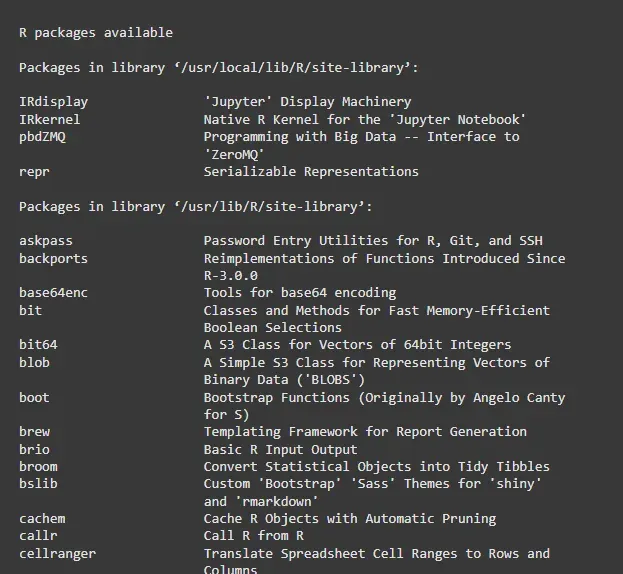
1. To check what packages are installed on our computer, type this command:
installed.packages()
2. To update all the packages, type this command:
update.packages()
3. To update a specific package, type this command:
install.packages("PACKAGE NAME")
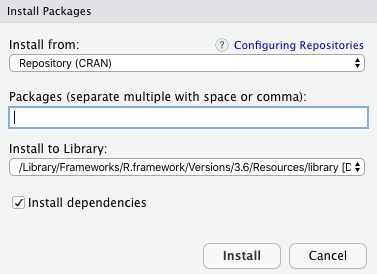
In R Studio goto Tools -> Install Package, and there we will get a pop-up window to type the package we want to install:
Under Packages, type, and search Package which we want to install and then click on install button.
When a R package is installed, we are ready to use its functionalities. If we just need a sporadic use of a few functions or data inside a package we can access them with the following notation.
Example:
Load a package using the library function
library(dplyr)
Alternatively, load a package using the require function
require(dplyr)
Both functions attempt to load the specified package, but there is a subtle difference between the two: library() returns an error if the package is not found or cannot be loaded, whereas require() returns a warning and sets the value of the package variable to FALSE.
There is always confusion between a package and a library, and we find people calling libraries as packages.
We can just input a vector of names to the install.packages() function to install an R package, in the case of the library() function, this is not possible. We can load a set of packages one at a time, or if we prefer, use one of the many workarounds developed by R users.
In R, we can load more than one package at a time using the library() function. Simply provide the names of the packages we want to load as a vector inside the library() function.
Example:
library(caret, dplyr, ggplot2)
Alternatively, we can use the require() function to load multiple packages, but this requires calling the function multiple times, once for each package:
require(caret)
require(dplyr)
require(ggplot2)
Both methods accomplish the same thing, so it's mostly a matter of personal preference. The library() function is more concise when loading multiple packages at once, while require() provides more control and can be used to load packages conditionally.
First, we need to install devtools by running the following code:
Output
Once devtools is installed, we can use the install_github() function to install an R package from GitHub.
devtools::install_github("github_username/github_repo")
Example, to install the tidyverse package from GitHub, we would run:
This will directly download and install the tidyverse package from GitHub.
It’s important to note that some packages may require additional dependencies before they can be used. In such cases, install_github() will attempt to install these dependencies automatically. If any issues arise during installation, we can manually install the missing dependencies using the install.packages() function.

.png)