|
VOOZH | about |
|
VOOZH | about |
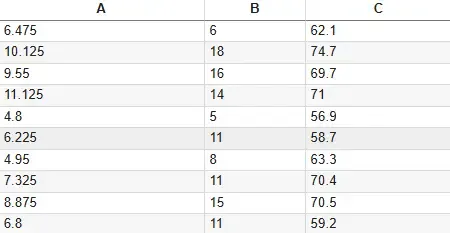
We can read external datasets and operate with them in our R environment by importing data into an R script. R programming language offers a number of functions for importing data from various file formats. For this demonstration, we will use two examples of a single dataset, one in .csv form and another .txt
You can download the files from here.
CSV files are a widely used format for tabular data and R offers built-in functions to read them easily.
The function has two parameters:
Example:
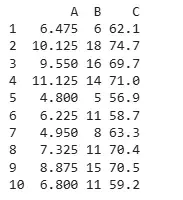
Output:
This function specifies how the dataset is separated, in this case we take sep=", " as an argument.
Example:
Output:
Tab-delimited files are commonly used for data exchange and R supports reading them with built-in methods.
The function has two parameters:
Example:
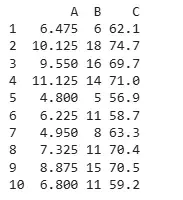
Output:
This function specifies how the dataset is separated, in this case we take sep="\t" as the argument.
Example:
Output:
Here we are going to import data through R studio with the following steps.
Steps:
In order to work with JSON files in R, one needs to install the “rjson” package.
JSON file for demonstration:
{
"ID":["1","2","3","4","5"],
"Name":["Mithuna","Tanushree","Parnasha","Arjun","Pankaj"],
"Salary":["722.5","815.2","1611","2829","843.25"],
"StartDate":["6/17/2014","1/1/2012","11/15/2014","9/23/2013","5/21/2013"],
"Dept":["IT","IT","HR","Operations","Finance"]
}
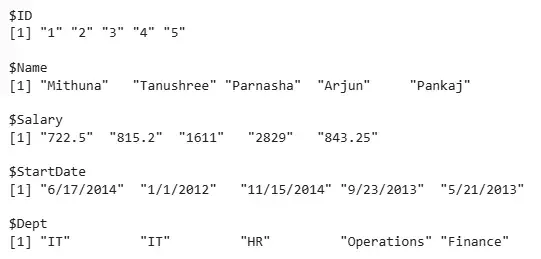
Output:
The output shows the JSON data successfully read into R, with fields such as ID, Name, Salary, StartDate and Dept stored as vectors. This data can now be converted into a data frame for further analysis or manipulation.

.png)
.png)