|
VOOZH | about |
|
VOOZH | about |
In this article we are going to create a finger counter using Computer Vision and OpenCv. This is a simple project that can be applied in various fields such as gesture recognition, human-computer interaction and educational tools. By the end of this article you will have a working Python application that detects the number of fingers shown in front of the camera.
We will follow a step-by-step approach to capture images, detect hands using Mediapipe and count the number of raised fingers.
We will be using OpenCv, numpy, PIL, IO, base64, eval js and mediapipe for this.
To begin using MediaPipe for detecting and tracking hands, you need to create a Hand model. The model can process frames from your webcam to detect hand landmarks.
mp.solutions.hands: Loads the hand tracking model.mp_draw: Helps visualize hand landmarks.hands = mp_hands.Hands(...): loads hand modelstatic_image_mode=True: Treats the input as a static image.max_num_hands=2: Detects up to 2 hands.min_detection_confidence=0.3:Sets a low detection confidence threshold.Here we opens a webcam video feed and captures a single frame and converts it into a Base64-encoded JPEG using javascript.
Here we will convert captured image into a NumPy array.
display(js): Displays JavaScript code in a notebook for browser interaction.data = eval_js("captureImage()"): Executes JavaScript function captureImage() to capture the image and return the data to Python._, encoded = data.split(',', 1): Splits the data string into metadata and base64-encoded image.image_bytes = base64.b64decode(encoded): Decodes the base64 string into raw image bytes.image = PIL.Image.open(io.BytesIO(image_bytes)): Converts the raw bytes into an image object.return np.array(image): Converts the image object into a NumPy array and returns it.Here we will counts the number of raised fingers based on hand landmarks.
finger_tips = [8, 12, 16, 20]: Defines the landmarks of the fingertips (Index, Middle, Ring, Pinky).fingers_up = 0: Initializes a counter for raised fingers.landmarks = hand_landmarks.landmark: Retrieves the hand landmarks from the hand_landmarks object.if landmarks[tip].y < landmarks[tip - 2].y:: Checks if the fingertip is above the base of the finger by comparing Y-coordinates.fingers_up += 1: Increments the counter for each raised finger.return fingers_up: Returns the total number of raised fingers.Here we will capture and process image by:
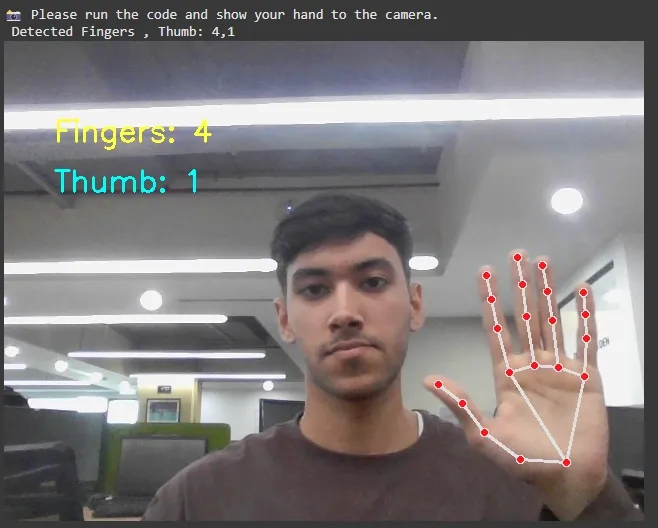
frame = capture_frame(): Captures an image from the webcam and returns it as a NumPy array.frame = cv2.cvtColor(frame, cv2.COLOR_RGB2BGR): Converts the captured image from RGB to BGR format for OpenCV processing.frame_resized = cv2.resize(frame, (640, 480)): Resizes the image to a fixed resolution of 640x480 pixels.results = hands.process(cv2.cvtColor(frame_resized, cv2.COLOR_BGR2RGB)): Processes the resized frame to detect hand landmarks using MediaPipe.if results.multi_hand_landmarks:: Checks if any hands are detected in the current frame.for hand_landmarks in results.multi_hand_landmarks:: Iterates through each detected hand's landmarks.mp_draw.draw_landmarks(frame_resized, hand_landmarks, mp_hands.HAND_CONNECTIONS): Draws the landmarks and connections for each detected hand on the frame.fingers_up = count_fingers(hand_landmarks): Counts the number of raised fingers using the count_fingers() function.thumb_up = detect_thumb(hand_landmarks): Detects whether the thumb is raised using the detect_thumb() function.cv2.putText(frame_resized, f'Fingers: {fingers_up}', (50, 100), cv2.FONT_HERSHEY_SIMPLEX, 1, (0, 255, 255), 2): Displays the number of raised fingers on the frame.if thumb_up == 1:: Checks if the thumb is raised.cv2.putText(frame_resized, 'Thumb: 1', (50, 150), cv2.FONT_HERSHEY_SIMPLEX, 1, (255, 255, 0), 2): Displays "Thumb: 1" on the frame if the thumb is raised.Output :
In this article we successfully created a finger counter which can track hand and landmark detection. It is able to identify raised fingers and even detect whether the thumb is up or not. This project serves as a great introduction for real-time gesture recognition. You can further enhance this application by integrating more complex gestures, adding interactivity or adapting it for different use cases.