We all have come across various web applications that use machine learning. For example, Netflix and YouTube use ML to personalize your experience by recommending you new content based on your viewing history. This helps them make better decisions and understand the browsing behaviors of their users.
Even you can create such an application in which you feed your input data and it predicts the output for you using your ML model. The machine learning models that you create can be put to better use if you can integrate your models into an application. This not only highlights your ML knowledge but also your app development skills.
In this article, I will teach you how to embed an ML model in your Web Application with Flask. Firstly, we will create a simple linear regression model to predict the CO2 emission from vehicles. Then we will develop a web application that takes the input to predict the emission.
- Create your machine learning model
- Develop your web application with Flask and integrate your model in the app
- Deploy your web-app in Heroku Cloud Platform
Note: This is just a simple example . You can create your own machine learning models like regression,classification,clustering etc. and deploy them on your web-app. The design of your application completely depends on your Web Development skills.
1. Create your machine learning model
We use linear regression to predict the CO2 emission from vehicles. The dataset has many columns but we only use a few of them as our features. The last column represents the class label. Our dataset has 1067 rows and 4 columns.
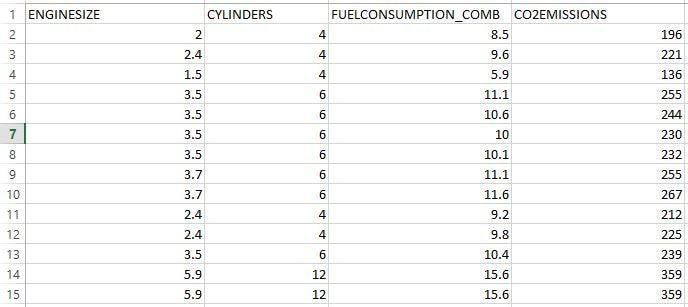
We use the built-in LinearRegression() class from sklearn to build our regression model. The following code helps us save our model using the Pickle module. Our ML model is saved as “model.pkl”. We will later use this file to predict the output when new input data is provided from our web-app.
Pickle : Python pickle module is used for serializing and de-serializing python object structures. The process to convert any kind of python object (list, dict, etc.) into byte streams (0s and 1s) is called pickling or serialization or flattening or marshalling. We can converts the byte stream (generated through pickling) back into python objects by a process called as unpickling.
import pandas as pd
from sklearn.linear_model import LinearRegression
import pickle

df = pd.read_csv("FuelConsumption.csv")
#use required features
cdf = df[['ENGINESIZE','CYLINDERS','FUELCONSUMPTION_COMB','CO2EMISSIONS']]

#Training Data and Predictor Variable
# Use all data for training (tarin-test-split not used)
x = cdf.iloc[:, :3]
y = cdf.iloc[:, -1]
regressor = LinearRegression()

#Fitting model with trainig data
regressor.fit(x, y)

# Saving model to current directory
# Pickle serializes objects so they can be saved to a file, and loaded in a program again later on.
pickle.dump(regressor, open('model.pkl','wb'))

'''
#Loading model to compare the results
model = pickle.load(open('model.pkl','rb'))
print(model.predict([[2.6, 8, 10.1]]))
'''
2. Develop your web application with Flask and integrate your model
Now that we have our model, we will start developing our web application with Flask. Those of you starting out in Flask can read about it here.
Flask learning resources: Flask Tutorials by Corey Schafer, Learn Flask for Python — Full Tutorial
2.1. Install Flask:
You can use the ‘pip install flask’ command. I use the PyCharm IDE to develop flask applications. To easily install libraries in PyCharm follow these steps.
2.2. Import necessary libraries, initialize the flask app, and load our ML model:
We will initialize our app and then load the “model.pkl” file to the app.
#import libraries
import numpy as np
from flask import Flask, render_template,request
import pickle#Initialize the flask App
app = Flask(__name__)
model = pickle.load(open('model.pkl', 'rb'))
2.3. Define the app route for the default page of the web-app :
Routes refer to URL patterns of an app (such as myapp.com/home or myapp.com/about). @app.route("/") is a Python decorator that Flask provides to assign URLs in our app to functions easily.
#default page of our web-app
@app.route('/')
def home():
 return render_template('index.html')
The decorator is telling our @app that whenever a user visits our app domain (localhost:5000 for local servers) at the given .route(), execute the home() function. Flask uses the Jinja template library to render templates. In our application, we will use templates to render HTML which will display in the browser.
2.4. Redirecting the API to predict the CO2 emission :
We create a new app route (‘/predict’) that reads the input from our ‘index.html’ form and on clicking the predict button, outputs the result using render_template.
#To use the predict button in our web-app
@app.route('/predict',methods=['POST'])
def predict():
 #For rendering results on HTML GUI
 int_features = [float(x) for x in request.form.values()]
 final_features = [np.array(int_features)]
 prediction = model.predict(final_features)
 output = round(prediction[0], 2)
 return render_template('index.html', prediction_text='CO2 Emission of the vehicle is :{}'.format(output))
Let’s have a look at our index.html file :
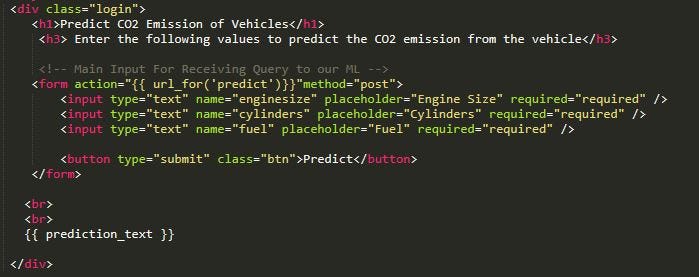
2.5. Starting the Flask Server :
if __name__ == "__main__":
 app.run(debug=True)
app.run() is called and the web-application is hosted locally on [localhost:5000].
“debug=True” makes sure that we don’t require to run our app every time we make changes, we can simply refresh our web page to see the changes while the server is still running
Project Structure :
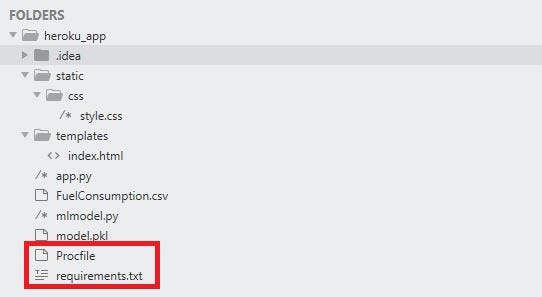
The project is saved in a folder called “heroku_app”. We first run the ‘mlmodel.py’ file to get our ML model and then we run the ‘app.py’. On running this file, our application is hosted on the local server at port 5000.
You can simply type “localhost:5000″ on your web browser to open your web-application after running ‘app.py’
- FuelConsumption.csv — This is the dataset we used
- mlmodel.py — This is our machine learning code
- model.pkl — This is the file we obtain after we run the mlmodel.py file. It is present in the same directory
- app.py — This is the Flask application we created above
- templates — This folder contains our ‘index.html’ file. This is mandatory in Flask while rendering templates. All HTML files are placed under this folder.
- static — This folder contains the “css” folder. The static folder in Flask application is meant to hold the CSS and JavaScript files.
It is always a good idea to run your application first in the local server and check the functionality of your application before hosting it online in a cloud platform. Let’s see what happens when we run ‘app.py’ :
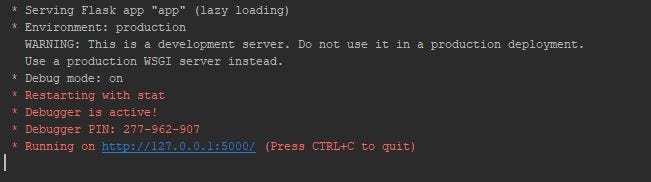
On clicking on the provided URL we get our website:
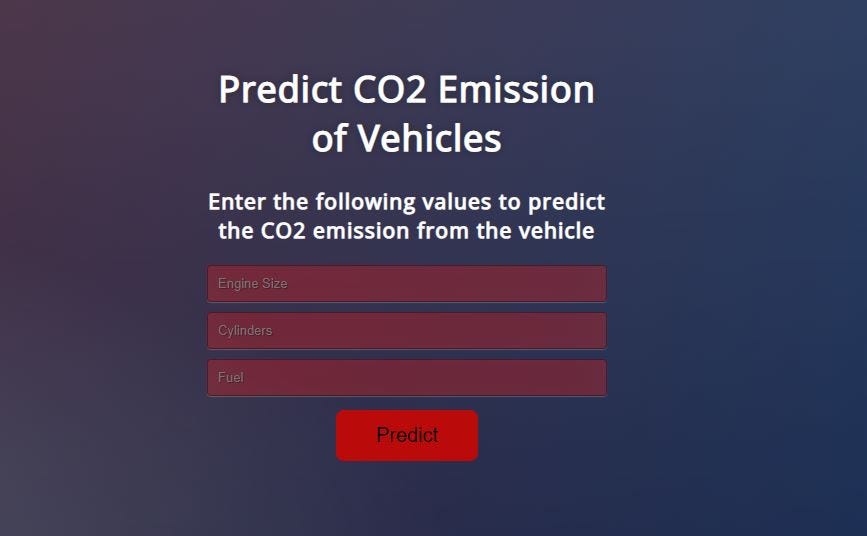
Now, let’s enter the required values and click on the “Predict” button and see what happens.
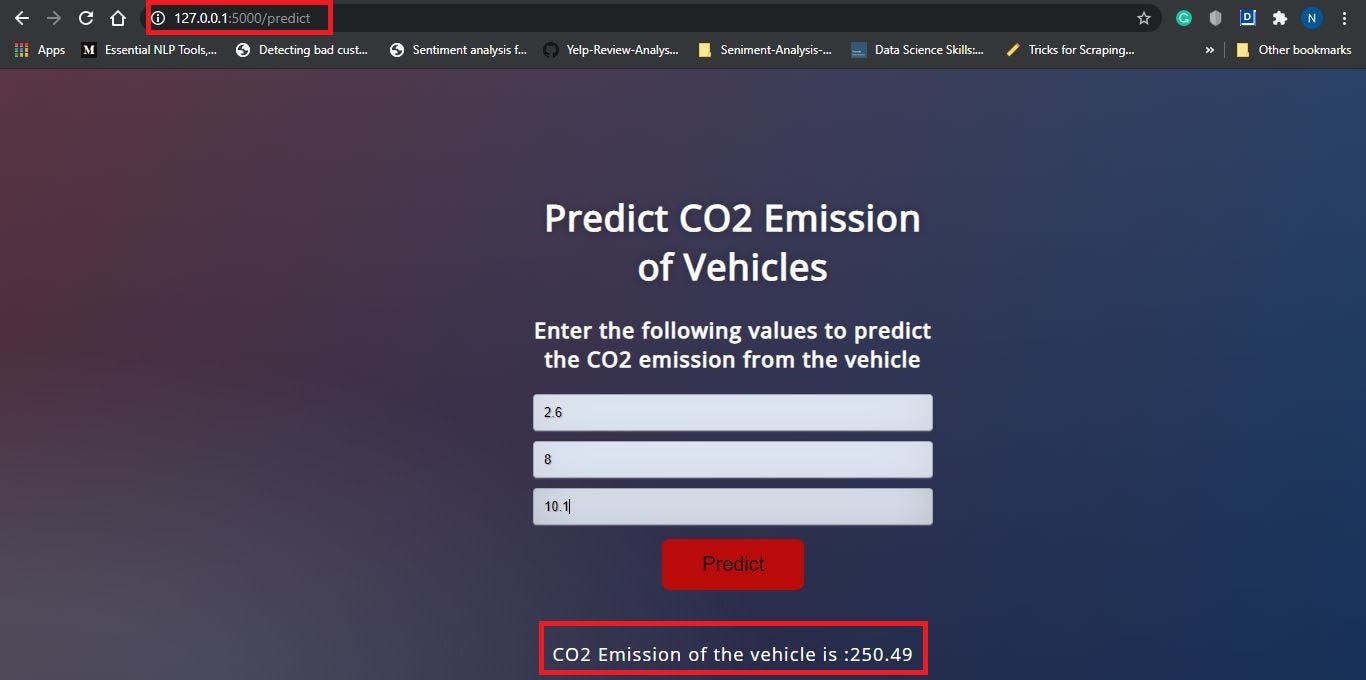
Observe the URL (127.0.0.1:5000/predict), this is the use of app routes. On clicking the “Predict” button we are taken to the predict page where the predict function renders the ‘index.html’ page with the output of our application.
3. Deploy your Web Application on Heroku
Now that our application has been successfully tested on the local server, it’s time to deploy our application on Heroku- cloud platform. There are two prerequisites to deploy any flask web-app to Heroku.
On the Project Structure, you might have noticed two new files named “Procfile” and “requirements.txt”. These two files are required to deploy your app on Heroku.
Before creating Procfile, we need to install Gunicorn. You can use the command ‘pip install gunicorn’ or use the above link to install libraries in PyCharm
3.1. Create Procfile :
A Procfile specifies the commands that are executed by a Heroku app on startup. Open up a new file named Procfile (without any extension) in the working directory and paste the following.
web: gunicorn app:app
3.2. Create requirements.txt: The requirements.txt file will contain all of the dependencies for the flask app. Open a new file and name it as “requirements.txt”. Mention all the requirements as following :
Flask==1.1.1
gunicorn==20.0.4
pandas==0.25.2
scikit-learn==0.23.2
numpy==1.17.3
pickle4==0.0.1
sklearn==0.0
Alternatively, you can also use the following command in your terminal in the working directory to create this file:
pip freeze > requirements.txt
3.3. Upload all files on your GitHub Repository :
To learn how to create a new repository, click here. You can take help from here if you want to learn how you can upload files to your repository. Your repository should look somewhat like this once all files are uploaded.
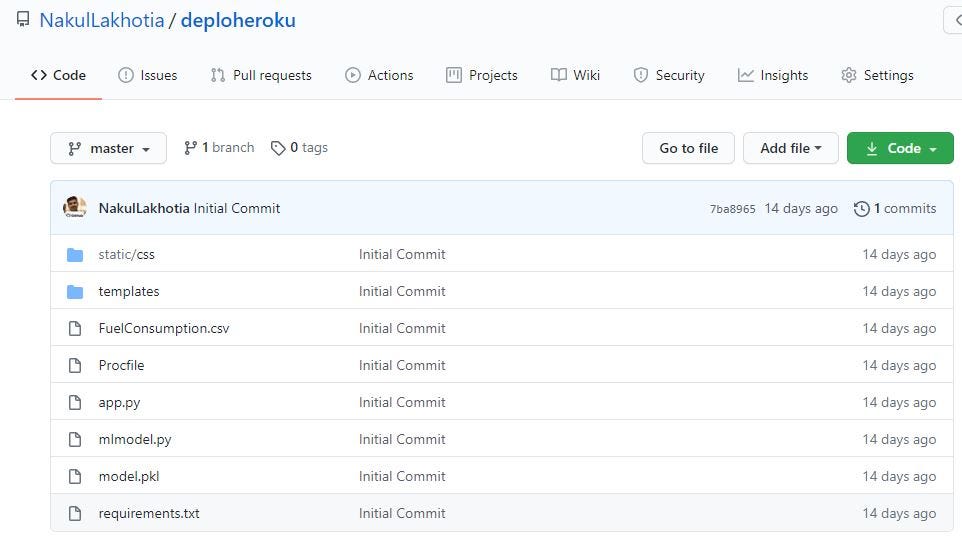
Note: All of these files in your repository should be at the working directory level and not in another folder
To deploy your app on Heroku from here on, follow the steps 2–3 in my following article: Deploying a Static Web Application to Heroku
And That’s it !! Your application has been hosted on the Heroku Cloud Platform. You can share the application link with your friends and family to show them what you have created. Anyone with access to the Internet and your application will be able to use your application. How Exciting 🙂
Link to my GitHub Repository
Link to my Web Application on Heroku — CO2 Emission Predictor
Note: All the resources that you will require to get started have been mentioned and the links provided in this article as well. I hope you make good use of it 🙂
I hope this article will help you host your ML Web-Application online using Heroku. Don’t forget to click on the “clap” icon below if you have enjoyed reading this article. Thank you for your time.