|
VOOZH | about |
|
VOOZH | about |
As we all know, single-link Hierarchical clustering begins by treating each observation as an individual cluster and then iteratively merges clusters until all the data points form a single cluster. Transitioning to the use of dendrograms to represent hierarchical clustering results, clusters merge based on the distance between them.
Various types of linkages, such as single linkage, complete linkage, and average linkage, utilize different methods to calculate the distance between clusters.
This article was published as a part of the Data Science Blogathon
It determines the distance between sets of observations as a function of the pairwise distance between observations.
Similarly, in this article, we aim to understand the Clustering process using the Single Linkage Clustering Method.
Begin with importing necessary libraries
import numpy as np
import pandas as pd
import matplotlib.pyplot as plt
%matplotlib inline
import scipy.cluster.hierarchy as shc
from scipy.spatial.distance import squareform, pdist
Let us create toy data using numpy.random.random_sample
a = np.random.random_sample(size = 5)
b = np.random.random_sample(size = 5)
Once we generate the random data points, we will create a pandas data frame.
point = ['P1','P2','P3','P4','P5']
data = pd.DataFrame({'Point':point, 'a':np.round(a,2), 'b':np.round(b,2)})
data = data.set_index('Point')
dataA glance at our toy data. Looks clean. Let us jump into the clustering steps.
plt.figure(figsize=(8,5))
plt.scatter(data['a'], data['b'], c='r', marker='*')
plt.xlabel('Column a')
plt.ylabel('column b')
plt.title('Scatter Plot of x and y')for j in data.itertuples():
plt.annotate(j.Index, (j.a, j.b), fontsize=15)dist = pd.DataFrame(squareform(pdist(data[[‘a’, ‘b’]]), ‘euclidean’), columns=data.index.values, index=data.index.values)For our convenience, we will be considering only the lower bound values of the matrix as shown below. Specifically, the lower bound values represent the minimum distance between any two points in the dataset.
We see the points P3, P4 has the least distance “0.30232”. So we will first merge those into a cluster.
Update the Distance Between
= Min(dist(P3,P4), P1)) -> Min(dist(P3,P1),dist(P4,P1))

= Min(0.59304, 0.46098)

= 0.46098= Min(dist(P3,P4), P2) -> Min(dist(P3,P2),dist(P4,P2))
= Min(0.77369, 0.61612)
= 0.61612= Min(dist(P3,P4), P5) -> Min(dist(P3,P5),dist(P4,P5))
= Min(0.45222, 0.35847)
= 0.35847After re-computing the distance matrix, we need to again look for the least distance to make a cluster.
Subsequently, we repeat this process until we have clustered all observations.
We see the points P2, P5 has the least distance “0.32388”. So we will group those into a cluster and recompute the distance matrix.
Update the distance between the cluster (P2,P5) to P1
= Min(dist((P2,P5),P1)) -> Min(dist(P2,P1), dist(P5, P1))

= Min(1.04139, 0.81841)

= 0.81841
Update the distance between the cluster (P2,P5) to (P3,P4)
= Min(dist((P2,P5), (P3,P4))) -> = Min(dist(P2,(P3,P4)), dist(P5,(P3,P4)))

= Min(dist(0.61612, 0.35847))

= 0.35847After recomputing the distance matrix, we need to again look for the least distance.
The cluster (P2,P5) has the least distance with the cluster (P3, P4) “0.35847”. So we will cluster them together.
Update the distance between the cluster (P3,P4, P2,P5) to P1
= Min(dist(((P3,P4),(P2,P5)), P1))

= Min(0.46098, 0.81841)

= 0.46098We have completed obtaining a single cluster.
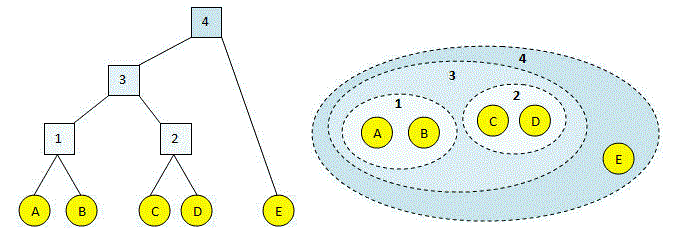
Theoretically, the clustering steps proceed as follows:
plt.figure(figsize=(12,5))
plt.title("Dendrogram with Single inkage")
dend = shc.dendrogram(shc.linkage(data[['a', 'b']], method='single'), labels=data.index)The length of the vertical lines in the dendrogram shows the distance. For example, the distance between the points P2, P5 is 0.32388.
The step-by-step clustering that we did is the same as the dendrogram
Single linkage clustering involves several key steps. Initially, after visualizing the data and calculating a distance matrix, clusters are formed based on the shortest distances. Once each cluster is formed, the algorithm updates the distance matrix to incorporate new distances. Throughout this iterative process, all data points are clustered until revealing patterns in the data. Therefore, it’s a simple, intuitive method that can uncover hidden structures in the data.
A. Single link hierarchical clustering, also known as single linkage clustering, merges clusters based on the closest pair of points between them. It forms clusters where the smallest pairwise distance between points is minimized.
A. Hierarchical clustering includes agglomerative and divisive methods. Agglomerative clustering, which includes single link clustering, merges data points into progressively larger clusters. Divisive clustering, in contrast, starts with one cluster and splits it into smaller ones.
A. The agglomerative hierarchical clustering method known as single link uses the nearest neighbor approach to merge clusters. Specifically, it connects clusters based on the shortest distance between any two points in different clusters.
A. The linkage method in hierarchical clustering problem determines how distances between clusters are calculated during the merging process. Common linkage methods include single (or nearest neighbor), complete (or farthest neighbor), average, and Ward’s method.
Hi, my name is Harika. I am a Data Engineer and I thrive on creating innovative solutions and improving user experiences. My passion lies in leveraging data to drive innovation and create meaningful impact.
GPT-4 vs. Llama 3.1 – Which Model is Better?
Llama-3.1-Storm-8B: The 8B LLM Powerhouse Surpa...
A Comprehensive Guide to Building Agentic RAG S...
Top 10 Machine Learning Algorithms in 2026
45 Questions to Test a Data Scientist on Basics...
90+ Python Interview Questions and Answers (202...
8 Easy Ways to Access ChatGPT for Free
Prompt Engineering: Definition, Examples, Tips ...
What is LangChain?
What is Retrieval-Augmented Generation (RAG)?
Nice Explanation. I really appreciate all of your work
Edit
Resend OTP
Resend OTP in 45s