VOOZH about

URL: https://www.analyticsvidhya.com/blog/2021/02/diminishing-the-dimensions-with-pca/

⇱ PCA for Dimensionality Reduction | Diminishing Dimensions With PCA


India's Most Futuristic AI Conference Is Back – Bigger, Sharper, Bolder

  • d
  • :
  • h
  • :
  • m
  • :
  • s

Reading list

Diminishing the Dimensions with PCA!

Prathamesh Last Updated : 21 Oct, 2024
4 min read

This article was published as a part of the Data Science Blogathon.

Introduction

This article will give you clarity on what is dimensionality reduction, its need, and how it works. There is also python code for illustration and comparison between PCA, ICA, and t-SNE.

What is Dimensionality Reduction and why do we need it?

Dimensionality Reduction is simply reducing the number of features (columns) while retaining maximum information. Following are reasons for Dimensionality Reduction:

  • Dimensionality Reduction helps in data compression, and hence reduced storage space.
  • It reduces computation time.
  • It also helps remove redundant features, if any.
  • Removes Correlated Features.
  • Reducing the dimensions of data to 2D or 3D may allow us to plot and visualize it precisely. You can then observe patterns more clearly.
  • It is helpful in noise removal also and as a result of that, we can improve the performance of models.

How does Dimensionality Reduction works (using PCA)?

There are many methods for Dimensionality Reduction like PCA, ICA, t-SNE, etc., we shall see PCA (Principal Component Analysis).

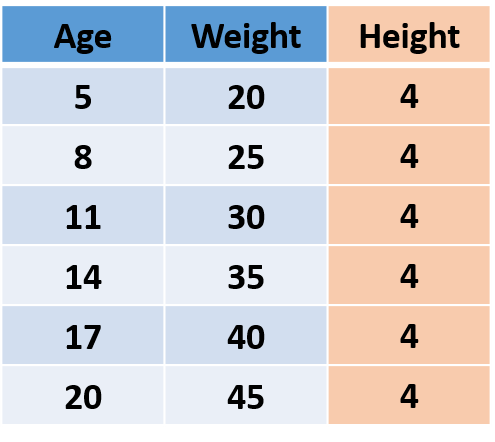
Let’s first understand what is information in data. Consider the following imaginary data, which has Age, Weight, and Height of people.

The information lies in the variance!

As the ‘Height’ of all the people is the same i.e. the variance is 0 thus it’s not adding any information, so we can remove the ‘Height’ column without losing any information.
Now we know that information is variance, let’s understand the working of PCA. In PCA, we find new dimensions (features) that capture maximum variance (i.e. information). To understand this we shall use the previous example. After removing ‘Height’, we are left with ‘Age’ and ‘Weight’. These two features are caring all the information. In other words, we can say that we require 2 features (Age and Height) to hold the information, and if we can find a new feature that alone can hold all the information, we can replace origination 2 features with a new single feature, achieving dimensionality reduction!
👁 PCA graph

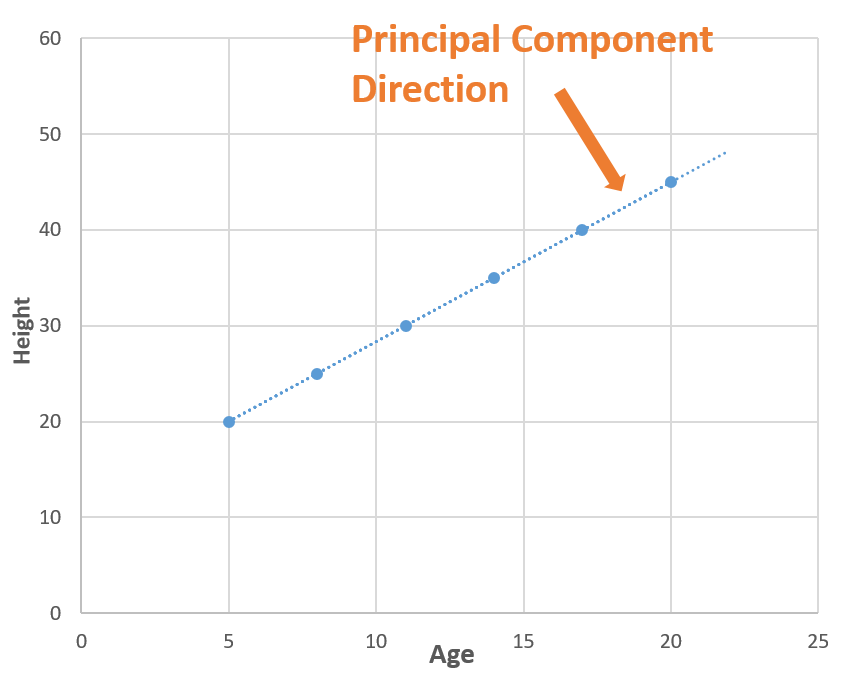
Now consider a line (blue dotted line) that is passing through all the points. The blue dotted line is capturing all the information so, we can replace ‘Age’ and ‘Weight’ (2 Dimensions) with the blue dotted line (1 Dimension) without losing any information, and in this way, we have done dimensionality reduction (2 dimensions to 1 dimension). The blue dotted line is called Principal Component.

You make be wondering how did we find the blue dotted line (Principal Component), so there is a lot of mathematics playing behind it. You can read this articlewhich explains this, but in simple words, we find the directions in which we can capture maximum variance using Eigenvalues and Eigenvectors.

PCA illustration in Python

Let’s see how to use PCA with an example. I have used wine quality data which has 12 features like acidity, residual sugar, chlorides, etc., and the quality of the wine for 1600 samples. You can download the jupyter notebook from here and follow along.

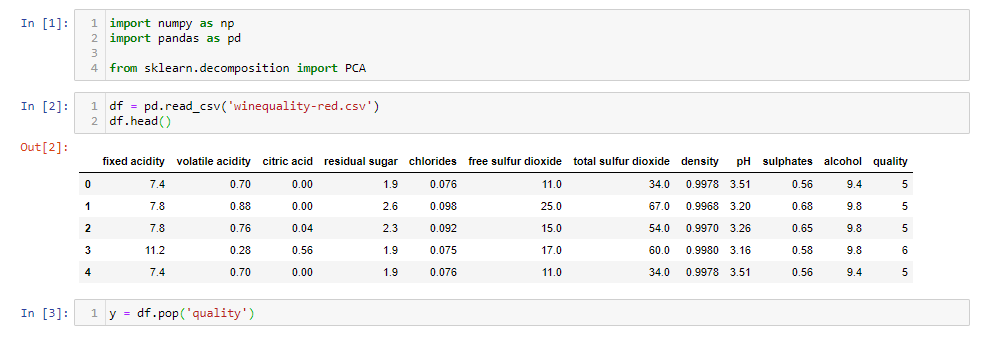
First, let’s load the data.

import numpy as np
import pandas as pd
from sklearn.decomposition import PCA
df = pd.read_csv('winequality-red.csv')
df.head()
y = df.pop('quality')
👁 PCA import data

After loading the data, we removed the ‘Quality’ of the wine as it is the target feature. Now we will scale the data because if not PCA will not be able to find the optimal Principal Components. For eg. we have a feature in ‘meters’ and another in ‘kilometers’, the feature with unit ‘meter’ will have more variance than ‘kilometers’ (1 km = 1000 m), so PCA will give more importance to the feature with high variance. So, let’s do the scaling.

from sklearn.preprocessing import StandardScaler
scalar = StandardScaler()
df_scaled = pd.DataFrame(scalar.fit_transform(df), columns=df.columns)
df_scaled
import pandas as pd
df = pd.read_csv('winequality-red.csv')

y = df.pop('quality')


from sklearn.preprocessing import StandardScaler
scalar = StandardScaler()
df_scaled = pd.DataFrame(scalar.fit_transform(df), columns=df.columns)
print(df_scaled)

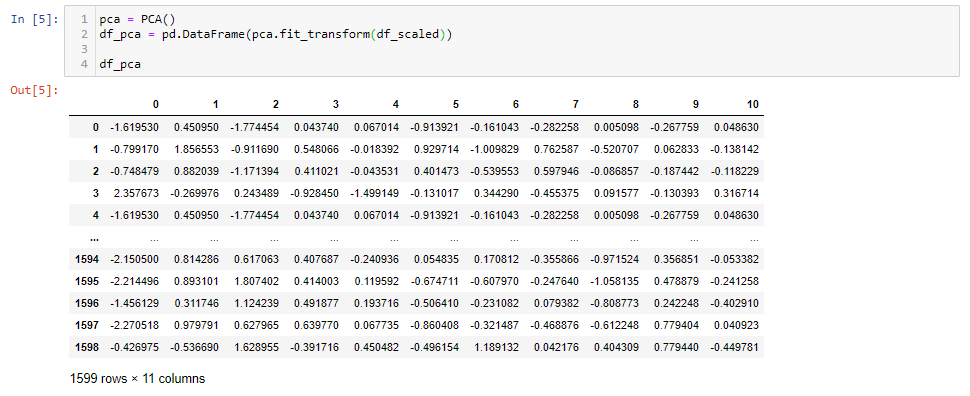
Now we are ready to apply for PCA.

pca = PCA()
df_pca = pd.DataFrame(pca.fit_transform(df_scaled))
df_pca
👁 PCA

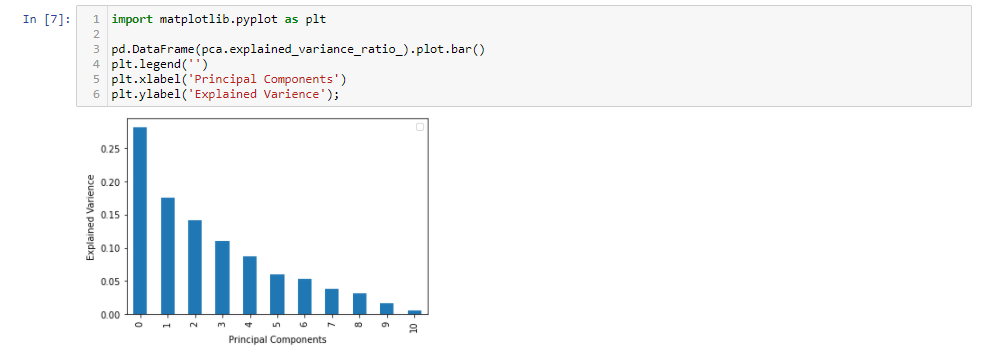
After applying PCA, we got 11 Principal Components. It’s interesting to see how much variance each principal component captures.

import matplotlib.pyplot as plt
pd.DataFrame(pca.explained_variance_ratio_).plot.bar()
plt.legend('')
plt.xlabel('Principal Components')
plt.ylabel('Explained Varience');
👁 Graph

The first 5 Principal Components are capturing around 80% of the variance so we can replace the 11 original features (acidity, residual sugar, chlorides, etc.) with the new 5 features having 80% of the information. So, we have reduced the 11 dimensions to only 5 dimensions while retaining most of the information.

Difference between PCA, ICA, and t-SNE

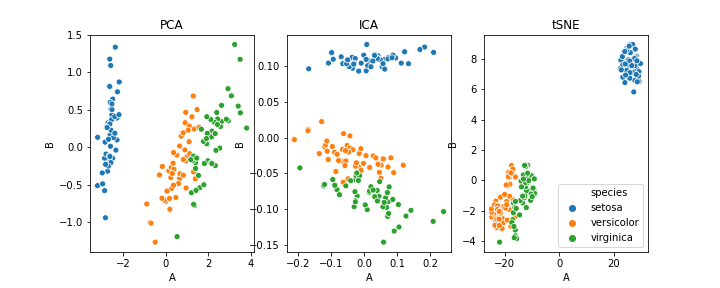
PCA can also be used for clustering. I have used the iris dataset for this purpose. The following image will show you the clustering using PCA, ICA, and t-SNE.  

As this article focuses on the basic ideas behind dimensionality reduction and working of PCA, we will not go into the details but those who are interested can go through this article.

In short, PCA does dimensionality reduction while capturing most of the variance. Now, you would be excited to apply PCA to your data but before that, I want to highlight some of the disadvantages of PCA:

  • Independent variables become less interpretable
  • Data standardization is a must before PCA
  • Information Loss

Hope you find this article informative. Thank you!

The media shown in this article are not owned by Analytics Vidhya and is used at the Author’s discretion.

Login to continue reading and enjoy expert-curated content.

Free Courses

AI Interview Questions & Answers Masterclass

Master AI interview questions with expert answers.

Model Deployment using FastAPI; Prepare, Train, and Test FastAPI Application

Deploy a fastapi machine learning model with XGBoost and Docker APIs.

Build Data Pipelines with Apache Airflow

Learn ETL pipeline building and workflow orchestration with Airflow.

Evaluation Metrics for Machine Learning Models

This course covers evaluation metrics to improve ML model performance.

The A to Z of Unsupervised Machine Learning

Learn Unsupervised ML & DBSCAN with real-world applications.

Responses From Readers

Flagship Programs

GenAI Pinnacle Program| GenAI Pinnacle Plus Program| AI/ML BlackBelt Program| Agentic AI Pioneer Program

Free Courses

Generative AI| DeepSeek| OpenAI Agent SDK| LLM Applications using Prompt Engineering| DeepSeek from Scratch| Stability.AI| SSM & MAMBA| RAG Systems using LlamaIndex| Building LLMs for Code| Python| Microsoft Excel| Machine Learning| Deep Learning| Mastering Multimodal RAG| Introduction to Transformer Model| Bagging & Boosting| Loan Prediction| Time Series Forecasting| Tableau| Business Analytics| Vibe Coding in Windsurf| Model Deployment using FastAPI| Building Data Analyst AI Agent| Getting started with OpenAI o3-mini| Introduction to Transformers and Attention Mechanisms

Popular Categories

AI Agents| Generative AI| Prompt Engineering| Generative AI Application| News| Technical Guides| AI Tools| Interview Preparation| Research Papers| Success Stories| Quiz| Use Cases| Listicles

Generative AI Tools and Techniques

GANs| VAEs| Transformers| StyleGAN| Pix2Pix| Autoencoders| GPT| BERT| Word2Vec| LSTM| Attention Mechanisms| Diffusion Models| LLMs| SLMs| Encoder Decoder Models| Prompt Engineering| LangChain| LlamaIndex| RAG| Fine-tuning| LangChain AI Agent| Multimodal Models| RNNs| DCGAN| ProGAN| Text-to-Image Models| DDPM| Document Question Answering| Imagen| T5 (Text-to-Text Transfer Transformer)| Seq2seq Models| WaveNet| Attention Is All You Need (Transformer Architecture) | WindSurf| Cursor

Popular GenAI Models

Llama 4| Llama 3.1| GPT 4.5| GPT 4.1| GPT 4o| o3-mini| Sora| DeepSeek R1| DeepSeek V3| Janus Pro| Veo 2| Gemini 2.5 Pro| Gemini 2.0| Gemma 3| Claude Sonnet 3.7| Claude 3.5 Sonnet| Phi 4| Phi 3.5| Mistral Small 3.1| Mistral NeMo| Mistral-7b| Bedrock| Vertex AI| Qwen QwQ 32B| Qwen 2| Qwen 2.5 VL| Qwen Chat| Grok 3

AI Development Frameworks

n8n| LangChain| Agent SDK| A2A by Google| SmolAgents| LangGraph| CrewAI| Agno| LangFlow| AutoGen| LlamaIndex| Swarm| AutoGPT

Data Science Tools and Techniques

Python| R| SQL| Jupyter Notebooks| TensorFlow| Scikit-learn| PyTorch| Tableau| Apache Spark| Matplotlib| Seaborn| Pandas| Hadoop| Docker| Git| Keras| Apache Kafka| AWS| NLP| Random Forest| Computer Vision| Data Visualization| Data Exploration| Big Data| Common Machine Learning Algorithms| Machine Learning| Google Data Science Agent
👁 Av Logo White

Continue your learning for FREE

Forgot your password?
👁 Av Logo White

Enter OTP sent to

Edit

Wrong OTP.

Enter the OTP

Resend OTP

Resend OTP in 45s

👁 Popup Banner
👁 AI Popup Banner