|
VOOZH | about |
|
VOOZH | about |
This article was published as a part of the Data Science Blogathon.
Outlier detection is one of the widely used methods in any data science project, as its presence can lead to the development of a bad machine learning model. Let’s take a quick scenario of the linear regression problem statement, where suppose you have to predict the person’s weight from the height. In general, one with more height will also have more weight (linear positive trend), but what if rarely we have 3-4 people who have much less weight, but comparatively more height than that data will be treated as bad data or the outliers. Which, in the end, would not be a good fit for our regression model.
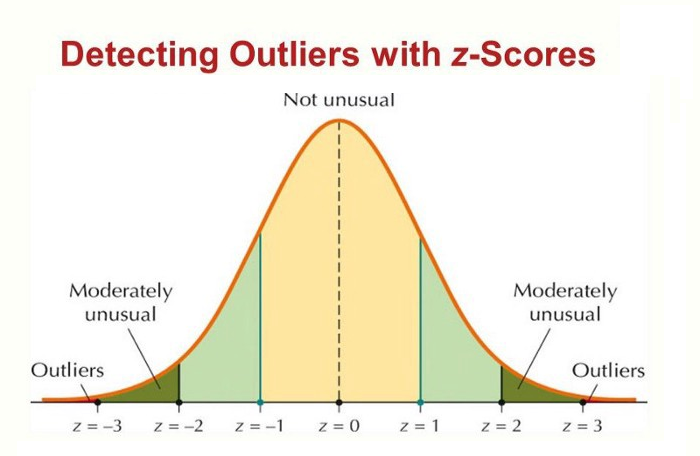
There are various ways through which we can deal with the outliers, though, in this article, we will have our complete focus on the Z-Score method. Here we will talk about the limitations of this method, When to use and prefer other methods, and of course, the complete implementation using Python.
Though Z-Score is a highly efficient way of detecting and removing outliers, we cannot use it with every data type. When we said that, we mean that it only works with the data which is completely or close to normally distributed, which in turn stimulates that this method is not for skewed data, either left skew or right skew. For the other data, we have something known as Inter quartile range (IQR) method, which we will cover in the next article in depth.
Enough of the theory. Let’s now jump to practically implement this method and see how we can detect and remove the bad data from the dataset to improve the model accuracy.
import numpy as np
import pandas as pd
import matplotlib.pyplot as plt
import seaborn as sns
We prepare our stuff by importing all the essential libraries from Python’s supported package. Here we have imported four main libraries that we will use during the execution part:
df_org = pd.read_csv('placement.csv')
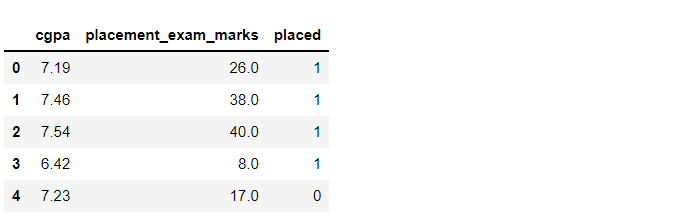
df_org.head()
Output:
Inference: We are using the simple placement dataset for this article where we will take GPA and placement exam marks as two columns and select one of the columns which will show the normal distribution, then will proceed further to remove outliers from that feature. Use the head function to show the top 5 rows.
df_org.shape
Output:
(1000, 3)
Inference: As the shape function stimulates, we have 1000 rows of data with 3 columns -> (1000,3).
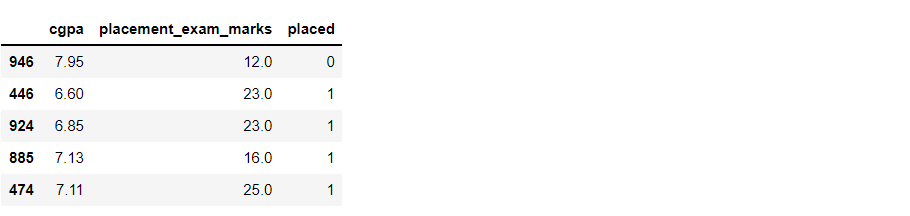
df_org.sample(5)
Output:
Inference: Like head function returns the top 5 rows (by default). Similarly, the sample function returns the random sample of ‘n’ rows depending on what value we are giving in the parameter.
plt.figure(figsize=(16,5))
plt.subplot(1,2,1)
sns.histplot(df_org['cgpa'], kde=True)

plt.subplot(1,2,2)
sns.histplot(df_org['placement_exam_marks'], kde=True)

plt.show()
Output:
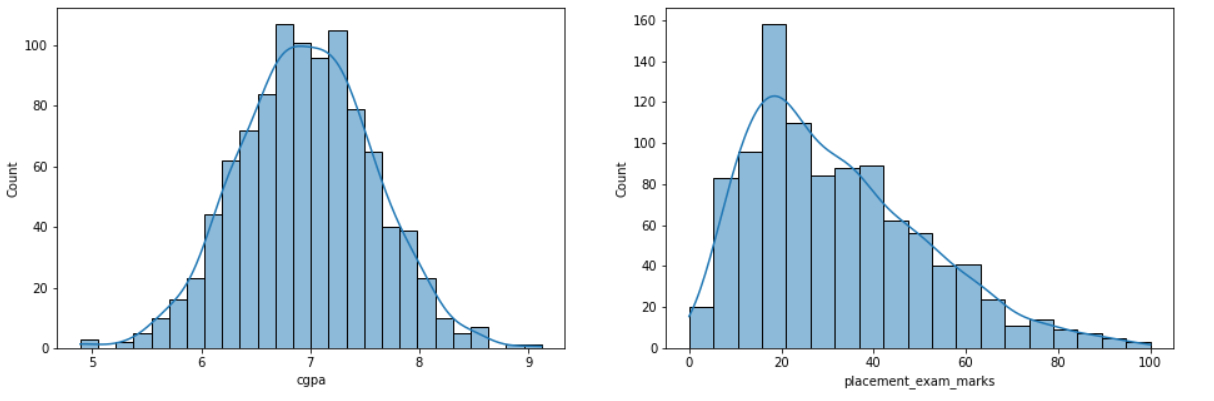
Inference: We chose hist-plot with kernel density as a True graph for both CGPA and placement_exam_marks column so that we can clearly understand that among them, which one has the normal distribution?
From the graph, we can see that CGPA is almost the right fit for the normal distribution, or we can say it is forming the correct bell curve. Meanwhile, the other one is slightly skewed towards the right. Hence, we are gonna take CGPA for our further analysis.
df_org['placement_exam_marks'].skew()
Output:
0.8356419499466834
df_org['cgpa'].skew()
Output:
-0.014529938929314918
Inference: We were lucky enough to spot the difference between a normal distribution and skewed distribution from the above graph, but sometimes, the graph might not give a clear understanding that we have the skew function from pandas which will give a higher positive value if the distribution seems to be skewed (placement_exam_marks) otherwise it will return the quite lower value even in negative if it is not skewed at all (CGPA).
print("Mean value of cgpa",df_org['cgpa'].mean())
print("Standard deviation of cgpa",df_org['cgpa'].std())
print("Minimum value of cgpa",df_org['cgpa'].min())
print("Maximum value of cgpa",df_org['cgpa'].max())
Output:
Mean value of cgpa 6.96124000000001
Standard deviation of cgpa 0.6158978751323894
Minimum value of cgpa 4.89
Maximum value of cgpa 9.12
Inference: Here are some different statistical measures for CGPA, which are printed out to compare the original values (from original data) to when the data will be free of any outlier. The analysis will also be evident.
From here onwards, our main task starts, but before implementing the same, let’s first discuss the game plan and how we will approach dealing with bad data using Z-Score:
print("Upper limit",df_org['cgpa'].mean() + 3*df_org['cgpa'].std())
print("Lower limit",df_org['cgpa'].mean() - 3*df_org['cgpa'].std())
Output:
Upper limit 8.808933625397177
Lower limit 5.113546374602842
Inference: In the output, we see that the highest value is 8.80 while the lowest value is 5.11. Hence any value out of this range is the bad data point
df_org[(df_org['cgpa'] > 8.80) | (df_org['cgpa'] < 5.11)]
Output:
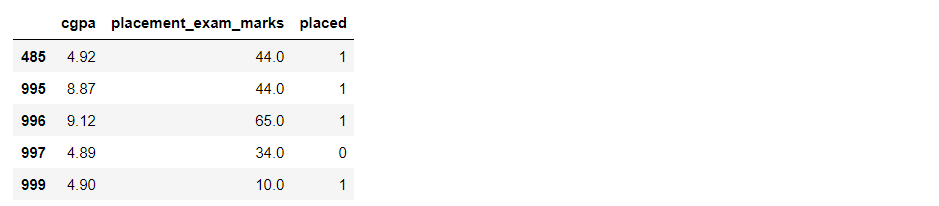
Inference: Now, we are performing the filtering using pandas where we are passing in two conditions keeping in mind that if either condition is True, then our objective will be attained. In the output, we can see that it returned 5 rows, i.e., 5 outliers in the dataset.
The first technique for dealing with outliers is trimming, and this is regardless of what kind of data distribution you are working with, trimming is an applicable and proven technique for most data types. We pluck out all the outliers using the filter condition in this technique.
new_df_org = df_org[(df_org['cgpa'] 5.11)]
new_df_org
Output:
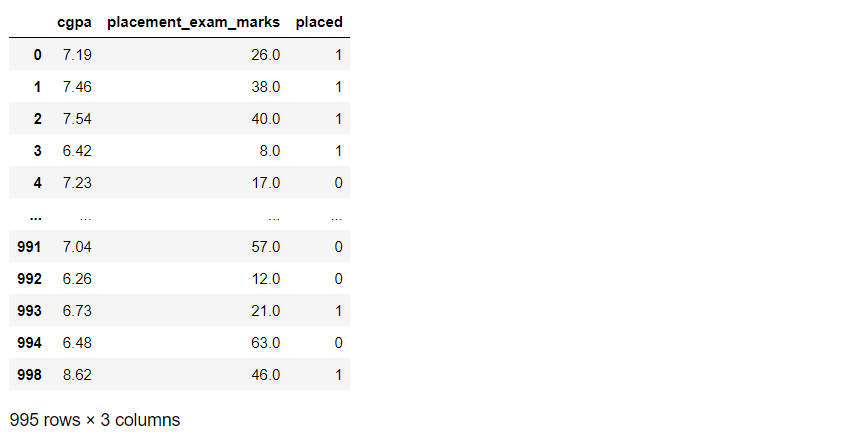
Inference: So, as we can see, we applied that condition where all the data should be in the range of our upper and lower limit. As a result, instead of 1000 rows, it returned 995 rows which indicate that we have successfully removed 5 outliers.
Capping is another technique for dealing with bad data points; it is useful when we have many outliers, and removing a good amount of data from the dataset is not good. In that case, capping comes into the picture as it won’t remove them. Instead, it brings back those data points within the range we specified according to our Z-Score value.
upper_limit = df_org['cgpa'].mean() + 3*df_org['cgpa'].std()
lower_limit = df_org['cgpa'].mean() - 3*df_org['cgpa'].std()

df_org['cgpa'] = np.where(
 df_org['cgpa']>upper_limit,
 upper_limit,
 np.where(
 df_org['cgpa']<lower_limit,
 lower_limit,
 df_org['cgpa']
 )
)
Inference: The first thing is setting the upper and lower bound. Then comes the part of np. Where the function that will help to implement the logic behind capping, the basic syntax is as, np.where(condition, True, False) i.e., if the condition is true, then that data point will be getting the upper limit value (within range) if not, it will go to check the lower limit, and if that’s true, then it will give that data point lower limit value (within range).
df_org.shape
Output:
(1000, 3)
Inference: As we did capping, no data was lost, and we still have 1000 rows.
df_org['cgpa'].describe()
Output:
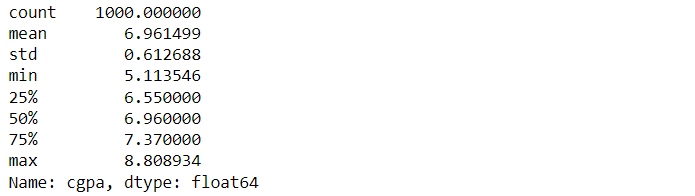
Inference: Now, if we compare the minimum and maximum values before outlier removal and after, we can see that the minimum value is increased and the maximum value is decreased.
In this article, we discussed one of the efficient ways of dealing with and removing the bad data for our further analysis, i.e., removing outliers, also known as Anamoly detection. Here we saw how statistical measures such as Z-Score can help deal with such problems.
The media shown in this article is not owned by Analytics Vidhya and is used at the Author’s discretion.
GPT-4 vs. Llama 3.1 – Which Model is Better?
Llama-3.1-Storm-8B: The 8B LLM Powerhouse Surpa...
A Comprehensive Guide to Building Agentic RAG S...
Top 10 Machine Learning Algorithms in 2026
45 Questions to Test a Data Scientist on Basics...
90+ Python Interview Questions and Answers (202...
8 Easy Ways to Access ChatGPT for Free
Prompt Engineering: Definition, Examples, Tips ...
What is LangChain?
What is Retrieval-Augmented Generation (RAG)?
Edit
Resend OTP
Resend OTP in 45s