Building a Basic PDF Summarizer LLM Application with LangChain
Last Updated : 14 Apr, 2026
A PDF summarizer is a specialized tool built using LangChain designed to analyze the content of PDF documents providing users with concise and relevant summaries. The application integrates:
Hugging Face models for advanced natural language understanding
FAISS for efficient vector-based search
Streamlit to deliver an interactive user interface.
The conversational summarizer is capable of processing a
How the Application Works (Step-by-Step)
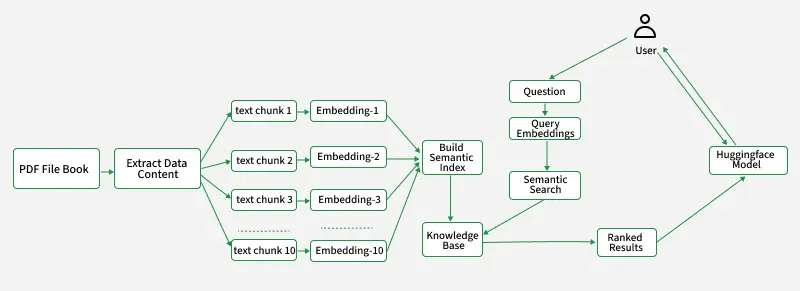
User uploads one or more PDF files.
Text is extracted from each PDF and split into chunks.
Chunks are embedded using Hugging Face Sentence Transformers and stored in a FAISS vector database.
When the user asks a question, it is embedded and compared to all chunk embeddings to find the most relevant context.
The relevant chunks are provided as context to the LLM which generates an answer.
The conversation history is maintained and both user questions and AI answers are displayed in the chat interface.
We will create a Python function get_pdf_text which takes a list of PDF documents (pdf_docs) as input. It iterates through each PDF then, through each page within that PDF. It extracts the text from each page and concatenates it into a single string. It helps to extract and consolidate text content from multiple PDF files.
4. Text Chunking
The function get_text_chunks splits a long string of text into smaller, manageable chunks.
It uses CharacterTextSplitter to break the text, primarily by newlines (\n) to ensure each chunk is no larger than 1000 characters. It overlaps consecutive chunks by 200 characters to maintain context.
It returns a list of these smaller text chunks which is ready for further processing.
5. Embedding Generation and Vector Store Creation
1. def get_vectorstore(text_chunks):
text_chunks is expected to be a list of strings.
Each string is a chunk or piece of text that will be embedded (converted to vectors).
This line initializes a sentence embedding model from Hugging Face.
We are using "sentence-transformers/all-MiniLM-L6-v2" model which is a lightweight and fast transformer that converts sentences into dense vector representations (embeddings).
These embeddings are useful for comparing text for similarity or clustering, searching, etc.
Loads a Language Model: It initializes the Falcon 7B Instruct model from Hugging Face to generate conversational responses.
Keeps Track of Chat History: It sets up a memory buffer (ConversationBufferMemory) to remember past messages and maintain coherent conversations.
Creates a Conversational Retrieval System: It combines the language model, memory and a vector store retriever to answer questions based on stored documents and past interactions.
7. User Input Handler (Ask Questions and Display Chat)
The function handle_userinput starts the chat experience in a Streamlit app which includes:
Readiness Check: It first confirms that the AI conversation model is loaded. If not it prompts the user to upload a PDF.
Get AI Response: It sends the user's question to the AI model and receives its response including the updated chat history.
Display Conversation: Finally it updates and presents the entire conversation history in the app, clearly labeling who said what.
The output generated would be an error message if the pdfs are not uploaded and hence if it is not ready there would be Streamlit error message and if it is ready the LLM processes the question, retrieves context and generates an answer and it is displayed in the Streamlit interface.
8. User Interface (Streamlit App Logic)
This main function launches a Streamlit app for chatting with PDFs:
Sets up the app: It configures the page and initializes session variables for the AI conversation and chat history.
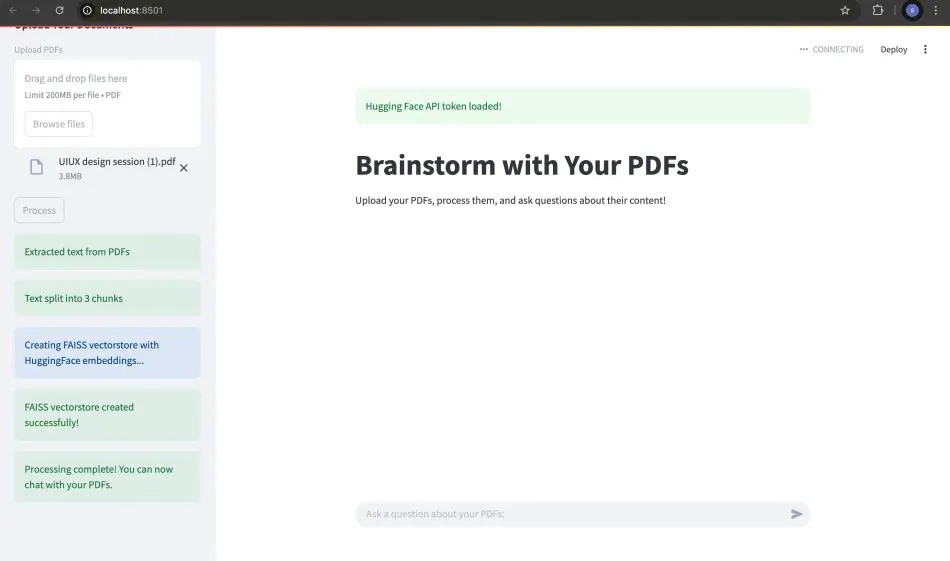
Handles PDF processing: A sidebar lets users upload PDFs. Clicking "Process" extracts text, chunks it, creates searchable embeddings, and sets up the AI conversation.
Manages user interaction: An input box allows users to ask questions, which are then processed by the AI, and the conversation is displayed.