VOOZH about

URL: https://www.analyticsvidhya.com/blog/2014/08/qvds-qlikview-application-efficient/

⇱ Use Qlikview Data Files To Make Your Qlikview Application Efficient


India's Most Futuristic AI Conference Is Back – Bigger, Sharper, Bolder

  • d
  • :
  • h
  • :
  • m
  • :
  • s

Reading list

How to use QVDs (QlikView Data files) to make your Qlikview application efficient?

Sunil Ray Last Updated : 17 Apr, 2015
4 min read

In June 2013, I had been using QlikView for about a year. During those days, I was working on a QlikView project where I had to show the sales number across various channels for various periods (e.g. Daily, Monthly, Yearly) and in comparison with last year.

I had two transactional tables, three mapping tables (available in Excel). I had completed this project successfully within a defined timeline. However, there were 2 problems with the model I used:

  • Whenever there was any change in any of the mapping files, I had to repeat the reload process which involved not only reloading the excel, but also reloading the entire transaction table. If there was any issue with the network or database, the reloading would fail.
  • When I used to report daily sales number, I reloaded complete tables on a daily basis whereas data till yesterday was already with me. It was too time consuming process.
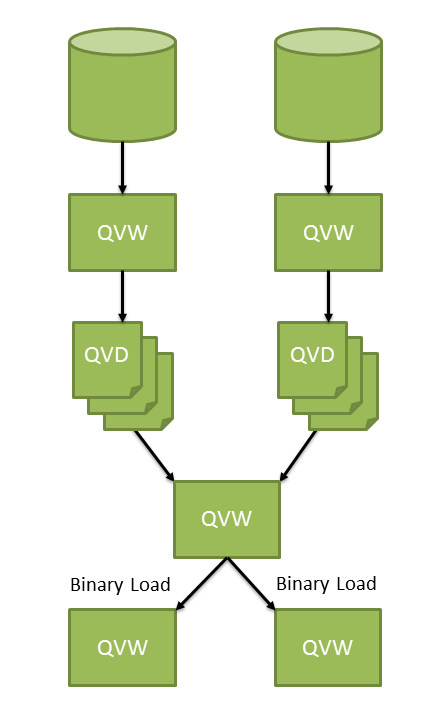
πŸ‘ Image Source: qlik.com

Image Source: qlik.com

This is when using a QVD (QlikView Data) file made a lot of difference. You can think of these QVD files as a middle layer, so that your front-end queries do not run on the databases directly. Creation of these QVDs can be done during off-peak hours (Less network and database load). QVDs are also essential to load only the incremental data (i.e. Additional or modified records).

πŸ‘ qvd_architecture

What Is a QVD file?

QVD is a QlikView format and can only be written to and read by QlikView. A single QVD file can store a single table and is created in the load script in a QVW file.

A QVD file consists of three parts:

  • XML header to describe the fields in the table, the layout of the subsequent information and other meta-data.
  • Symbol tables in a byte stuffed format.
  • Actual table data in a bit-stuffed format.

Advantages of using QVDs:

QVD files offer many advantages to your QlikView applications, including the following:

  • Faster load time: Reading data from QVD is 10-100 times faster than other sources i.e. decreasing load time. It is because QVD creation uses the same algorithms as QlikView uses to store data in memory, the result of that Loading from QVD is faster, when compared to other formats.
  • Less load on databases and networks: Once data is exported in QVDs, you don’t need to connect with external database again. It reduces the workload on external databases and network. Furthermore, when several QlikView scripts share the same data, it is only necessary to load it once from the source database. The other applications can also make use of the same data via a QVD file.
  • Incremental loads of QVDs: Incremental load (loading only new/ modified detail of a database) can be done only by using QVDs. It reduces the load time significantly as compared to complete load.
  • Consolidating data from multiple data sources and databases: Multi-layer QVDs are used to create a with robust model, when data is fetched from multiple data sources.

How to create a QVD?

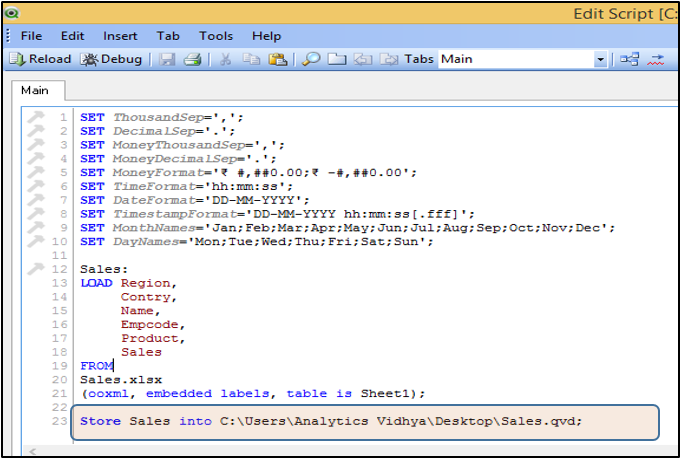
QVDs are most commonly created during the execution of QlikView load script using the STORE command:

Syntax: STORE <TableName> INTO <Path\FileName.qvd>

It is a good practice to have separate application to create QVD files. This layer is used to handle all interaction with source databases. And the result of this interaction can be reloaded quickly from QVD files.

πŸ‘ qlikview_qvd_store

Incremental loads: As mentioned before, Incremental loads are defined as loading only new or updated records from the database into an established QVD. Incremental loads are useful because they run much faster than full loads, particularly for large data sets from databases. (Will discuss it in detail in the next article)

How to load data from QVD?

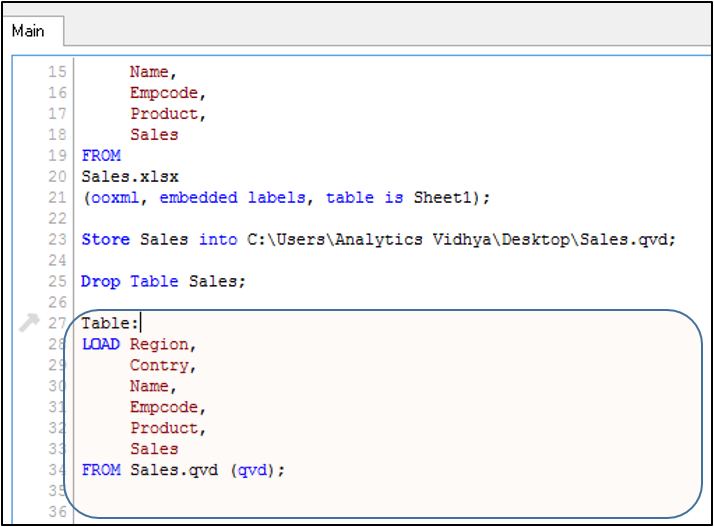
To read data from QVD, we need to write a LOAD statement (similar to the command to load CSV or excel file).

Syntax: 
TableName:
 LOAD
 FieldList 
 FROM <Path\FileName.qvd (qvd) >;

πŸ‘ qlikview_qvd_load

QVD files can be read in two modes, standard (fast) and super-fast. The selected mode is determined automatically by the QlikView script engine. Super-fast mode can be utilized only when all fields or a subset of it are required to be read without any manipulation (e.g. formula based field generation), although the renaming of fields is allowed.

End Notes:

Managing QVDs is one of most important part in any QlikView application project. It can be used to provide a logical data layer and hence it can act as a data warehouse in absence of one (one of the big benefits of Qlikview in comparison to other BI tools in the market).

Creating QVDs helps to decrease the database and network load. Once a base QVD is generated, an incremental load script can be run to load only the new or modified records to the QVD. Incremental load also removes the deleted records. As a result of this, your application consumes less space and requires less load time.

If you have used QVDs in past to create multi-level data models or plan to use one in your application now, please feel free to share your experience with me through the comments below.

If you like what you just read & want to continue your analytics learning, subscribe to our emailsfollow us on twitter or like our facebook page.

Sunil Ray is Chief Content Officer at Analytics Vidhya, India's largest Analytics community. I am deeply passionate about understanding and explaining concepts from first principles. In my current role, I am responsible for creating top notch content for Analytics Vidhya including its courses, conferences, blogs and Competitions.

I thrive in fast paced environment and love building and scaling products which unleash huge value for customers using data and technology. Over the last 6 years, I have built the content team and created multiple data products at Analytics Vidhya.

Prior to Analytics Vidhya, I have 7+ years of experience working with several insurance companies like Max Life, Max Bupa, Birla Sun Life & Aviva Life Insurance in different data roles.

Industry exposure: Insurance, and EdTech

Major capabilities: Content Development, Product Management, Analytics, Growth Strategy.

Login to continue reading and enjoy expert-curated content.

Free Courses

Generative AI - A Way of Life

Explore Generative AI for beginners: create text and images, use top AI tools, learn practical skills, and ethics.

Getting Started with Large Language Models

Master Large Language Models (LLMs) with this course, offering clear guidance in NLP and model training made simple.

Building LLM Applications using Prompt Engineering

This free course guides you on building LLM apps, mastering prompt engineering, and developing chatbots with enterprise data.

Improving Real World RAG Systems: Key Challenges & Practical Solutions

Explore practical solutions, advanced retrieval strategies, and agentic RAG systems to improve context, relevance, and accuracy in AI-driven applications.

Microsoft Excel: Formulas & Functions

Master MS Excel for data analysis with key formulas, functions, and LookUp tools in this comprehensive course.

Responses From Readers

Nice article Sunil :) !

hi , very helpful info thnx for sharing

Its very useful.Thanks a lot Sunil

Flagship Programs

GenAI Pinnacle Program| GenAI Pinnacle Plus Program| AI/ML BlackBelt Program| Agentic AI Pioneer Program

Free Courses

Generative AI| DeepSeek| OpenAI Agent SDK| LLM Applications using Prompt Engineering| DeepSeek from Scratch| Stability.AI| SSM & MAMBA| RAG Systems using LlamaIndex| Building LLMs for Code| Python| Microsoft Excel| Machine Learning| Deep Learning| Mastering Multimodal RAG| Introduction to Transformer Model| Bagging & Boosting| Loan Prediction| Time Series Forecasting| Tableau| Business Analytics| Vibe Coding in Windsurf| Model Deployment using FastAPI| Building Data Analyst AI Agent| Getting started with OpenAI o3-mini| Introduction to Transformers and Attention Mechanisms

Popular Categories

AI Agents| Generative AI| Prompt Engineering| Generative AI Application| News| Technical Guides| AI Tools| Interview Preparation| Research Papers| Success Stories| Quiz| Use Cases| Listicles

Generative AI Tools and Techniques

GANs| VAEs| Transformers| StyleGAN| Pix2Pix| Autoencoders| GPT| BERT| Word2Vec| LSTM| Attention Mechanisms| Diffusion Models| LLMs| SLMs| Encoder Decoder Models| Prompt Engineering| LangChain| LlamaIndex| RAG| Fine-tuning| LangChain AI Agent| Multimodal Models| RNNs| DCGAN| ProGAN| Text-to-Image Models| DDPM| Document Question Answering| Imagen| T5 (Text-to-Text Transfer Transformer)| Seq2seq Models| WaveNet| Attention Is All You Need (Transformer Architecture) | WindSurf| Cursor

Popular GenAI Models

Llama 4| Llama 3.1| GPT 4.5| GPT 4.1| GPT 4o| o3-mini| Sora| DeepSeek R1| DeepSeek V3| Janus Pro| Veo 2| Gemini 2.5 Pro| Gemini 2.0| Gemma 3| Claude Sonnet 3.7| Claude 3.5 Sonnet| Phi 4| Phi 3.5| Mistral Small 3.1| Mistral NeMo| Mistral-7b| Bedrock| Vertex AI| Qwen QwQ 32B| Qwen 2| Qwen 2.5 VL| Qwen Chat| Grok 3

AI Development Frameworks

n8n| LangChain| Agent SDK| A2A by Google| SmolAgents| LangGraph| CrewAI| Agno| LangFlow| AutoGen| LlamaIndex| Swarm| AutoGPT

Data Science Tools and Techniques

Python| R| SQL| Jupyter Notebooks| TensorFlow| Scikit-learn| PyTorch| Tableau| Apache Spark| Matplotlib| Seaborn| Pandas| Hadoop| Docker| Git| Keras| Apache Kafka| AWS| NLP| Random Forest| Computer Vision| Data Visualization| Data Exploration| Big Data| Common Machine Learning Algorithms| Machine Learning| Google Data Science Agent
πŸ‘ Av Logo White

Continue your learning for FREE

Forgot your password?
πŸ‘ Av Logo White

Enter OTP sent to

Edit

Wrong OTP.

Enter the OTP

Resend OTP

Resend OTP in 45s

πŸ‘ Popup Banner
πŸ‘ AI Popup Banner