|
VOOZH | about |
|
VOOZH | about |
This article was published as a part of the Data Science Blogathon
A Support Vector Machine (SVM) is a very powerful and versatile Machine Learning model, capable of performing linear or nonlinear classification, regression, and even outlier detection. With this tutorial, we learn about the support vector machine technique and how to use it in scikit-learn. We will also discover the Principal Component Analysis and its implementation with scikit-learn.
Another simple approach that any machine learning expert should know about is the support vector machine. Many people prefer the support vector machine because it produces great accuracy while using less computing power. SVM (Support Vector Machine) can be used for both regression and classification. However, it is widely applied in classifications objectives.
The objective of the support vector machine algorithm is to find a hyperplane in N-dimensional space(N — the number of features) that distinctly classifies the data points.
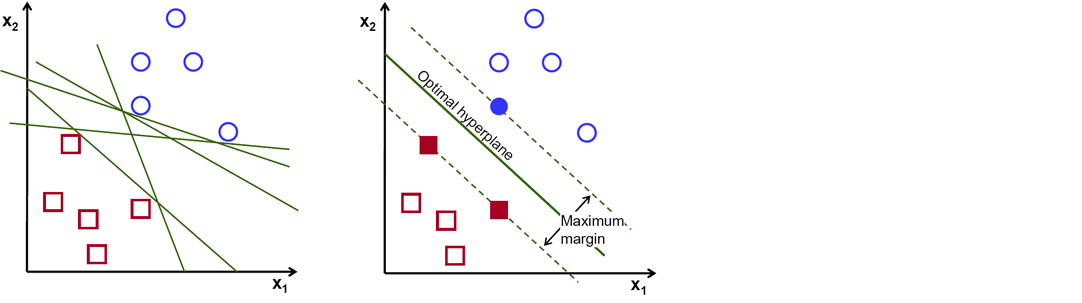
There are numerous hyper-planes from which to choose to split the two kinds of data points. Our goal is to discover a plane with the greatest margin, or the greatest distance between data points from both classes. Maximizing the margin distance adds some reinforcement, making it easier to classify future data points.
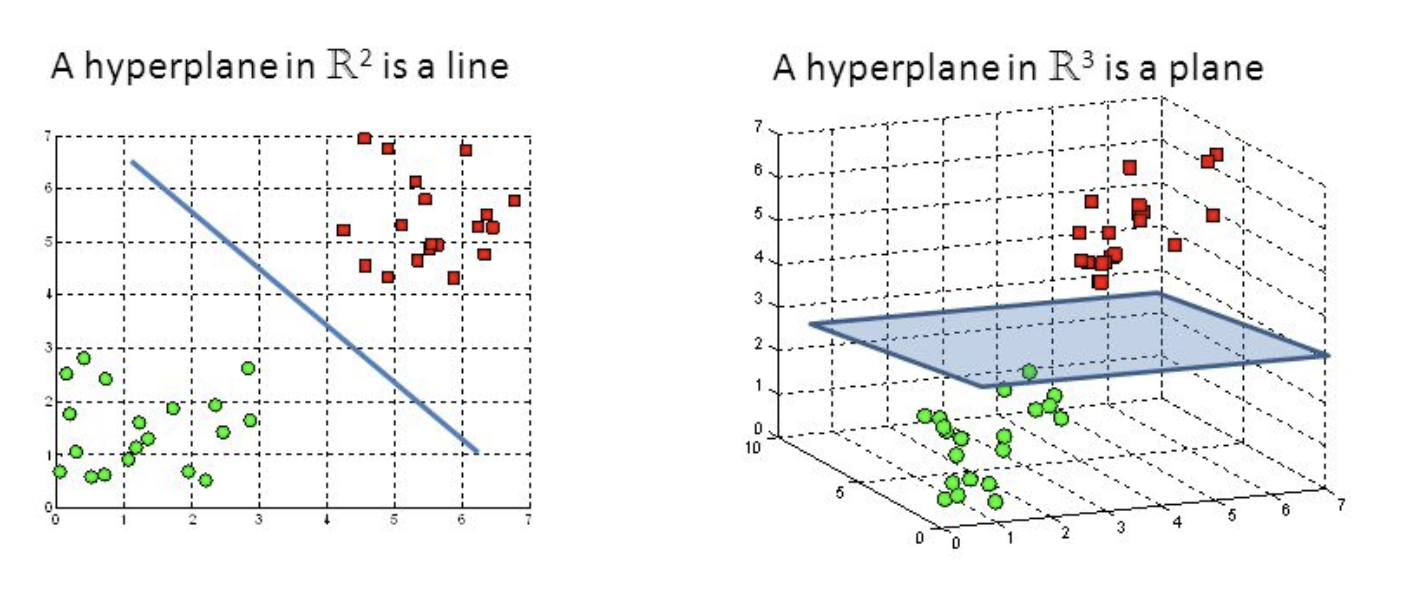
Hyper-planes are decision-making boundaries that help in data classification. Different classes can be assigned to data points on either side of the hyperplane. The hyperplane’s dimension is also determined by the number of features. If there are only two input characteristics, the hyperplane is simply a line. The hyperplane becomes a two-dimensional plane when the number of input features reaches three. When the number of features exceeds three, it becomes impossible to imagine.
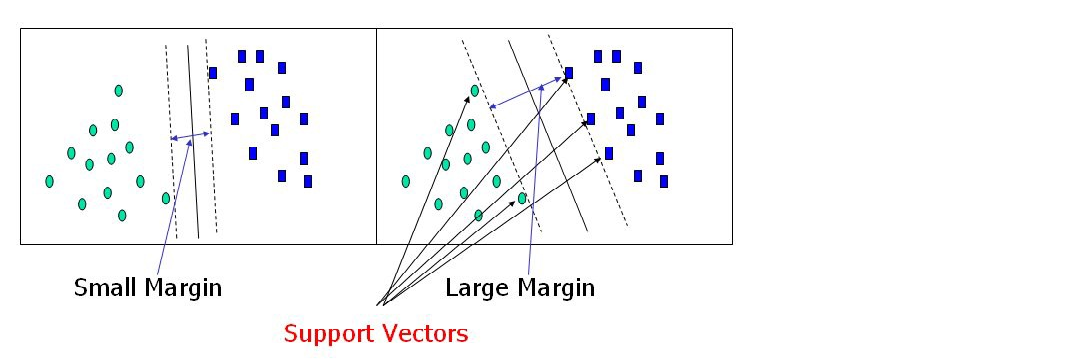
Support vectors are data points that are closer to the hyperplane and have an influence on the hyperplane’s position and orientation. We increase the classifier’s margin by using these support vectors. The hyperplane’s position will be altered if the support vectors are deleted. These are the points that will assist us in constructing our SVM.
We will use a support vector machine in Predicting if the cancer diagnosis is benign or malignant based on several observations/features.
import pandas as pd
import numpy as np
import matplotlib.pyplot as plt
import seaborn as sns
%matplotlib inline
sns.set_style('whitegrid')
Python Code:
import pandas as pd
import numpy as np
from sklearn.datasets import load_breast_cancer
cancer = load_breast_cancer()
col_names = list(cancer.feature_names)
col_names.append('target')
df = pd.DataFrame(np.c_[cancer.data, cancer.target], columns=col_names)
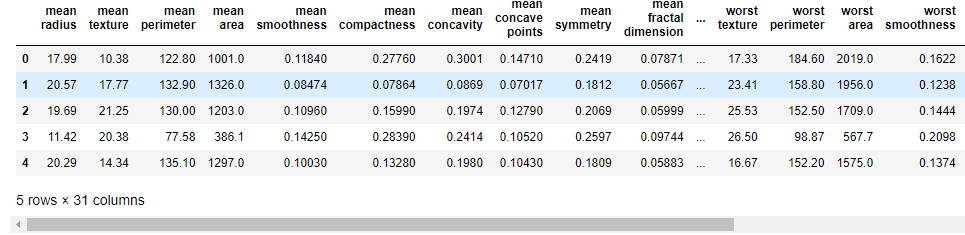
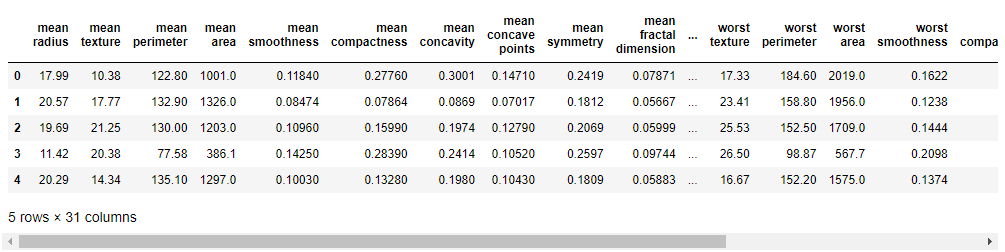
print(df.head())print(cancer.target_names)
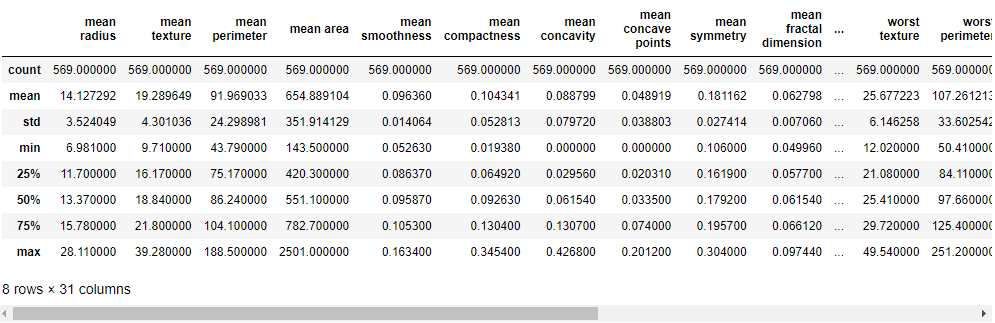
df.describe()
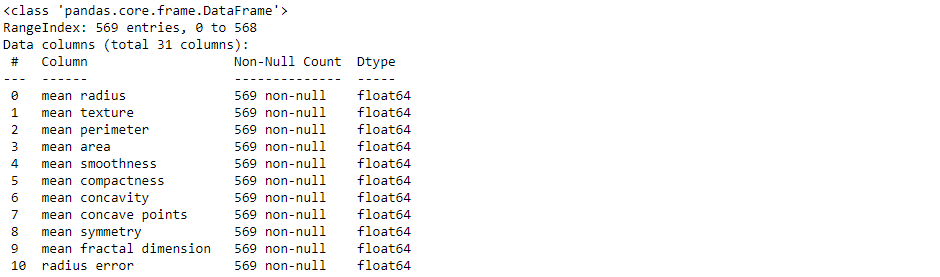
df.info()
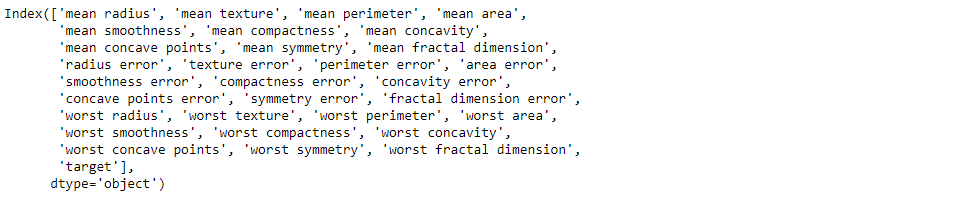
df.columns
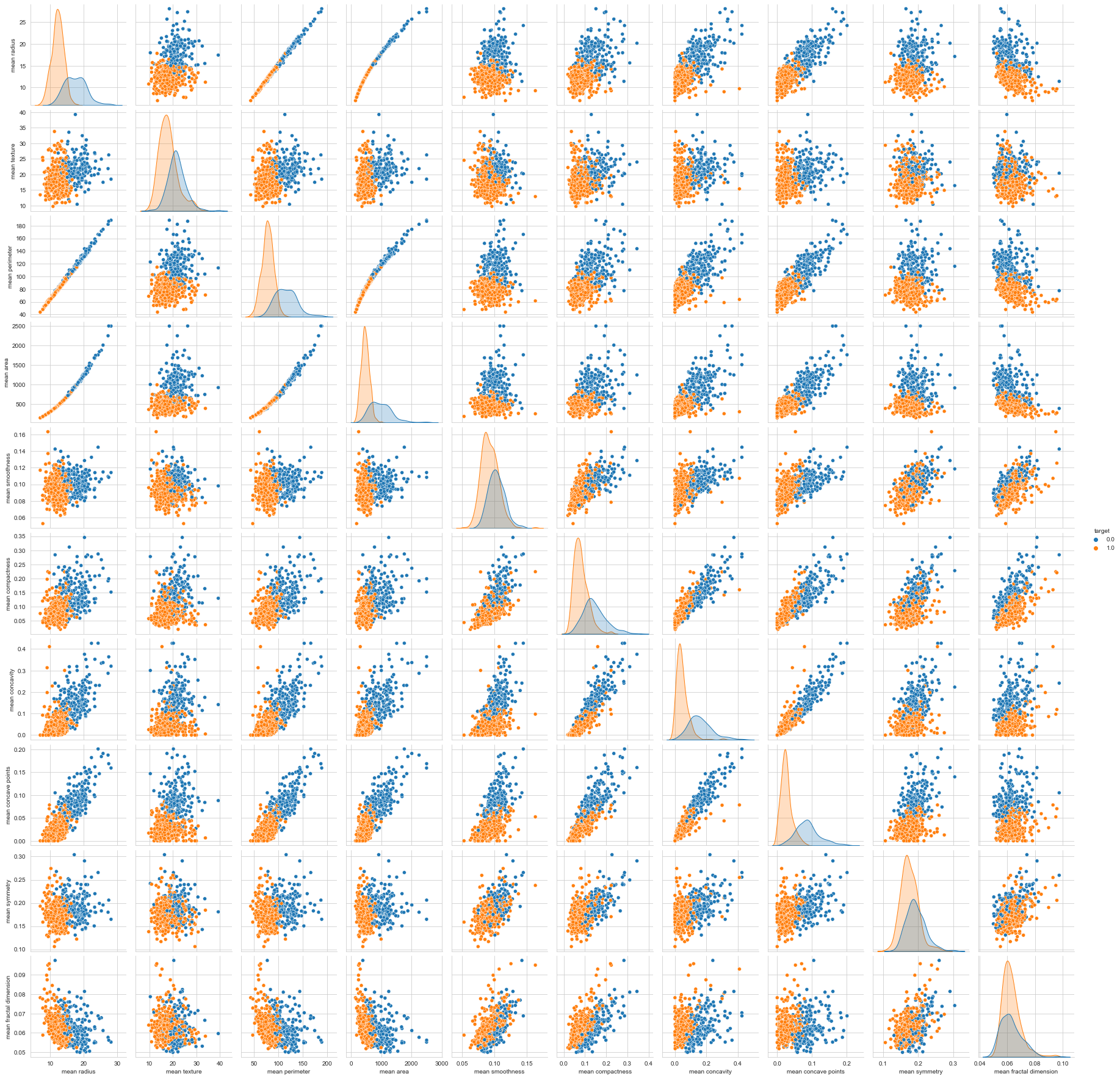
sns.pairplot(df, hue='target', vars=['mean radius', 'mean texture', 'mean perimeter', 'mean area',
 'mean smoothness', 'mean compactness', 'mean concavity',
 'mean concave points', 'mean symmetry', 'mean fractal dimension'])
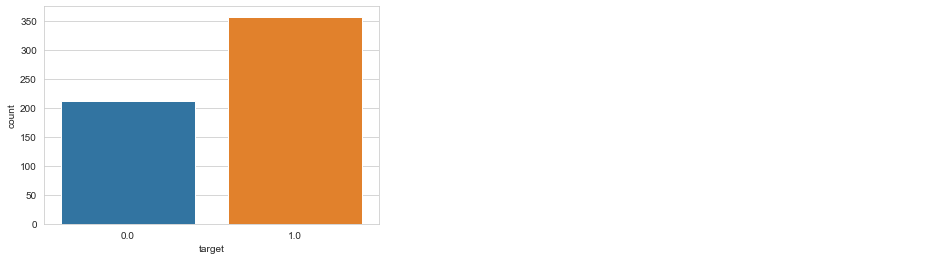
sns.countplot(df['target'], label = "Count")
plt.figure(figsize=(10, 8))
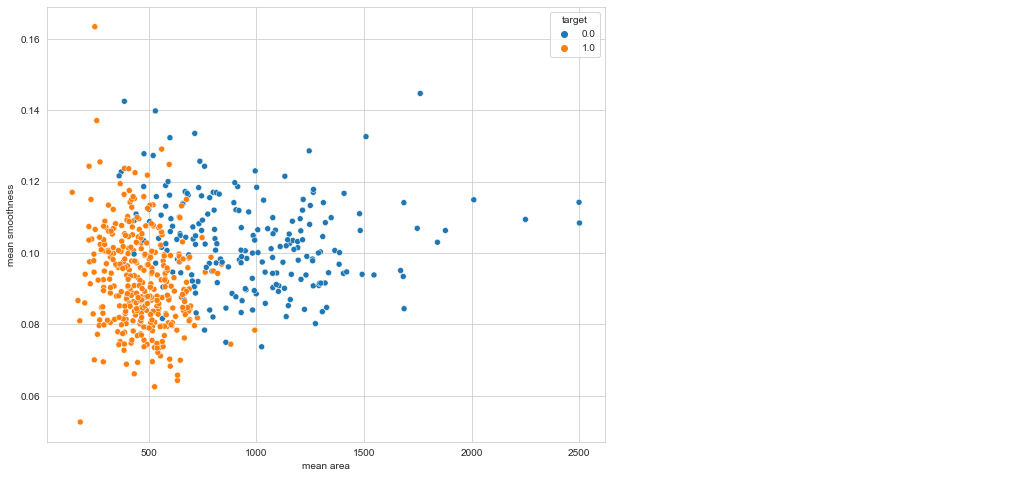
sns.scatterplot(x = 'mean area', y = 'mean smoothness', hue = 'target', data = df)
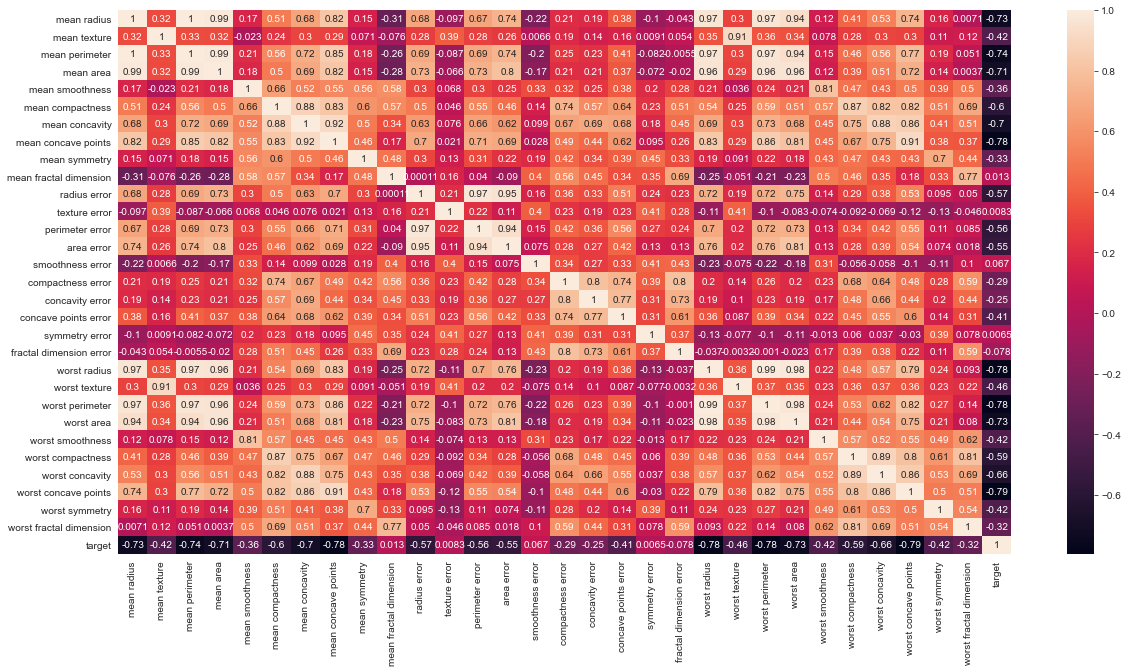
# Let's check the correlation between the variables
# Strong correlation between the mean radius and mean perimeter, mean area and mean primeter
plt.figure(figsize=(20,10))
sns.heatmap(df.corr(), annot=True)
we use SVM sklearn for selection and for training, sklearn support vector machine to do cross_val_score, train_test_split data.
from sklearn.model_selection import cross_val_score, train_test_split
from sklearn.pipeline import Pipeline
from sklearn.preprocessing import StandardScaler, MinMaxScaler
X = df.drop('target', axis=1)
y = df.target
print(f"'X' shape: {X.shape}")
print(f"'y' shape: {y.shape}")
pipeline = Pipeline([
 ('min_max_scaler', MinMaxScaler()),
 ('std_scaler', StandardScaler())
])
X_train, X_test, y_train, y_test = train_test_split(X, y, test_size=0.3, random_state=42)
from sklearn.metrics import accuracy_score, confusion_matrix, classification_report
def print_score(clf, X_train, y_train, X_test, y_test, train=True):
 if train:
 pred = clf.predict(X_train)
 clf_report = pd.DataFrame(classification_report(y_train, pred, output_dict=True))
 print("Train Result:n================================================")
 print(f"Accuracy Score: {accuracy_score(y_train, pred) * 100:.2f}%")
 print("_______________________________________________")
 print(f"CLASSIFICATION REPORT:n{clf_report}")
 print("_______________________________________________")
 print(f"Confusion Matrix: n {confusion_matrix(y_train, pred)}n")
 elif train==False:
 pred = clf.predict(X_test)
 clf_report = pd.DataFrame(classification_report(y_test, pred, output_dict=True))
 print("Test Result:n================================================")
 print(f"Accuracy Score: {accuracy_score(y_test, pred) * 100:.2f}%")
 print("_______________________________________________")
 print(f"CLASSIFICATION REPORT:n{clf_report}")
 print("_______________________________________________")
 print(f"Confusion Matrix: n {confusion_matrix(y_test, pred)}n")
Support Vector Machines (Kernels)
Grid search is a popular way to find the right hyper-parameter values. Performing a large grid search first, then a refined grid search centred on the best results is frequently faster. Knowing what each hyper-parameter does can also help you identify the right part of the hyper-parameter space to search for.
SVM Kernel type:
1. Linear Kernel SVM
from sklearn.svm import LinearSVC
model = LinearSVC(loss='hinge', dual=True)
model.fit(X_train, y_train)
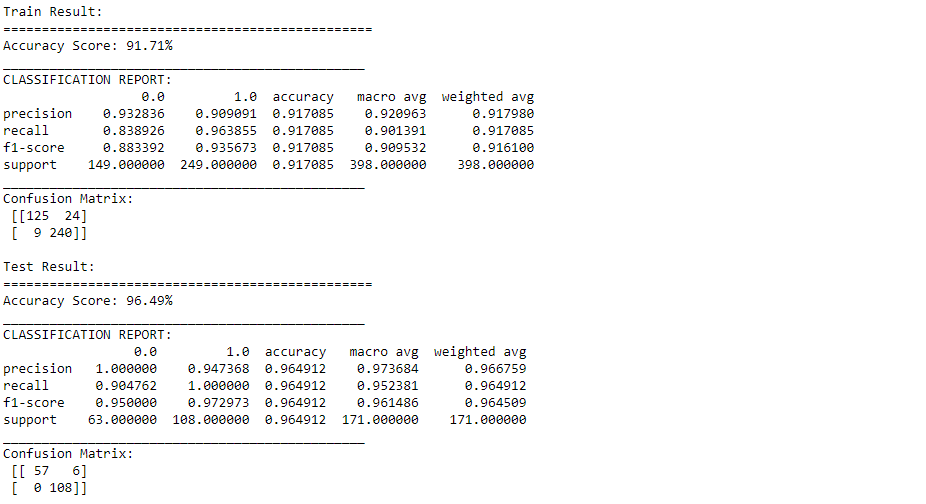
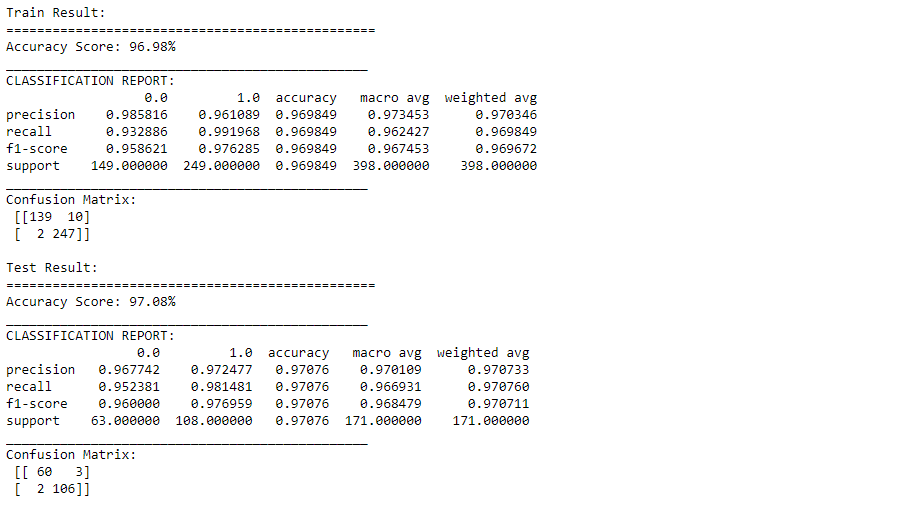
print_score(model, X_train, y_train, X_test, y_test, train=True)
print_score(model, X_train, y_train, X_test, y_test, train=False)
2. Polynomial Kernel SVM
This code trains an SVM classifier using a 2nd-degree polynomial kernel.
from sklearn.svm import SVC
# The hyperparameter coef0 controls how much the model is influenced by high degree ploynomials
model = SVC(kernel='poly', degree=2, gamma='auto', coef0=1, C=5)
model.fit(X_train, y_train)
print_score(model, X_train, y_train, X_test, y_test, train=True)
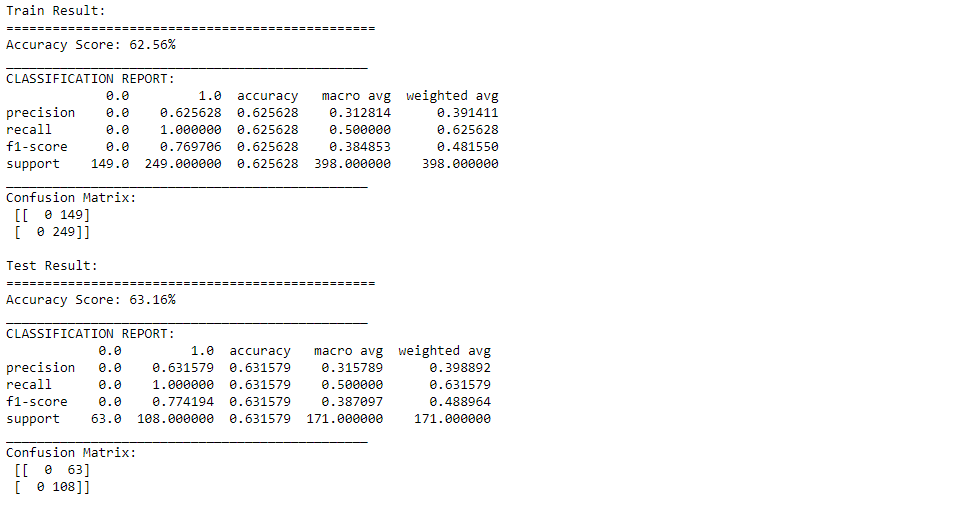
print_score(model, X_train, y_train, X_test, y_test, train=False)
3. Radial Kernel SVM
Just like the polynomial features method, the similarity features can be useful with any
model = SVC(kernel='rbf', gamma=0.5, C=0.1)
model.fit(X_train, y_train)
print_score(model, X_train, y_train, X_test, y_test, train=True)
print_score(model, X_train, y_train, X_test, y_test, train=False)
Other kernels are available, but they are used far less frequently. Some kernels, for example, are specialized to particular data structures. When identifying text documents based on DNA sequences, string kernels are sometimes used.
How do you determine which kernel to use when there are so many options? If the training set is big or has a lot of characteristics, you should always attempt the linear kernel first. You should also try the Gaussian RBF kernel if the training set isn’t too big.
from sklearn.model_selection import GridSearchCV
param_grid = {'C': [0.01, 0.1, 0.5, 1, 10, 100],
 'gamma': [1, 0.75, 0.5, 0.25, 0.1, 0.01, 0.001],
 'kernel': ['rbf', 'poly', 'linear']}
grid = GridSearchCV(SVC(), param_grid, refit=True, verbose=1, cv=5, iid=True)
grid.fit(X_train, y_train)
best_params = grid.best_params_
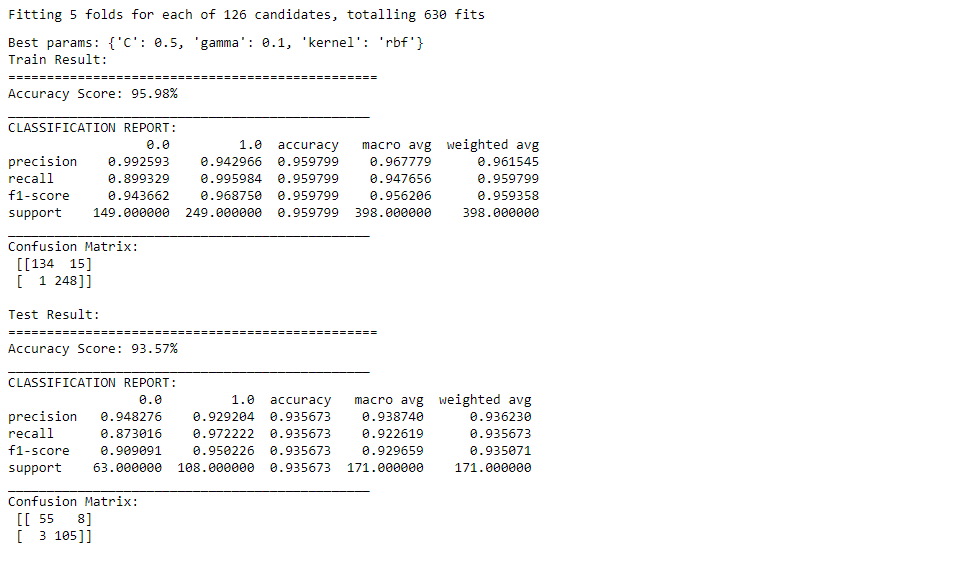
print(f"Best params: {best_params}")
svm_clf = SVC(**best_params)
svm_clf.fit(X_train, y_train)
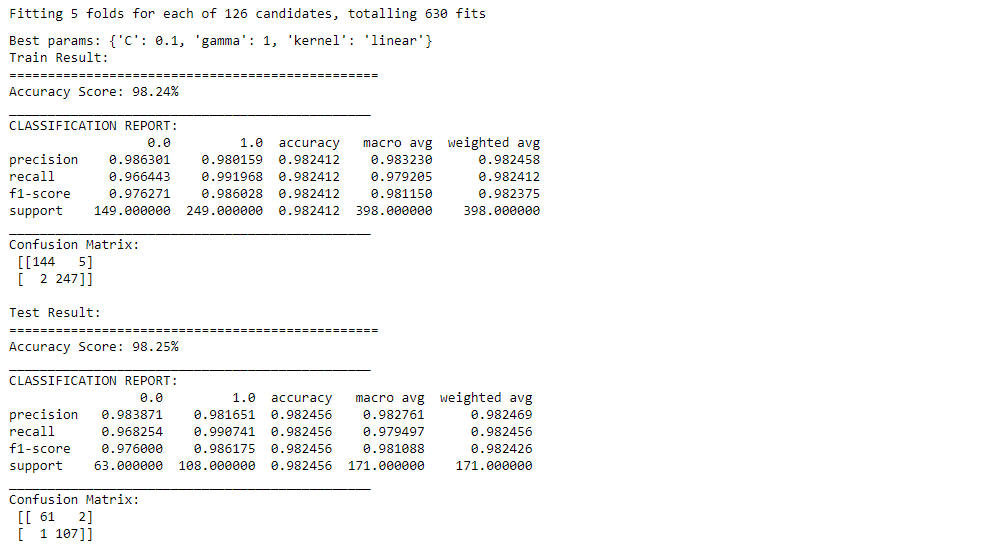
print_score(svm_clf, X_train, y_train, X_test, y_test, train=True)
print_score(svm_clf, X_train, y_train, X_test, y_test, train=False)
robpca
.()
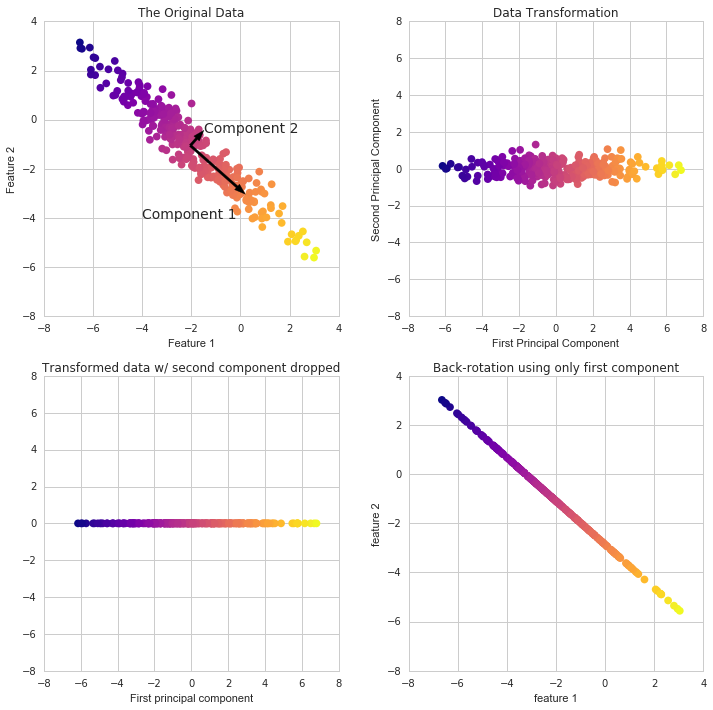
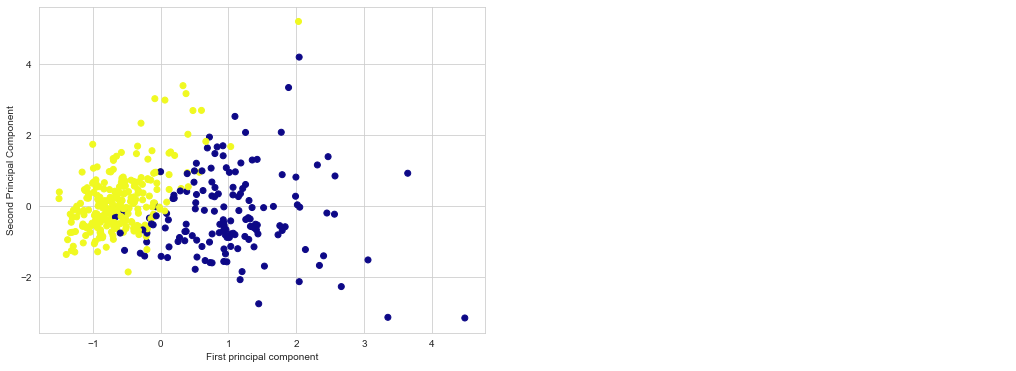
Because it’s difficult to represent high-dimensional data using a single scatter-plot, we may use PCA to determine the first two main components and visualize the data in this new, two-dimensional space. However, we must first scale our data to ensure that each feature has single unit variance.
scaler = StandardScaler()
X_train, X_test, y_train, y_test = train_test_split(X, y, test_size=0.3, random_state=42)
X_train = scaler.fit_transform(X_train)
X_test = scaler.transform(X_test)
PCA in Scikit Learn works in a similar way to the other preprocessing methods in Scikit Learn. We create a PCA object, use the fit method to discover the principle components, and then use transform to rotate and reduce the dimensionality.
When building the PCA object, we can additionally indicate how many components we wish to create.
from sklearn.decomposition import PCA
pca = PCA(n_components=3)
scaler = StandardScaler()
X_train = pca.fit_transform(X_train)
X_test = pca.transform(X_test)
X_train = scaler.fit_transform(X_train)
X_test = scaler.transform(X_test)
plt.figure(figsize=(8,6))
plt.scatter(X_train[:,0],X_train[:,1],c=y_train,cmap='plasma')
plt.xlabel('First principal component')
plt.ylabel('Second Principal Component')
Using these two components we can easily separate these two classes.
param_grid = {'C': [0.01, 0.1, 0.5, 1, 10, 100],
 'gamma': [1, 0.75, 0.5, 0.25, 0.1, 0.01, 0.001],
 'kernel': ['rbf', 'poly', 'linear']}
grid = GridSearchCV(SVC(), param_grid, refit=True, verbose=1, cv=5, iid=True)
grid.fit(X_train, y_train)
best_params = grid.best_params_
print(f"Best params: {best_params}")
svm_clf = SVC(**best_params)
svm_clf.fit(X_train, y_train)
print_score(svm_clf, X_train, y_train, X_test, y_test, train=True)
print_score(svm_clf, X_train, y_train, X_test, y_test, train=False)
Thank you for reading!
I hope you enjoyed the article and increased your knowledge.
Please feel free to contact me on Email
Something not mentioned or want to share your thoughts? Feel free to comment below And I’ll get back to you.
Hardikkumar M. Dhaduk
Data Analyst | Digital Data Analysis Specialist | Data Science Learner
Connect with me on Linkedin
Connect with me on Github
The media shown in this article are not owned by Analytics Vidhya and are used at the Author’s discretion.
Data Analyst | Digital Data Analysis Specialist | Data Science Learner Currently working in Data Analytics field. I have done my post-graduation. My main focus is growing in the fields of Data Science and Analytics.
GPT-4 vs. Llama 3.1 – Which Model is Better?
Llama-3.1-Storm-8B: The 8B LLM Powerhouse Surpa...
A Comprehensive Guide to Building Agentic RAG S...
Top 10 Machine Learning Algorithms in 2026
45 Questions to Test a Data Scientist on Basics...
90+ Python Interview Questions and Answers (202...
8 Easy Ways to Access ChatGPT for Free
Prompt Engineering: Definition, Examples, Tips ...
What is LangChain?
What is Retrieval-Augmented Generation (RAG)?
learn so many new thing about support vector machine. Thankyou for sharing such informative content. Enroll at Best Python Training in Noida.
Find it very relevant. Glad to reach out to your content , learn so much about Support Vector Machine. Take a look on Best Python Training in Noida.
Edit
Resend OTP
Resend OTP in 45s