|
VOOZH | about |
|
VOOZH | about |
This article was published as a part of the Data Science Blogathon
Pretty much everything or all sorts of information available online is stored in some sort of database. The amount of data and information online is pretty huge. Your Facebook profile photo, your tweets, your past food orders on Zomato: all are stored somewhere.
So, the question arises, where are all these stored. The answer is simple.
(Image: https://www.pexels.com/photo/close-up-view-of-system-hacking-in-a-monitor-5380664/)
A database is a collection of related information. Modern databases contain millions or even trillions of pieces of information. Databases provide convenience for easy storage and access to data.
The word ‘datum’ means a single piece of information. The word data is the plural form of datum. One of the most important aspects of a database is to easily manage and operate large amounts of data.
Modern databases are managed by something called Database Management System.
A database management system is software that helps users create and maintain a database. Database Management Systems manage large amounts of information, handle security, take care of data backups, import or export data and let users access data.
A database that follows the relational model and stores data in a tabular format is known as a relational database. The database has rows and columns and a unique key for each data point.
Relational databases are very common and have high usage. Pretty much everything you have entered online in a form or something like that usually gets stored in a relational database. Examples of relational databases: Microsoft SQL Server, Oracle, MYSQL.
Let us create a simple relational database using SQL.
The SQL commands are written as follows.
CREATE TABLE student_data(
 studentID int PRIMARY KEY NOT NULL,
 student_name varchar(30),
 gender VARCHAR(1),
 course varchar(15),
 marks float,
 fees int,
 admission_year int
);
A simple table consisting of sample data will be created. To give brief information about the table created, the student is the PRIMARY KEY. Usually, this will be the roll number of a student in a college or school. This cannot be NULL, that is, this field must have a value. The “NOT NULL” keyword is used to define this.
Other data columns include student name, gender, course, marks, fees, and admission year.
A simple table consisting of sample data will be created. To give brief information about the table created, the studentID is the PRIMARY KEY. Usually, this will be the roll number of a student in a college or school. This cannot be NULL, that is, this field must have a value. The “NOT NULL” keyword is used to define this.
Other data columns include student name, gender, course, marks, fees, and admission year.
Now, let us enter data into the table.
INSERT INTO student_data VALUES ('1', 'Rahul','M', 'BA English', 89.2, 15000, 2019);
INSERT INTO student_data VALUES ('2', 'Riya', 'F','BA History', 68, 12000, 2018);
INSERT INTO student_data VALUES ('3', 'Sagnik','M', 'MBBS', 96, 19000, 2019);
INSERT INTO student_data VALUES ('4', 'Aditya', 'M','BA English', 95, 8000, 2018);
INSERT INTO student_data VALUES ('5', 'Sunny', 'M','Btech', 78, 14000, 2019);
INSERT INTO student_data VALUES ('6', 'Anshuman', 'M','Btech', 67, 6000, 2018);
INSERT INTO student_data VALUES ('7', 'Soumya','M', 'Btech', 86.8, 17000, 2019);
INSERT INTO student_data VALUES ('8', 'Ravi', 'M','MBBS', 87.9, 18000, 2018);
INSERT INTO student_data VALUES ('9', 'Priya', 'F','BA English', 93, 12000, 2019);
INSERT INTO student_data VALUES ('10', 'Ankita', 'F','BA History', 89.2, 14000, 2018);
We inserted 10 entries into the table.
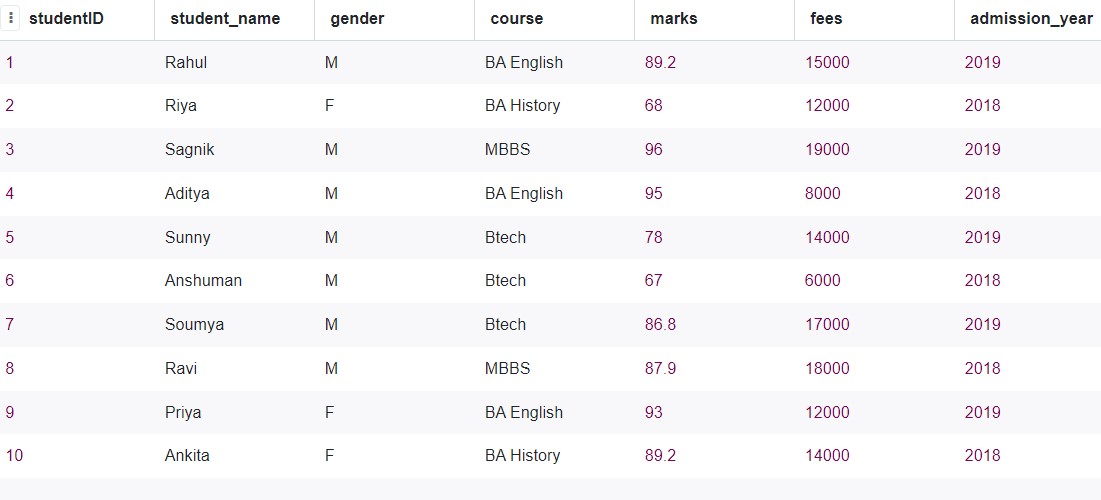
The table now looks like this.
If you have come across excel, now you will understand that the visualization looks something like excel. Like, each sheet holds some data in an excel file, each table holds some sort of information.
A table is a collection of related data entries and uses columns and rows to store data.
Each column is a data attribute, in the above table, gender, course, marks, etc are the data fields or attributes. The rows are called records, they are the individual entries of the table.
Such a way of storing data is easy, flexible, and efficient. New entries can simply be added at the end of the table. Computer scientist Edgar F. Codd developed the relational model of storing data in 1970.
All the above-mentioned parts are important aspects of relational databases. Just to sum it up, tables, known as relations, consist of data as rows and columns. All tables have a primary key. The logical connection between two or more tables can be established with the help of foreign keys. A foreign key is a column referring to the primary key of another table.
Relationships between multiple tables can be defined or modeled using an entity-relationship diagram. It has all the entities and attributes. In RDBMs, as the data gets stored in a table format, relationships are also stored in a table format.
Relational databases are the most used, they support data independence, and the data stored as tables can be analyzed and processed easily.
For example, let us consider the above student data. Here, there are 10 entries, but let us assume a real-life situation and there are 5000 students. We cannot analyze each data point individually.
Let’s say, we have to see the marks distribution, count the number of male and female students, and do other data exploration tasks. RDBMS will make these things easy.
What has to be done is quite simple. The data can be extracted, converted to an excel file, and analyzed in Excel. Or, it can be converted to a csv file and analyzed in Excel. The data becomes quite simple to work with, after this.
The relational model of RDBMs helps in separating the logical data structures from the physical storage structures. This enables database administrators to manage physical data storage without affecting access to that data as a logical structure.
Relational Databases provide a way of storing data and representing that, which can be used by any application or software. The main strength of relational databases is the use of tables to store data. Tables are a simple, robust, and flexible way of storing data.
SQL has become the most popular language for database queries. SQL can be easily used to retrieve data from databases. Let us implement some simple SQL queries.
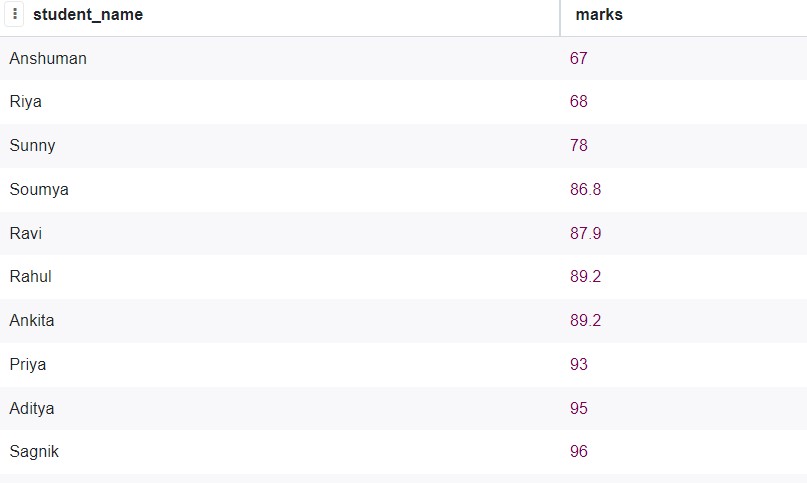
Now, from the student database created above, let us say, we want to get all the student marks, sorted in ascending order. The SQL query will be:
SELECT student_data.student_name, student_data.marks
FROM student_data
ORDER BY marks;
Output:
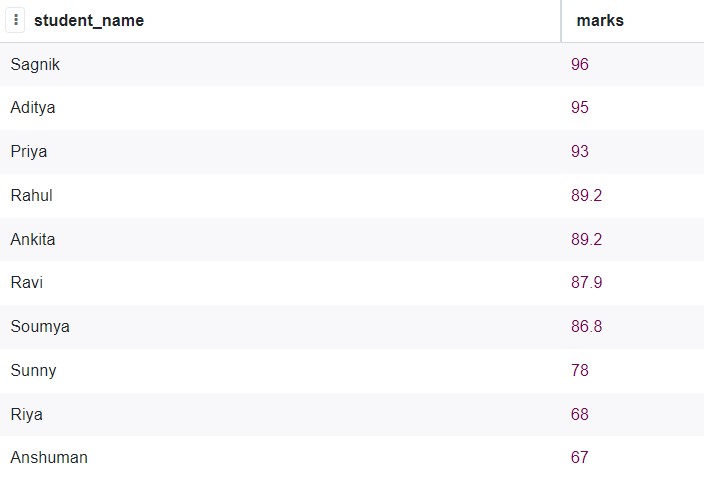
Now, we want the same output, but in descending order.
The SQL query will be:
SELECT student_data.student_name, student_data.marks
FROM student_data
ORDER BY marks DESC;
Output:
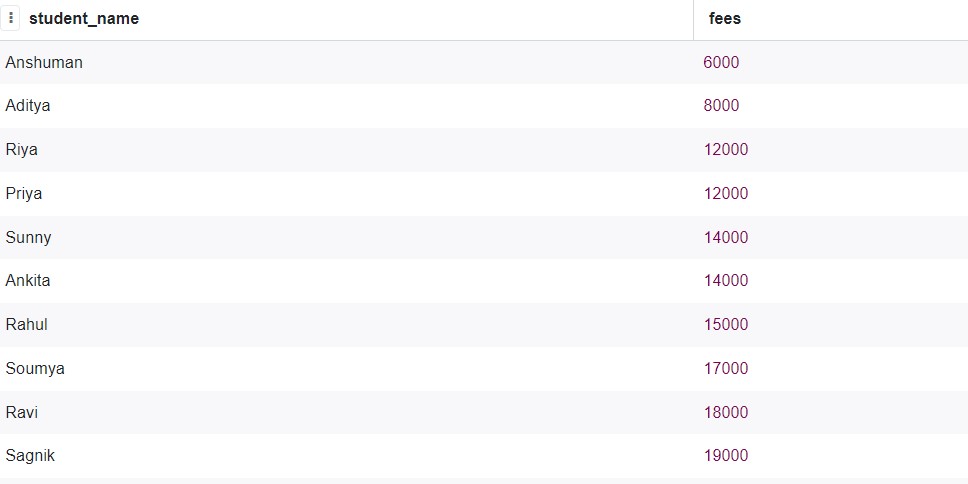
Now, we want to analyze the student fees, let us see how to implement them.
The SQL query is quite simple.
SELECT student_name, fees
FROM student_data
ORDER BY fees;
Output:
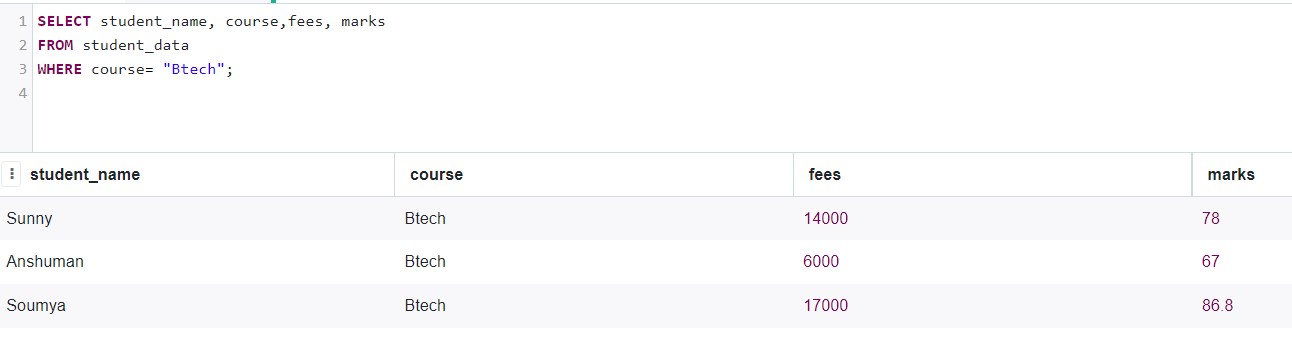
Now, let us take the students who are in the BTech course.
The query is as follows.
SELECT student_name, course,fees, marks
FROM student_data
WHERE course= "Btech";
Output:
The online SQL tool used is: https://sqliteonline.com/
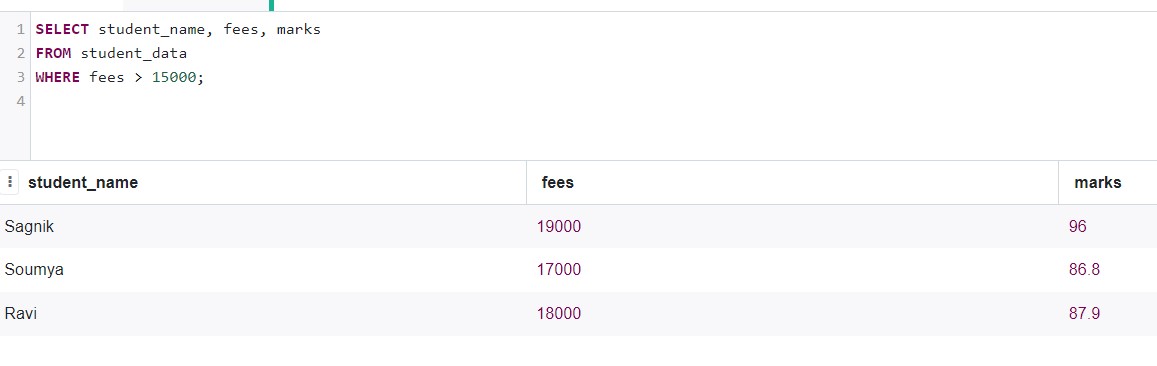
Now, let us check which students have fees greater than 15000.
SELECT student_name, fees, marks
FROM student_data
WHERE fees > 15000;
Output:
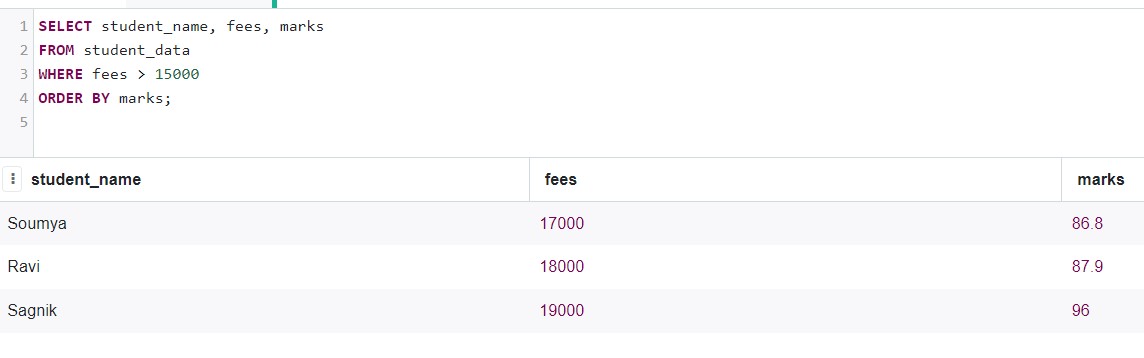
Now, let us check students whose fees are greater than 15000, and the entries are sorted by their marks.
SELECT student_name, fees, marks
FROM student_data
WHERE fees > 15000
ORDER BY marks;
Output:
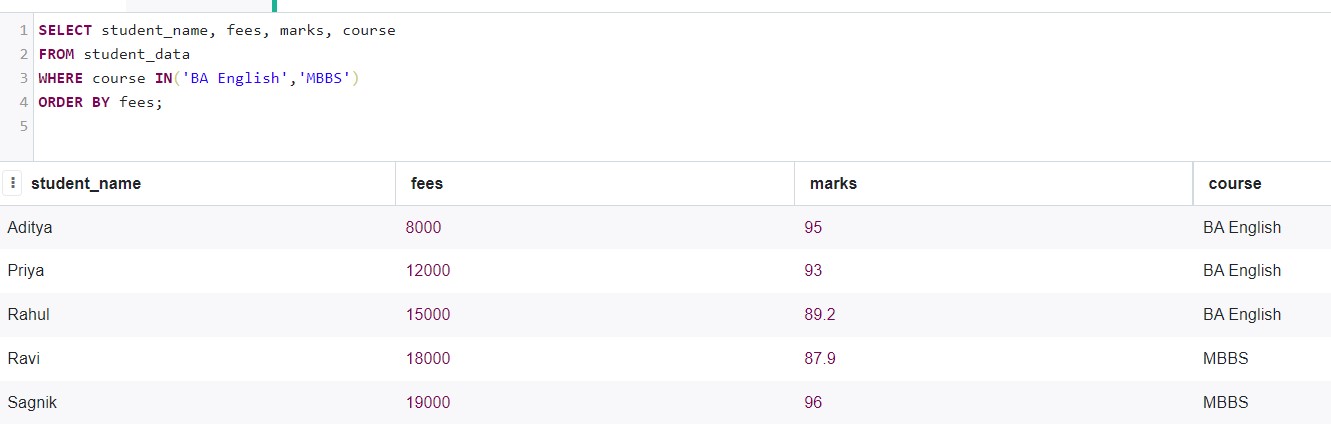
Now, let us choose students who have taken either BA English or MBBS, then we will order them by the fees.
SELECT student_name, fees, marks, course
FROM student_data
WHERE course in('BA English','MBBS')
ORDER BY fees;
Output:
So, we can see that getting and retrieving data from a relational database is very easy.
The tabular structure of relational databases is the main advantage of such databases. Such databases are also very simple and queries can be used to extract data or modify existing data. The data stored is also highly accurate. Data validity checks and data typing ensure the integrity of data. By allowing access to specific people, RDBMs also take care of the security issue.
Relational databases have a well-defined relationship between tables. Tables are related to each other which makes data easily searchable and makes data reporting easy and simple. Relational databases are very important as they have made a universal model for storing information and data. Most modern computers can use relational databases.
They are well understood by people, scaling and expansion is easy, and they also fit the use case most of the time. That is why relational databases are mostly used.
Prateek Majumder
Analytics | Content Creation
Connect with me on Linkedin.
My other articles on Analytics Vidhya: Link.
Thank You.
Prateek is a dynamic professional with a strong foundation in Artificial Intelligence and Data Science, currently pursuing his PGP at Jio Institute. He holds a Bachelor's degree in Electrical Engineering and has hands-on experience as a System Engineer at TCS Digital, where he excelled in API management and data integration. Prateek also has a background in product marketing and analytics from his time with start-ups like AppleX and Milkie Way, Inc., where he was involved in growth campaigns and technical blog management. Recognized for his structured thinking and problem-solving abilities, he has received accolades like the Dr. Sudarshan Chakraborty Award for Best Student Performance. Fluent in multiple languages and passionate about technology, Prateek continues to expand his expertise in the rapidly evolving AI and tech landscape.
GPT-4 vs. Llama 3.1 – Which Model is Better?
Llama-3.1-Storm-8B: The 8B LLM Powerhouse Surpa...
A Comprehensive Guide to Building Agentic RAG S...
Top 10 Machine Learning Algorithms in 2026
45 Questions to Test a Data Scientist on Basics...
90+ Python Interview Questions and Answers (202...
8 Easy Ways to Access ChatGPT for Free
Prompt Engineering: Definition, Examples, Tips ...
What is LangChain?
What is Retrieval-Augmented Generation (RAG)?
Edit
Resend OTP
Resend OTP in 45s