According to the Bureau of Labor Statistics, the job outlook for computer and information research scientists, data scientists is projected to grow by at least 19 per cent by 2026. Data is collected and processed in every company regardless of the domain.
Data scientists dive into the data to find valuable insights beneficial to the company.
Why learn SQL?
Most companies store and manage their data with Relational Database Management System (RDBMS).
SQL stands for Structured Query Language, and it lets users access and manipulate the data. Companies use different systems like MySQL, PostgreSQL, Oracle database, etc., for data storage. There are slight differences between all these different versions of SQL, but shifting to the other is relatively easy once you get hold of one performance.
I’ll be using Oracle Live SQL in this article, but you can try it out on any other version as well. In case of any error, you can google to find out solutions.
Data Scientists deal with already maintained databases, but we will start from the basics.
What is a Database Table in SQL?
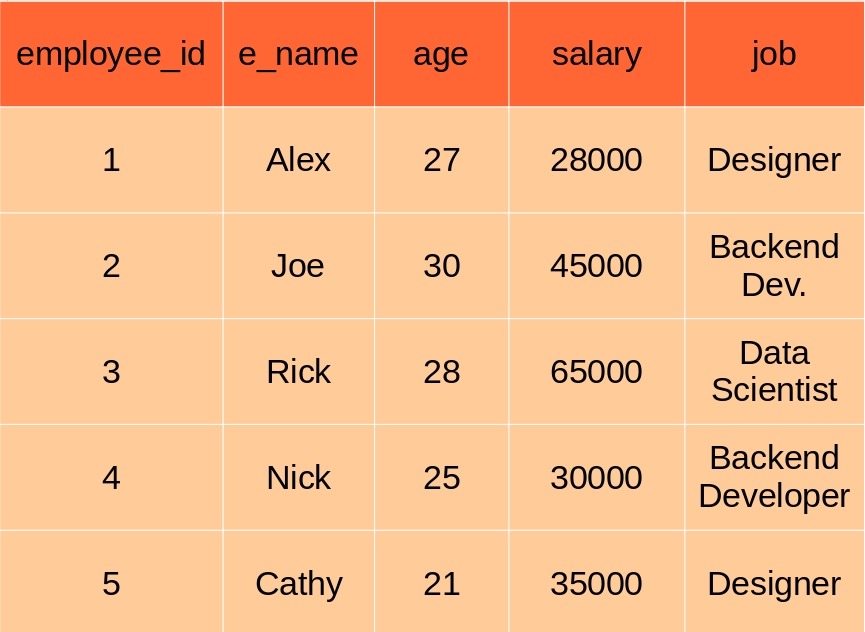
Data in databases is stored in tables that can be thought of, just like Excel spreadsheets. Each spreadsheet has rows and columns. Each row consists of data related to an entity (like a person, company, etc.) & each column consists of data concerning a specific aspect of the row (like name, account_id, age, etc.)
In the above table, each row contains information about a single employee & each column denotes specific feature information of the employee.
SQL Naming Convention
Note that SQL is not case-sensitive. It treats “table” the same as “TABLE”. But it is conventional to write SQL commands in all capitals, Database tables are named in lower letters and underscores are used instead of spaces.
Create Tables
The syntax for creating new tables in SQL is as below.
We use statement followed by the table name. Then we mention column names along with their datatype inside parentheses. Note that every SQL statement ends with a semicolon.
Some of the widely used data types in SQL are VARCHAR(string), BOOL (boolean), int(integer), FLOAT(floating numbers), DATETIME(DateTime), etc. You can refer to the documentation to learn more about data types.
Let’s create a new table, as shown in the image above.
Now let’s insert dummy values into the table we created above.
INSERT INTO employee VALUES (1,'Alex',27,28000,'Designer');
INSERT INTO employee VALUES (2,'Joe',30,45000,'Backend Dev');
INSERT INTO employee VALUES (3,'Rick',25,65000,'Data Scientist');
INSERT INTO employee VALUES (4,'Nick',21,30000,'Backend Dev');
INSERT INTO employee VALUES (5,'Cathy',21,35000,'Designer');
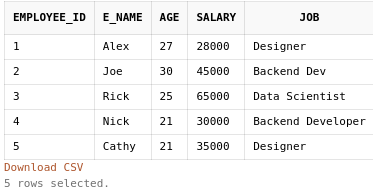
We can view our table data using the SELECT statement, which we will look at next. Mini Task: Add five employees more to the table (make sure the employee_id is unique).
SELECT & FROM
The statement is used to select data from a database. The statement lists out the database table we will be taking data from.
SELECT column_name_1,column_name_2, . . .
FROM table_name;
To select all columns in the database column, replace the column names with an asterisk (*).
We will now view all employee dataset columns using the below statement.
So right now, we can display the contents of the database table without filtering. But what if we want to show names of employees who have a salary of more than 50,000 PokeDollars (yes, you’ve read it right). Here are various statements like WHERE, LIKE, IN, etc.
We will focus on such statements now.
WHERE
WHERE statement filters out records based on the condition mentioned after the statement, the syntax is as below.
SELECT column1,column2, . . .
FROM table_name
WHERE condition;
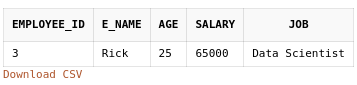
Code to filter out employees having salaries of more than 50,000 PokeDollars is as below.
Note that the WHERE statement is placed below FROM statement.
Inside the condition, we can use logical expressions (OR, AND & NOT) as well as comparison operators like >, <, =, = (in SQL, we use = instead of == for equality comparison), etc.
We can also use particular expressions like IN, BETWEEN, LIKE, etc.
AND, OR & NOT
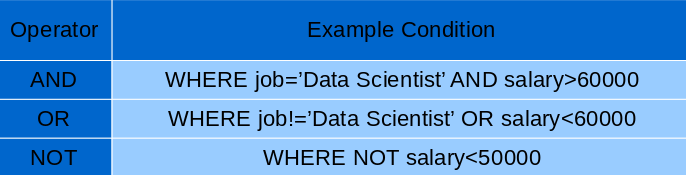
These three are some of the most commonly used logical operators. I believe these operators don’t need any explanation, so here’s a table containing example conditions.
Before explaining the LIKE operator, let’s say we want to filter out the Backend developers working in our company. You may use the WHERE statement and comparison operator as below.
SELECT *
FROM employee
WHERE job='Backend Developer';
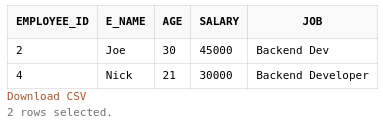
The problem with this kind of query is, as you can see in our database table, there is another backend developer (Nick) in our table who didn’t get filtered as his job title is ‘Backend Dev’. So to get through this problem, we will use the LIKE operator.
So we can find Backend Developers using the below query.
SELECT *
FROM employee
WHERE job LIKE '%Backend%';
% character represents zero, one, or multiple characters.
Mini Task: Find employees whose name starts with a vowel (Hint: You need to use multiple OR operators).
There’s a catch here, lower and upper case letters are not the same in a string. Searching for the word “Backend” will miss out on all instances with “backend” in the job title.
So to get rid of this flaw, we need to temporarily convert the string to Upper or Lowercase & then compare it.
For example, the modified query will be
SELECT *
FROM employee
WHERE UPPER(job) LIKE '%BACKEND%';
BETWEEN
We want to find all employees having salaries between 25,000 and 40,000 (inclusive). We can do it using AND and comparison operators as below.
SELECT *
FROM employee
WHERE salary>=25000 AND salary<=40000;
Another way of doing this is with the help of Operator. The BETWEEN operator is inclusive: begin and end values are included.
We can perform the above query using BETWEEN Operator.
SELECT *
FROM employee
WHERE salary BETWEEN 25000 AND 40000;
Mini Task: Filter out all employees having salaries between 30,000 and 40,000 ().
IN
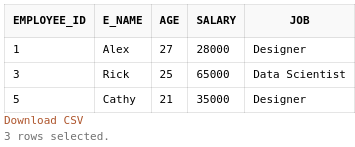
Here we explicitly define a list of values and return the records containing any of the values from the list. We want to select employees with employee_id either 1, 3, or 5.
SELECT *
FROM employee
WHERE employee_id IN (1,3,5);
This is similar to having multiple conditions linked together using an OR statement (WHERE employee_id=1 OR employee_id=3 . . .) Mini Task: Select all employee names with employee_id 2 and 5.
LIMIT/FETCH
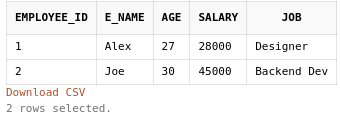
Okay, now enough of filtering out based on some conditions. What if we want to select only the top 3 employees of the table. We can quickly achieve this by using the keyword, and it is placed at the end of the query code. Just enter LIMIT and the count of records we want to show & we are done.
Remember we talked briefly about different versions of SQL and how there can be slight differences in the syntax. We need to use “FETCH FIRST number ROWS ONLY” instead of “LIMIT number” in Oracle SQL. Refer to SQL version documentation for more information.
As the name suggests, the statement sorts the result in Ascending or Descending order.
The column (or columns) by which the results should be sorted is added after the ORDER BY keyword.
It sorts the results in ascending order by default. To sort it by descending order, we need to add at the end of the ORDER BY statement.
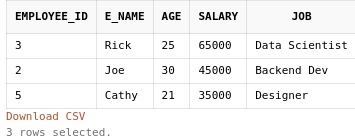
Let’s say we want to display the top 3 most-earning employees. The code will be as below.
SELECT *
FROM employee
ORDER BY salary DESC
FETCH FIRST 3 ROWS ONLY;
So that’s it for the basics. I’ll highly suggest you try solving SQL Basic Select coding questions on Hackerrank.
This is not the end, as SQL consists of more complex topics like Joins, Window functions, etc. Nevertheless, this is a step in the right direction.
Sources
I created all of the images shown in the article (author).
The media shown in this article is not owned by Analytics Vidhya and are used at the Author’s discretion.
I'm an Engineering student, Mobile Dev Head at GDSC RAIT and an avid Data Science Enthusiast. I love to document everything I learn and thus I'm a technical writer as well. Technical writing helps me question my in-depth knowledge about any topic.
Improving Real World RAG Systems: Key Challenges & Practical Solutions
Explore practical solutions, advanced retrieval strategies, and agentic RAG systems to improve context, relevance, and accuracy in AI-driven applications.
Good article. A couple of points need clarification. Case sensitivity is normally determined by the collation defined on the database. Collation will also determine other things like whether NULL values are at the top or bottom of the index.
Be careful using BETWEEN with datetime fields as not specifying the time element will normally default the time to midnight so it is NOT inclusive on the end date.
In T-SQL you limit records using SELECT TOP n. I believe you can also do this in PL/SQL but if you combine it with ORDER BY Oracle will get the top first, then order by whereas Microsoft will order by then get top; a very different result