|
VOOZH | about |
|
VOOZH | about |
This article was published as a part of the Data Science Blogathon.
Docker is everywhere in the world of the software industry today. Docker is a DevOps tool and is very popular in the DevOps and MLOPS world. Docker has stolen the hearts of many developers, system administrators, and engineers, among others.
We’ll start with what Docker brings you; why you should use it in the first place. The article is chopped into parts this is because I’m trying to explain as simply as I can in order to make it accessible for as many people as possible. So now let’s go!
When working on a team project we often have to see how each other code is running in our system, well I am sure you have ever said this statement or listened to this statement “This code is not running in my machine” or “I don’t know this is running in my computer but not running in your’s computer(another user)”. So these types of things can be fixed easily by docker.
Docker is a software platform that allows you to build, test, and deploy applications quickly. Docker packages software into standardized units called containers that have everything the software needs to run including libraries, system tools, code, and runtime. Using Docker, you can quickly deploy and scale applications into any environment and know your code will run.
Docker provides the ability to package and run an application in a loosely isolated environment called a container. The isolation and security allow you to run many containers simultaneously on a given host. Containers are lightweight and contain everything needed to run the application, so you do not need to rely on what is currently installed on the host. You can easily share containers while you work, and be sure that everyone you share with gets the same container that works in the same way.
2. Using Docker we can easily reproduce the working environment to train and run the model on different operating systems
3. We can easily deploy and make your model available to the clients using technologies such as OpenShift, a Kubernetes distribution.
4. Developers can keep track of different versions of a container image, check who built a version with what, and also roll back to previous versions.
5. Even if our Machine Learning application is down, repairing, or updating, it will not stop running.
6. Our machine learning model is usually written in a single programming language such as python but the application will certainly need to interact with other applications written in different programming languages. Docker manages all these interactions as each microservice can be written in a different language allowing scalability and the easy addition or deletion of independent services.
Let us understand how to deploy our Machine Learning model inside a Docker container. Here, I will take a simple Titanic dataset Machine Learning model to illustrate the workflow.
1. Create a separate directory for this task and copy your Machine learning code to that directory.
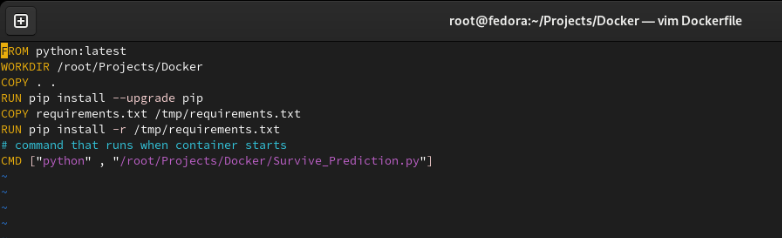
2. Create a Dockerfile.
It’s just a way to create your own customized Docker image. This file contains step-by-step requirements as per our use case. Simply Dockerfile is a script on a recipe for creating a Docker image. It contains some. special keywords such as FROM, RUN, CMD, etc.
Dockerfile is dynamic in nature. It means at any point in time if you want to change any stop, update or add anything, you can just add & build. That’s quick & time-saving.
Now let us understand the code inside Dockerfile
This is used for providing the name of the base image on which we’ll be adding our requirements. Here, I have used Python as a base image for the container.
command will copy the specified files from the local machine to the container that will be launched using this image.
it’s a build time keyword, & any program that goes with it will be executed during the building of the image.
It’s a runtime keyword. Any program one command goes with it will be executed when the container is launched.
: In Docker or Container world, we launch a specific container for a specific program or process only. So after it is Executed completely – we don’t need the environment Hence we can conclude the life of the process=Life of the container
Entrypoint and CMD, both can be used to specify the command to be executed when the container is started. The only difference is that ENTRYPOINT doesn’t allow you to override the command. Instead, anything added to the end of the docker RUN command is appended to the command.
3. Python Code
This python code will be run when as soon as our container start. Here I have used the joblib module in python through which we can save and load our trained models.
import joblib


classifier = joblib.load('survive_prediction.pkl')
print("Enter the following details to make the predictions:- n")


pclass = int(intput("Enter The Pclass:- "))
Age = int(intput("Enter The Age:- "))
SibSP = int(intput("Enter The SibSp:- "))
Parch = int(intput("Enter The Parch:- "))
Sex = int(intput("Enter The Sex:- "))

passenger_prediction = classifier.predict([[pclass,Age,SibSP,Parch,Sex]])

if passenger_prediction == 0:
print("Not Survived.")
else ;

print("Survived")
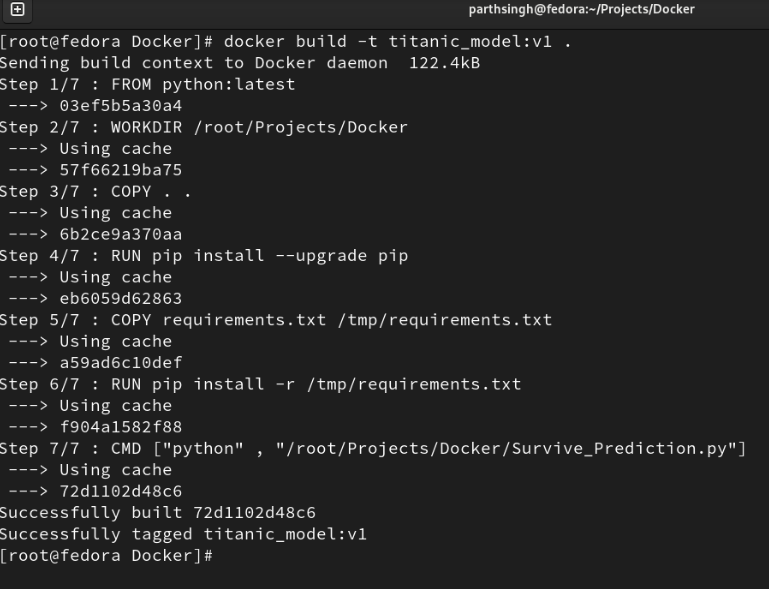
4. Now, we will going to build the image from the Dockerfile that we have created just above.
To build the image we use the following command.
docker build -t image_name:version .
5. Now Finally, we are ready to launch our container and run our machine learning model
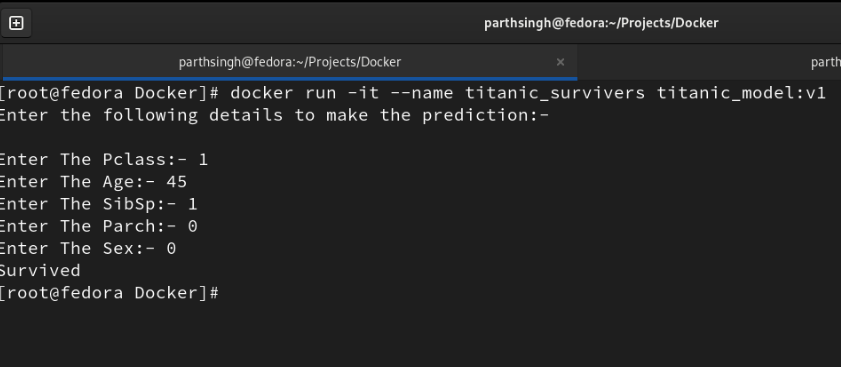
docker run -it –name titanic_survivers titanic_model:v1
-> When we run this command, a new environment is launched; a new OS entirely. So behind the scene, docker-engine does a lot of tasks such as providing network card, storage, complete new file system, RAM/CPU, etc. These are with respect to an OS.
->So if you want to see the entire details of the container you can use
docker info container_name
-> With this command, you can see the entire details of the container like, how much storage it is using, what’s the network card and many more.
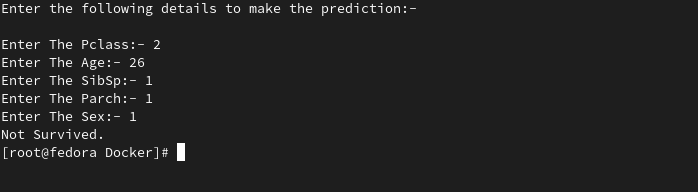
6. Using CLI(Command Line Input) we can give input to our python code. By command-line input means through the keyboard we can pass input to the container.
I hope now you have some understanding of how to deploy your model inside the docker/ containerize model in docker. Still, we’ve only scratched the surface when it comes to all of the benefits Docker has to offer.
The media shown in this article is not owned by Analytics Vidhya and is used at the Author’s discretion.
Hello, I’m Parth, an Associate Data Scientist with expertise in Computer Vision and Generative AI (GenAI). I’m passionate about exploring the latest advancements in AI and using technology to solve complex problems. My work involves projects that range from cutting-edge vision transformers to innovative generative models. When I'm not immersed in AI, you can find me at the gym or connecting with people who motivate me to keep pushing forward. I’m always looking to learn, grow, and make an impact in the tech world.
GPT-4 vs. Llama 3.1 – Which Model is Better?
Llama-3.1-Storm-8B: The 8B LLM Powerhouse Surpa...
A Comprehensive Guide to Building Agentic RAG S...
Top 10 Machine Learning Algorithms in 2026
45 Questions to Test a Data Scientist on Basics...
90+ Python Interview Questions and Answers (202...
8 Easy Ways to Access ChatGPT for Free
Prompt Engineering: Definition, Examples, Tips ...
What is LangChain?
What is Retrieval-Augmented Generation (RAG)?
Edit
Resend OTP
Resend OTP in 45s