|
VOOZH | about |
|
VOOZH | about |
This article was published as a part of the Data Science Blogathon.
Elasticsearch is primarily a document-based NoSQL database, meaning developers do not need any prior knowledge of SQL to use it. Still, it is much more than just a NoSQL database. Elasticsearch is a modern search and analytics engine based on Apache Lucene, which is distributed by nature and has been widely adopted by companies that handle humungous amounts of data. Elasticsearch’s focus on search capabilities differentiates it from other NoSQL databases like MongoDB or CouchDB. Also, since Elasticsearch is distributed in nature, it can easily handle big data without any hassle. Elasticsearch is usually used along with other technologies like Kibana and Logstash that make up the ELK stack.
In this article, we will learn how to run Elasticsearch on a docker container and perform basic CRUD operations and different types of search operations using the python programming language.
To run Elasticsearch locally, you could install it from their official website or run it on a docker container. Please note that java has to be installed to run Elasticsearch on your local machine without using Docker. I will be explaining the latter in detail.
The first step is to install Docker on your Windows machine. You can download Docker Desktop from here. The installation process is fairly simple and direct. Now that Docker is installed successfully let’s try running an Elasticsearch instance on a Docker container.
To run Elasticsearch in a container, we can download the Elasticsearch image manually from Docker Hub and then spin up a container using it. Still, the downside is that it might fail in most cases as Docker requires a minimum of 4GB of memory allocated to it. This can be accessed and configured in the Advanced tab in Settings. This might require proper configuration of your WSL2 on your machine, which might be a challenging task for most newbies.
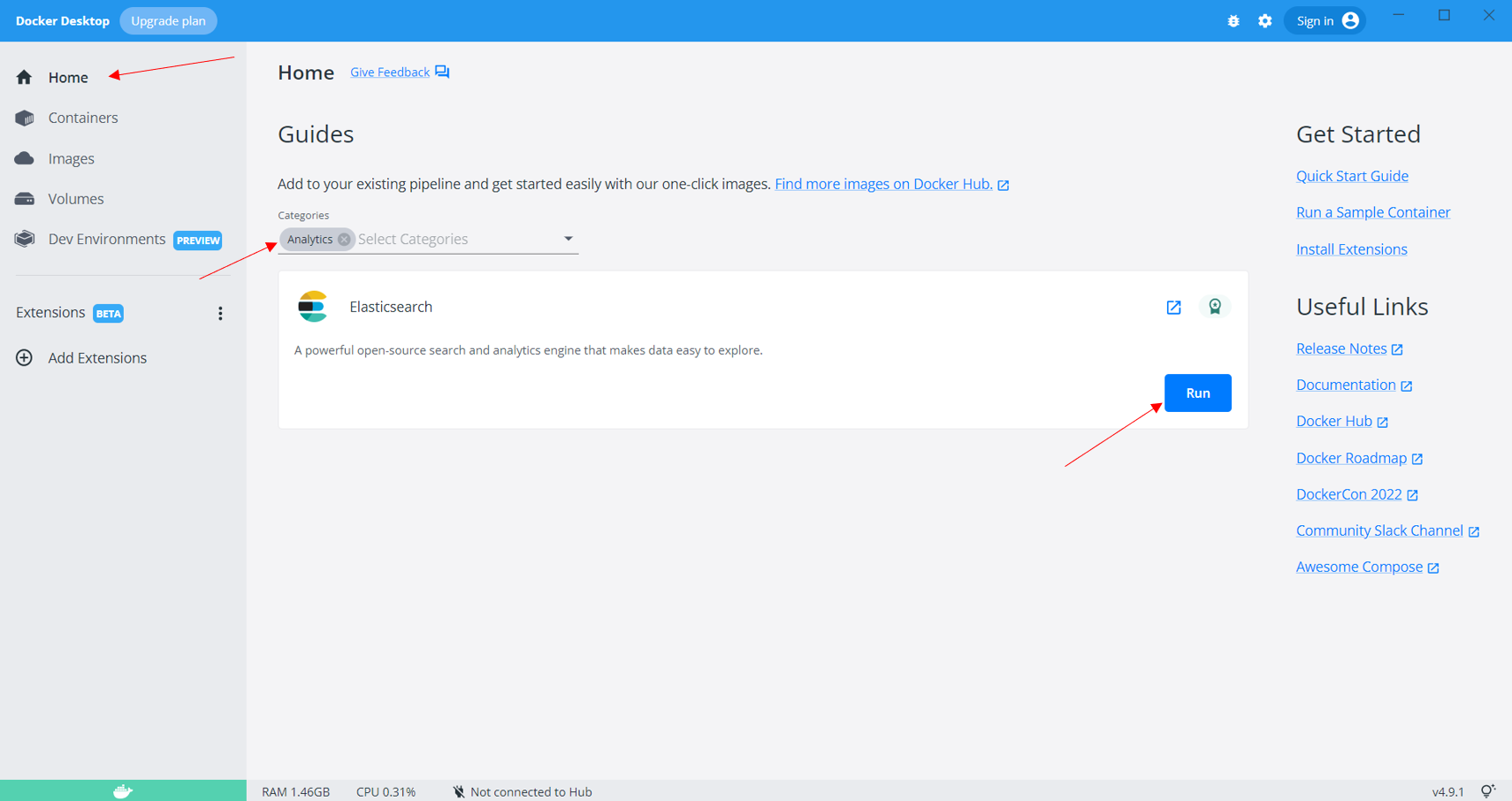
The other way to quickly spin up an Elasticsearch instance in just one click is to move to the Home tab on the Docker desktop application and search for “Analytics” in the search bar. It will show Elasticsearch as a result with a “Run” button. Click on the Run button to start the Elasticsearch instance.
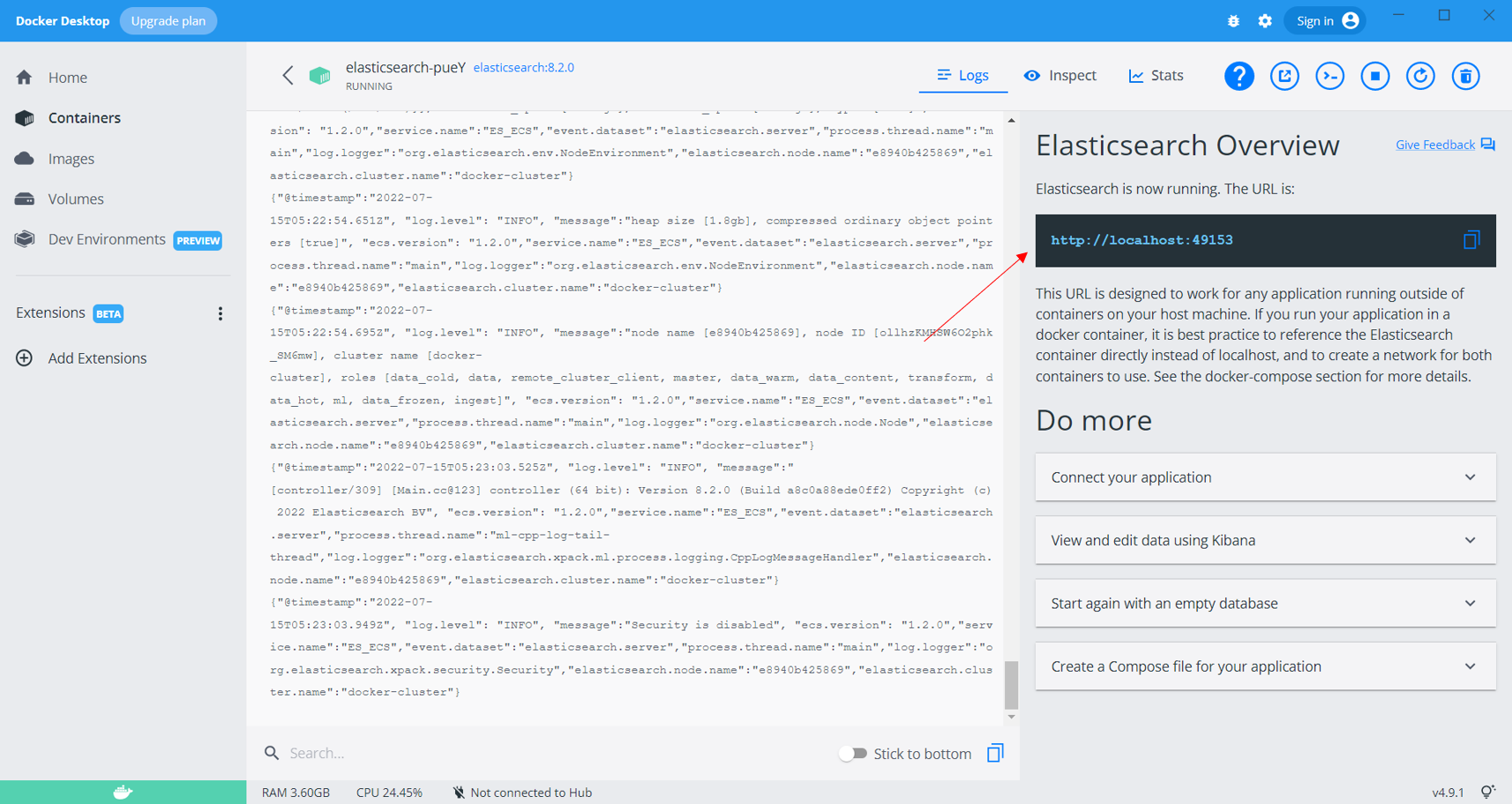
Sit back and relax, as this will take quite some time since the Elasticsearch image is pretty huge. You will get a prompt once the Elasticsearch instance is up and running. Once it is up and running, you can move to the Containers tab and click on the container that is running the Elasticsearch instance, which will provide you with the URL to access Elasticsearch over the internet.
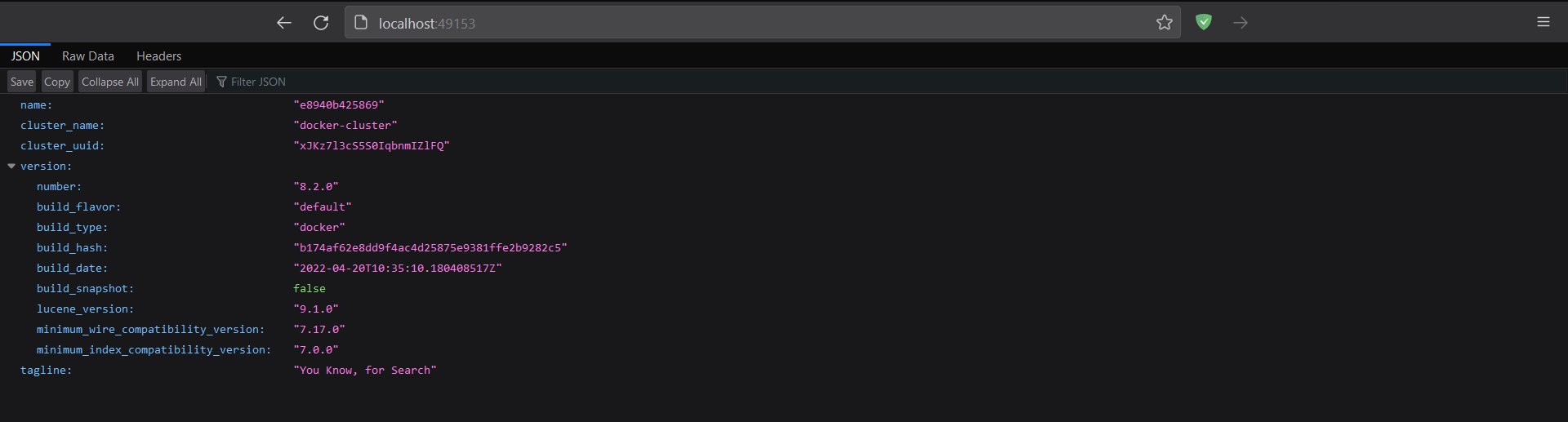
Copy and paste the URL into a new browser window, and the response will be as shown below. Now that the Elasticsearch instance is running let’s get our hands dirty and shift our focus to the programming part.
We will use the “elasticsearch” module that is freely available and can be installed like any other python module using pip. To install the Elasticsearch driver for python, run the following command.
$ pip install elasticsearch
Now that we have installed the Elasticsearch python module let’s try to connect to the Elasticsearch instance that is running on the docker container.
from elasticsearch import Elasticsearch
es = Elasticsearch(['http://localhost:49154']) # connecting to elasticsearch
es.ping()
True
We can see that the code returns true, signifying that we have successfully connected to the Elasticsearch instance. Now that we have connected to the ES instance let’s see how we can perform basic CRUD operations and a few simple search operations, as this is the main highlight of Elasticsearch to deliver Near-Real-Time (NRT) search results.
Let’s first understand the concept of the “Index” in Elasticsearch. As the name suggests, many might assume that this is the same as the indexing concept in other databases like MySQL, MongoDB, etc. The simple answer is NO. Index in Elasticsearch represents a database where you store all the data. So, do not confuse this with the indexing concept. Now that we have a basic understanding of what index is in ES, let’s try to insert a few documents into a database.
To insert a document, we can directly use the “index()” function that accepts the index name and the document data as parameters. Looping over each document in the list and calling the index function to insert huge amounts of data will be time-consuming. ES has the “bulk()” function for this scenario to write huge amounts of data to its database. You can refer to their document for more details. As far as this article is concerned, we will stick with the “index()” function only to keep things as simple as possible.
employees_data = [
 {
 'name': 'Vishnu',
 'age': 21,
 'programming_languages': ['C++', 'python', 'nodejs']
 },
 {
 'name': 'Sanjay',
 'age': 23,
 'programming_languages': ['python', 'C#']
 },
 {
 'name': 'Arjun',
 'age': 33,
 'programming_languages': ['C++', 'Ruby']
 },
 {
 'name': 'Ram',
 'age': 27,
 'programming_languages': ['Rust', 'python']
 }
]
for data in employees_data: es.index(index='employees', document=data)
Now that we have inserted a few documents let’s try to fetch them. Elasticsearch exposes APIs that can be alternatively used if you are not comfortable with programming. Let’s look at an example of using the APIs to fetch all the documents in the database.
Open a new tab in your browser and enter the URL given below. This URL might not work for you if your ES instance runs on a different port. So, please make sure you are using the correct port number to access the ES database.
URL: http://localhost:49153/employees/_search
Now let’s try to fetch a single document with its id using python. For this, we can use the “get()” function, which takes in two parameters: the index and the document id. We can extract the id from the above image for all the documents.
res = es.get(index="employees", id='snO1AYIBqhIpBwyVnPS_') # fetch doc
print(res['_source'])
{'name': 'Vishnu', 'age': 21, 'programming_languages': ['C++', 'python', 'nodejs']}
Now that we have seen how documents can be fetched from the database let’s understand how to update the documents. We use the “update()” function to update a document, which takes in the index, document id, and updated data as parameters. Let us see this in action now.
es.update(index="employees", id='snO1AYIBqhIpBwyVnPS_', doc={'country': 'India'},) # update doc
res = es.get(index="employees", id='snO1AYIBqhIpBwyVnPS_') # fetch doc
print(res['_source'])
{'name': 'Vishnu', 'age': 21, 'programming_languages': ['C++', 'python', 'nodejs'], 'country': 'India'}
We can see that the document has been updated as it has a new key-value pair, which is the country parameter.
Now, let us look at how we can delete a document in the database. For this, we can use the “delete()” function, which takes in the index and the document id as the parameters.
res = es.delete(index="employees", id='snO1AYIBqhIpBwyVnPS_')
print(res)
ObjectApiResponse({'_index': 'employees', '_id': 'snO1AYIBqhIpBwyVnPS_', '_version': 3, 'result': 'deleted', '_shards': {'total': 2, 'successful': 1, 'failed': 0}, '_seq_no': 5, '_primary_term': 1})
Now that we have performed all the basic CRUD operations let’s look at a couple of search operations in Elasticsearch.
Let’s assume we want to search for documents with “Ram” as the name. Now, we want this to be an exact search and not something like a fuzzy search. For both of these scenarios, we make use of the “search()” function but it is just that we use the “match” keyword for an exact full-string match while the “fuzzy” keyword for performing a simple fuzzy search. Let’s first look at full-string matching.
es.search(index="employees", query={"match": {'name':'Ram'}}) # full-string search
ObjectApiResponse({'took': 10, 'timed_out': False, '_shards': {'total': 1, 'successful': 1, 'skipped': 0, 'failed': 0}, 'hits': {'total': {'value': 1, 'relation': 'eq'}, 'max_score': 1.3862942, 'hits': [{'_index': 'employees', '_id': 'tXO1AYIBqhIpBwyVnfQ3', '_score': 1.3862942, '_source': {'name': 'Ram', 'age': 27, 'programming_languages': ['Rust', 'python']}}]}})
Now, let’s look at how we can perform a simple fuzzy search. For this, we will try to fetch all the documents where python is present in the programming_langauges key.
es.search(index="employees", query={"fuzzy": {'programming_languages':'python'}}) # fuzzy search
ObjectApiResponse({'took': 11, 'timed_out': False, '_shards': {'total': 1, 'successful': 1, 'skipped': 0, 'failed': 0}, 'hits': {'total': {'value': 2, 'relation': 'eq'}, 'max_score': 0.308732, 'hits': [{'_index': 'employees', '_id': 's3O1AYIBqhIpBwyVnfQe', '_score': 0.308732, '_source': {'name': 'Sanjay', 'age': 23, 'programming_languages': ['python', 'C#']}}, {'_index': 'employees', '_id': 'tXO1AYIBqhIpBwyVnfQ3', '_score': 0.308732, '_source': {'name': 'Ram', 'age': 27, 'programming_languages': ['Rust', 'python']}}]}})
Now let’s see how we can use regular expressions for searching. For this also, we can use the same “search()” function but need to add the regexp keyword. Let us see this in action. Let’s try to fetch all the names that contain the letter “n.”
es.search(index="employees", query={"regexp": {'name':'.*n.*'}}) # regular expression search
ObjectApiResponse({'took': 47, 'timed_out': False, '_shards': {'total': 1, 'successful': 1, 'skipped': 0, 'failed': 0}, 'hits': {'total': {'value': 2, 'relation': 'eq'}, 'max_score': 1.0, 'hits': [{'_index': 'employees', '_id': 's3O1AYIBqhIpBwyVnfQe', '_score': 1.0, '_source': {'name': 'Sanjay', 'age': 23, 'programming_languages': ['python', 'C#']}}, {'_index': 'employees', '_id': 'tHO1AYIBqhIpBwyVnfQt', '_score': 1.0, '_source': {'name': 'Arjun', 'age': 33, 'programming_languages': ['C++', 'Ruby']}}]}})
A few key takeaways are:
Elasticsearch is the most popular near real-time (NRT) search engine used by major companies like Uber, Udemy, Amazon, and Shopify to speed up searching operations on their websites and applications. Many companies are now shifting to the ELK stack as it integrates all the tools for performing analytics at scale with ease. Now that I have covered Elasticsearch (E) in this article, I will also try to cover Logstash (L) and Kibana (K) in another article so that we understand the ELK stack in detail.
That’s it for this article. I hope you enjoyed reading this article and learned something new. Thanks for reading, and happy learning!
The media shown in this article is not owned by Analytics Vidhya and is used at the Author’s discretion.
I love exploring ML, DL, Machine Vision, Databases, and Full-stack Web Development. I've worked on multiple projects with different stacks and I also hold a patent in the domain of machine vision for manufacturing.
GPT-4 vs. Llama 3.1 – Which Model is Better?
Llama-3.1-Storm-8B: The 8B LLM Powerhouse Surpa...
A Comprehensive Guide to Building Agentic RAG S...
Top 10 Machine Learning Algorithms in 2026
45 Questions to Test a Data Scientist on Basics...
90+ Python Interview Questions and Answers (202...
8 Easy Ways to Access ChatGPT for Free
Prompt Engineering: Definition, Examples, Tips ...
What is LangChain?
What is Retrieval-Augmented Generation (RAG)?
Edit
Resend OTP
Resend OTP in 45s