Zookeeper in Hadoop can be considered a centralized repository where distributed applications can put data into and retrieve data from. It makes a distributed system work together as a whole using its synchronization, serialization, and coordination goals. For clarity, Zookeeper can be thought of as a file system where we have nodes that store data instead of files or directories that store data. Zookeeper is a Hadoop Admin tool used to manage jobs in a cluster.
The formal definition of Apache Zookeeper says that it is a distributed, open-source configuration, synchronization service along with a name registry for distributed applications. Apache Zookeeper is used to manage and coordinate a large cluster of machines. For example, Apache Storm, which Twitter uses to store machine state data, has Apache Zookeeper as a coordinator between machines.
Why do we need a Zookeeper in Hadoop?
Distributed applications are difficult to coordinate and work with because they are much more prone to errors due to the large number of machines connected to the network. Because many machines are involved, race conditions and deadlocks are common problems when implementing distributed applications. A race condition occurs when a machine tries to perform two or more operations at once, and this can be resolved with ZooKeeper’s serialization feature.
A deadlock occurs when two or more computers attempt to access the same shared resource simultaneously. More precisely, they try to access each other’s resources, which leads to a deadlock because neither system releases the resource but waits for the other system to release it. Synchronization in Zookeeper helps resolve deadlocks. Another major problem with a distributed application is partial process failure, leading to data inconsistency. Zookeeper handles this with atomicity, meaning either the entire process terminates, or nothing is left after failure. So Zookeeper is an important part of Hadoop that takes care of these small but important matters so that the developer can focus more on the application’s functionality.
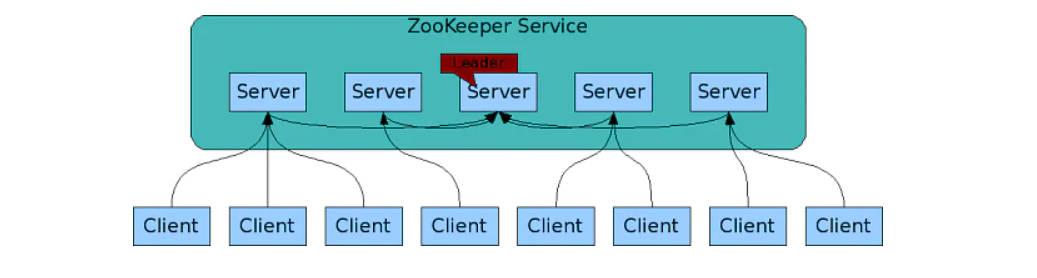
👁 ZooKeeper service Source: – https://data-flair.training/blogs/zookeeper-architecture/
How does Zookeeper Architecture work in Hadoop?
Hadoop Zookeeper Architecture is a distributed application that follows a simple client-server model, where clients are the nodes that consume the service and servers are the nodes that provide the service. Multiple server nodes are collectively called a ZooKeeper file. A zookeeper client uses at least one server at a given time.
The master node is dynamically selected based on consensus within the ensemble, so the Zookeeper file is usually an odd number, so that’s where the majority of votes are. If the master node fails, another master node is instantly selected and takes over from the previous master node.
In addition to masters and slaves, there are also observers in Zookeeper. Observers were invited to address the scaling issue. The addition of slaves affected writing performance because the voting process was expensive. Observers are, therefore, slaves who do not participate in voting but have similar duties to other slaves.
Writes in Zookeeper Architecture
All writes to Zookeeper Architecture go through the master node, so all writes are guaranteed to be sequential. When performing a write operation to Zookeeper, each server connected to this client stores data along with the master server. This keeps all servers updated with the data. However, this also means that concurrent writes cannot be performed. The linear write guarantee can be problematic if Zookeeper is used for the main write load.
Zookeeper in Hadoop is ideally used to coordinate message exchange between clients, which involves fewer writes and more reads. Zookeeper is useful until the data is shared, but if the application has concurrent data writes, Zookeeper can get in the way and impose a strict order of operations.
Reads in ZookeeperArchitecture
Zookeeper is best at reading because reading can be concurrent. Concurrent reads are performed because each client is connected to a different server, and all clients can read from the servers simultaneously. However, concurrent reads result in ultimate consistency because the master server is not involved. There may be cases where the client may have an outdated view that updates with a small delay.
How to use Apache ZooKeeper to build distributed applications?
Zookeeper Architecture does all the above details, and the user does not need to do anything. A commander is chosen, observers are set, and the stage is set for users to use Zookeeper.
Compared to earlier users, Zookeeper can be used as a file system where directories can be created and data stored. Like any other file system, the directories created above can also have children and grandchildren. This file system is stored centrally and can be accessed from anywhere.
An example of Apache Zookeeper might be a data model. Each directory in our example is called a znode in Zookeeper. Stores statistical data such as version details and user data up to 1 Mb in size. This small information storage space clearly shows that Zookeeper is not used to store data like a database but instead to store small amounts of data such as configuration data that must be shared.
There are 2 types of snobs:
Persistent: This is the default node type in every Zookeeper. Persistent nodes are always present and contain important configuration details. When a new node is added to Zookeeper, it goes to the permanent node and gets configuration information.
Transient: These are session nodes that are created when the application starts and are deleted when the application ends. This is mainly useful for checking client applications in case of failure. When the app crashes, znode dies.
Installing Apache ZooKeeper
Steps to download and install Zookeeper 3.4.6 with configuration for 3 Zookeeper nodes:
Download and install the JDK from http://www.oracle.com/technetwork/java/javase/downloads/index.html or http://www.guru99.com/install-java.html – if not already installed. The Apache ZooKeeper server runs on the JVM, an important prerequisite.
Go to http://zookeeper.apache.org/ and download Zookeeper from the release page.
Select download from mirrors and select the first mirror.
Go to the stable folder and download zookeeper-3.4.6.tar.gz
Unzip the tarball with tar –zxvf zookeeper-3.4.6.tar.gz
Create the directory with mkdir/usr/local/zookeeper/data. You can create this directory as root and change the owner to any user you need.
Create a zookeeper configuration file using sudo vi / usr/local/zookeeper/conf/zoo.cfg and insert the following code:
Create a file named myid in the data folder using sudo vi/usr/local/zookeeper/data/myid and write “1” without quotes in this file and save it.
Do steps 1 to 7 for the other 2 servers, but change the myid data to 2 for servers 2 and 3 for server 3.
Use the zkServer.sh start command to start Zookeeper on all servers
To confirm that Zookeeper has started, type jps and check QuorumPeerMain.
Use the command zkCli.sh -server Slave1:2181 to start the client
Using Zookeeper
The below-listed points explain how to use Zookeeper-
• Store configuration data and settings in a centralized repository for access from anywhere.
• Message queue for asynchronous communication, for example, a user clicks a button to place an order on a website, and it takes some time to generate that order, so instead of the user having to wait, the order can be placed in a message queue, and the user can continue shopping.
Zookeeper Architecture Hadoop can be run as a watchdog, and other nodes can be notified of data changes in one node through notifications.
Conclusion
Zookeeper Architecture goes through the master node, so all writes are guaranteed to be sequential. When performing a write operation to Zookeeper, each server connected to this client stores data along with the master server. This keeps all servers updated with the data. However, this also means that concurrent writes cannot be performed.
Apache Zookeeper might be a data model. Each directory in our example is called a znode in Zookeeper. Stores statistical data such as version details and user data up to 1 Mb in size.
If the master node fails, another master node is instantly selected and takes over from the previous master node. In addition to masters and slaves, there are also observers in Zookeeper.
Multiple server nodes are collectively called a ZooKeeper file. A Zookeeper Architecture client uses at least one server at a given time.
The media shown in this article is not owned by Analytics Vidhya and is used at the Author’s discretion.
I am an Accountant at Global private Analytics Services working with the Data Analysis Team for handling the budget of various Growing Companies. We provide service of analytics and made the work of new tech companies easy by helping them manage their total investment and giving suggestions.
Improving Real World RAG Systems: Key Challenges & Practical Solutions
Explore practical solutions, advanced retrieval strategies, and agentic RAG systems to improve context, relevance, and accuracy in AI-driven applications.

.png)