VOOZH about

URL: https://www.analyticsvidhya.com/blog/2024/06/cosine-similarity-in-python/

⇱ How to Calculate Cosine Similarity in Python?


India's Most Futuristic AI Conference Is Back – Bigger, Sharper, Bolder

  • d
  • :
  • h
  • :
  • m
  • :
  • s

Reading list

How to Calculate Cosine Similarity in Python?

Badrinarayan M Last Updated : 20 Jun, 2024
4 min read

Introduction

This article will discuss cosine similarity, a tool for comparing two non-zero vectors. Its effectiveness at determining the orientation of vectors, regardless of their size, leads to its extensive use in domains such as text analysis, data mining, and information retrieval. This article explores the mathematics of cosine similarity and shows how to use it in Python.

Overview: 

  • Learn how cosine similarity measures the angle between two vectors to compare their orientation effectively.
  • Discover the applications of cosine similarity in text analysis, data mining, and recommendation systems.
  • Understand the mathematical foundation of cosine similarity and its practical implementation using Python.
  • Gain insights into implementing cosine similarity with NumPy and scikit-learn libraries in Python.
  • Explore how cosine similarity is used in real-world scenarios, including document comparison and recommendation systems.

What is Cosine Similarity?

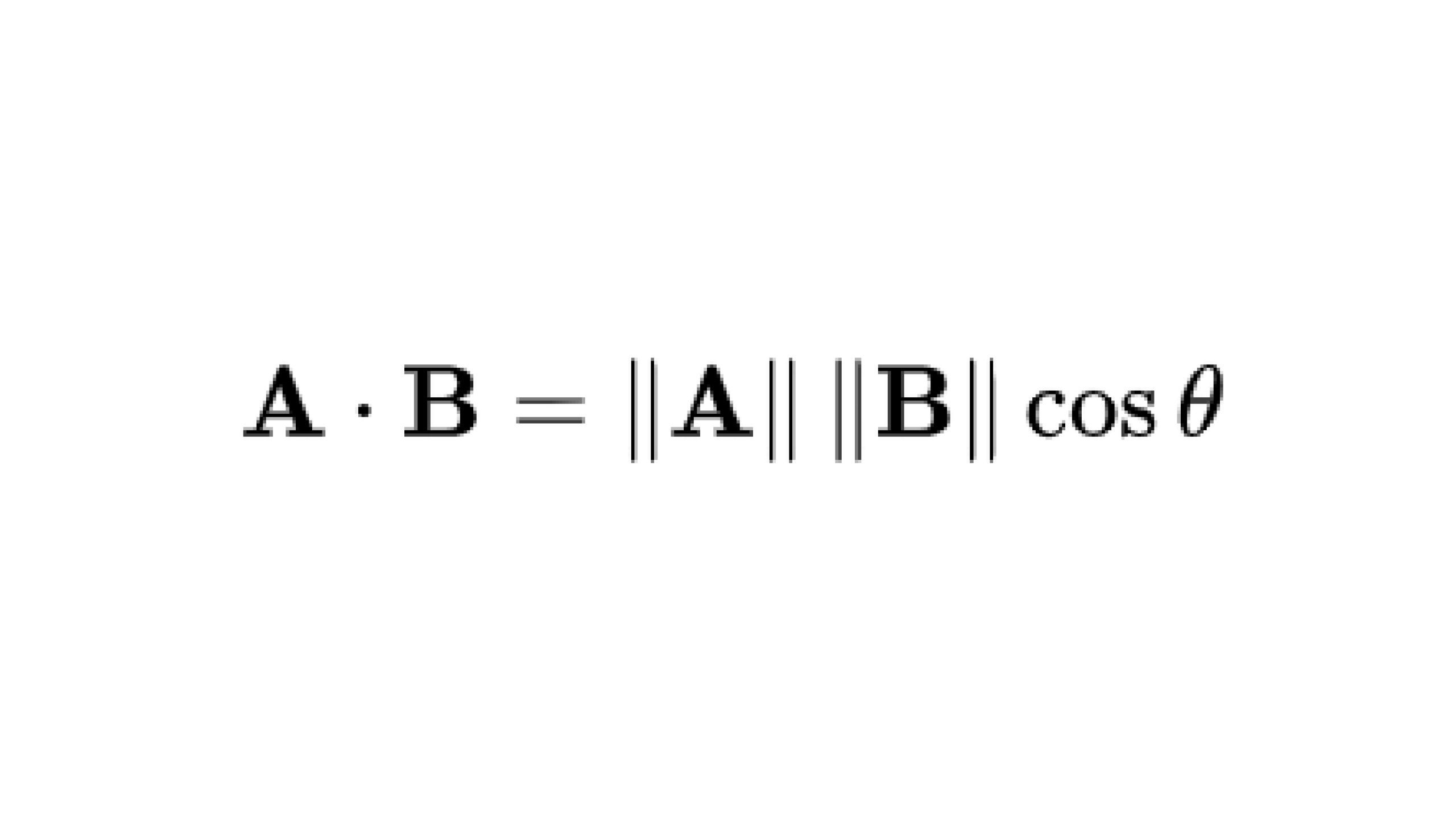
Cosine similarity measures the cosine of the angle between two vectors in a multi-dimensional space. The cosine of two non-zero vectors can be derived by using the Euclidean dot product formula:

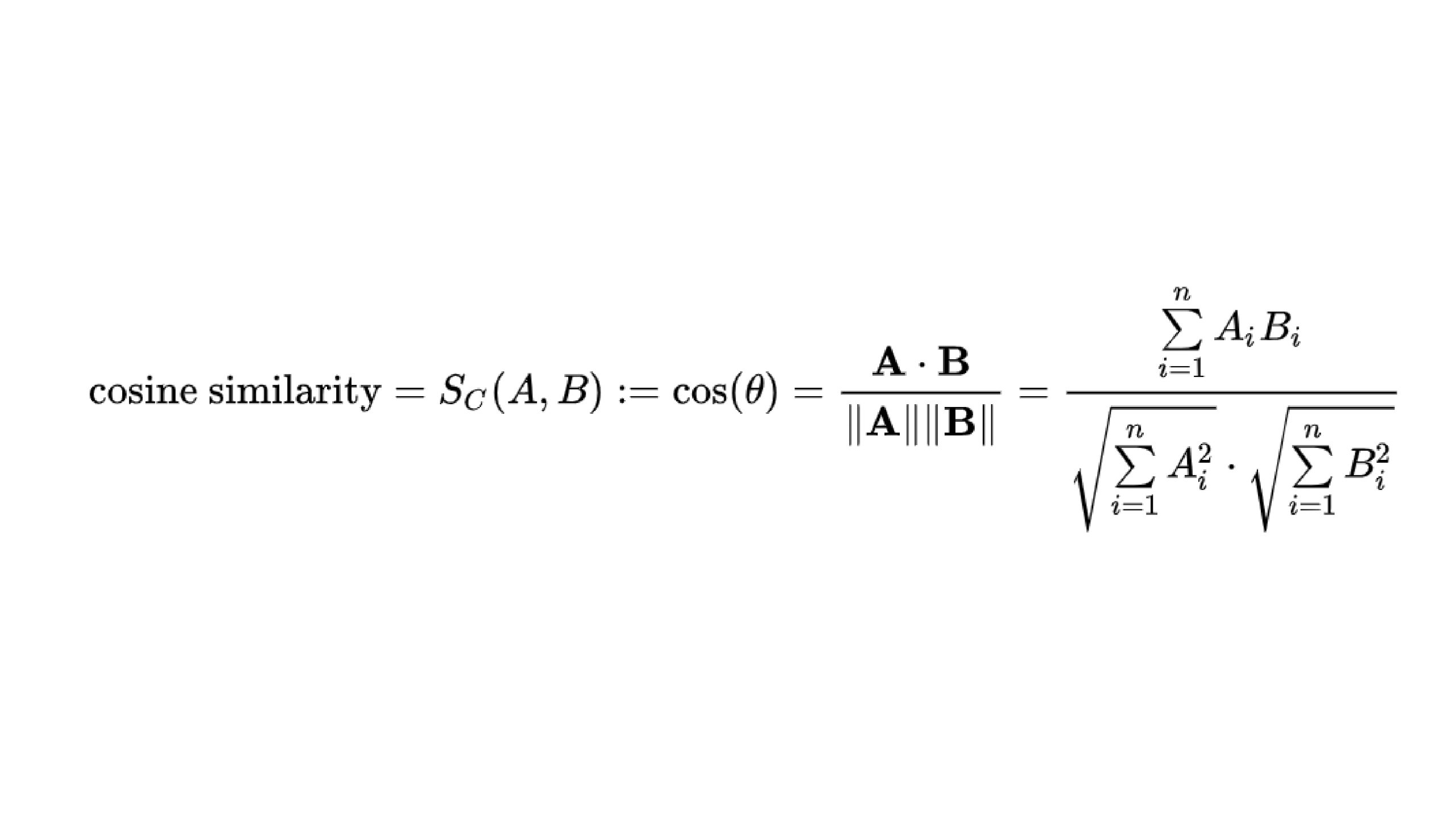
Given two n-dimensional vectors of attributes, A and B, the cosine similarity, cos(ΞΈ), is represented using a dot product and magnitude as

πŸ‘ Cosine Similarity: Measuring Vector Similarity with Python

The cosine similarity ranges from -1 to 1, where:

  • 1 indicates that the vectors are identical,
  • 0 indicates that the vectors are orthogonal (no similarity),
  • -1 indicates that the vectors are diametrically opposed.

Applications in Data Science

  • Text similarity: In NLP, we use cosine similarity to understand document similarities. We transform texts in those documents into TF-IDF vectors and then use cosine similarity to find their similarities.
  • Recommendation Systems: Let’s say we have a music recommendation system. Here, we calculate the similarity between users, and based on the score, we suggest songs or music to other users. Generally, recommendation systems use cosine similarity in collaborative filtering or other filtering techniques to suggest items for our users.

Implementation of Cosine Similarity

Let us now learn how to implement cosine similarity using different libraries:

Implementation Using Numpy Library

# Using numpy
import numpy as np

# Define two vectors
A = np.array([1, 2, 3])
B = np.array([4, 5, 6])

# Compute cosine similarity
cos_sim = np.dot(A, B) / (np.linalg.norm(A) * np.linalg.norm(B))
print("Cosine Similarity (NumPy):", cos_sim)
πŸ‘ Image

Here, we are creating two arrays, A and B, which will act as the vectors we need to compare. We use the cosine similarity formula, i.e., the dot product of A and B upon mod of A X mod B.

Implementation Using Scikit-learn Library

from sklearn.metrics.pairwise import cosine_similarity

# Define two vectors
A = [[1, 2, 3]]
B = [[4, 5, 6]]

# Compute cosine similarity
cos_sim = cosine_similarity(A, B)
print("Cosine Similarity (scikit-learn):", cos_sim[0][0])
πŸ‘ Image

Here, we can see that the inbuilt function in the sklearn library does our job of finding the cosine similarity.

Step-By-Step Mathematics Behind the Numpy Code

  1. Defining Vector

    The first step behind the numpy code in defining vectors. πŸ‘ Image

  2. Calculate the dot product

    Compute the dot product of the two vectors A and B. The dot product is obtained by multiplying corresponding elements of the vectors and summing up the results.πŸ‘ Image

  3. Calculate the Magnitude of each Vector

    Determine the magnitude (or norm) of each vector A and B. This involves calculating the square root of the sum of the squares of its elements.πŸ‘ Image

  4. Calculate the Cosine similarity

    The final step is to calculate the values. πŸ‘ Image

Conclusion

Cosine similarity is a powerful tool for finding the similarity between vectors, particularly useful in high-dimensional and sparse datasets. In this article, we have also seen the implementation of cosine similarity using Python, which is very straightforward. We have used Python’s NumPy and scikit-learn libraries to implement cosine similarity. Cosine similarity is important in NLP, text analysis, and recommendation systems because it is independent of the magnitude of the vector.

Frequently Asked Questions

Q1. What is Cosine Similarity?

A. Cosine similarity measures the cosine of the angle between two non-zero vectors in a multi-dimensional space, indicating how similar the vectors are.

Q2. How is Cosine Similarity used in text analysis?

A. In text analysis, we compare documents using cosine similarity by transforming texts into TF-IDF vectors and calculating their similarity.

Q3. How can you implement Cosine Similarity in Python?

A. You can implement cosine similarity in Python using the NumPy or scikit-learn libraries, which provide straightforward calculation methods.

Data science Trainee at Analytics Vidhya, specializing in ML, DL and Gen AI. Dedicated to sharing insights through articles on these subjects. Eager to learn and contribute to the field's advancements. Passionate about leveraging data to solve complex problems and drive innovation.

Login to continue reading and enjoy expert-curated content.

Free Courses

Generative AI - A Way of Life

Explore Generative AI for beginners: create text and images, use top AI tools, learn practical skills, and ethics.

Getting Started with Large Language Models

Master Large Language Models (LLMs) with this course, offering clear guidance in NLP and model training made simple.

Building LLM Applications using Prompt Engineering

This free course guides you on building LLM apps, mastering prompt engineering, and developing chatbots with enterprise data.

Improving Real World RAG Systems: Key Challenges & Practical Solutions

Explore practical solutions, advanced retrieval strategies, and agentic RAG systems to improve context, relevance, and accuracy in AI-driven applications.

Microsoft Excel: Formulas & Functions

Master MS Excel for data analysis with key formulas, functions, and LookUp tools in this comprehensive course.

Responses From Readers

Flagship Programs

GenAI Pinnacle Program| GenAI Pinnacle Plus Program| AI/ML BlackBelt Program| Agentic AI Pioneer Program

Free Courses

Generative AI| DeepSeek| OpenAI Agent SDK| LLM Applications using Prompt Engineering| DeepSeek from Scratch| Stability.AI| SSM & MAMBA| RAG Systems using LlamaIndex| Building LLMs for Code| Python| Microsoft Excel| Machine Learning| Deep Learning| Mastering Multimodal RAG| Introduction to Transformer Model| Bagging & Boosting| Loan Prediction| Time Series Forecasting| Tableau| Business Analytics| Vibe Coding in Windsurf| Model Deployment using FastAPI| Building Data Analyst AI Agent| Getting started with OpenAI o3-mini| Introduction to Transformers and Attention Mechanisms

Popular Categories

AI Agents| Generative AI| Prompt Engineering| Generative AI Application| News| Technical Guides| AI Tools| Interview Preparation| Research Papers| Success Stories| Quiz| Use Cases| Listicles

Generative AI Tools and Techniques

GANs| VAEs| Transformers| StyleGAN| Pix2Pix| Autoencoders| GPT| BERT| Word2Vec| LSTM| Attention Mechanisms| Diffusion Models| LLMs| SLMs| Encoder Decoder Models| Prompt Engineering| LangChain| LlamaIndex| RAG| Fine-tuning| LangChain AI Agent| Multimodal Models| RNNs| DCGAN| ProGAN| Text-to-Image Models| DDPM| Document Question Answering| Imagen| T5 (Text-to-Text Transfer Transformer)| Seq2seq Models| WaveNet| Attention Is All You Need (Transformer Architecture) | WindSurf| Cursor

Popular GenAI Models

Llama 4| Llama 3.1| GPT 4.5| GPT 4.1| GPT 4o| o3-mini| Sora| DeepSeek R1| DeepSeek V3| Janus Pro| Veo 2| Gemini 2.5 Pro| Gemini 2.0| Gemma 3| Claude Sonnet 3.7| Claude 3.5 Sonnet| Phi 4| Phi 3.5| Mistral Small 3.1| Mistral NeMo| Mistral-7b| Bedrock| Vertex AI| Qwen QwQ 32B| Qwen 2| Qwen 2.5 VL| Qwen Chat| Grok 3

AI Development Frameworks

n8n| LangChain| Agent SDK| A2A by Google| SmolAgents| LangGraph| CrewAI| Agno| LangFlow| AutoGen| LlamaIndex| Swarm| AutoGPT

Data Science Tools and Techniques

Python| R| SQL| Jupyter Notebooks| TensorFlow| Scikit-learn| PyTorch| Tableau| Apache Spark| Matplotlib| Seaborn| Pandas| Hadoop| Docker| Git| Keras| Apache Kafka| AWS| NLP| Random Forest| Computer Vision| Data Visualization| Data Exploration| Big Data| Common Machine Learning Algorithms| Machine Learning| Google Data Science Agent
πŸ‘ Av Logo White

Continue your learning for FREE

Forgot your password?
πŸ‘ Av Logo White

Enter OTP sent to

Edit

Wrong OTP.

Enter the OTP

Resend OTP

Resend OTP in 45s

πŸ‘ Popup Banner
πŸ‘ AI Popup Banner