|
VOOZH | about |
|
VOOZH | about |
In my previous article, we discussed “How to use QVDs to make your QlikView application more efficient?”. In this article, we will go one step ahead to make our application more efficient while dealing with large transactional data. As discussed in my previous article I was working on a QlikView application, where I had to show the sales across various channels for pre-defined frequencies (e.g. Daily, Monthly, Yearly).
Initially, I was reloading the entire transactions table on a daily basis even though I already had the data till yesterday with me. This not only took significant time, but also increased the load on the database server and the network.This is where incremental load with QVDs made a huge difference by loading only new or updated data from the database into a table.
Incremental loads:
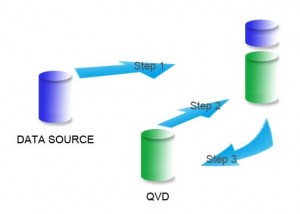
Incremental load is defined as the activity of loading only new or updated records from the database into an established QVD. Incremental loads are useful because they run very efficiently when compared to full loads, particularly so for large data sets.
👁 Incremental Load, QlikView, QVD, Optimize Qlikview
Incremental load can be implemented in different ways, the common methods are as follows:
Let us understand each of these 3 scenarios with an example
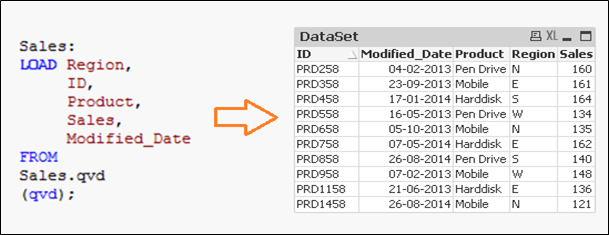
Let us say, we have sales raw data (in Excel) and whenever a new sales get registered, it is updated with basic details about the sale by modified date. Since, we are working on QVDs, we already have QVD created till yesterday (25-Aug-14 in this case). Now, I want to load only the incremental records (Highlighted in yellow below).
To perform this exercise, first create a QVD for data till 25-Aug-14. To identify new incremental records, we need to know the date till which, QVD is already updated. This can be identified by checking the maximum of Modified_date in available QVD file.
As mentioned before, I have assumed that “Sales. qvd” is updated with data till 25-Aug-14. In order to identify the last modified date of “Sales. qvd”, following code can help:
Here, I have loaded the last updated QVD into the memory and then identifed the last modified date by storing maximum of “Modified_Date”. Next we store this date in a variable “Last_Updated_Date” and drop the table “Sales”. In above code, I have used Peek() function to store maximum of modified date. Here is it’s syntax:
Peek( FieldName, Row Number, TableName)
This function returns the contents of given field for a specified row from the internal table. FieldName and TableName must be given as a string and Row must be an integer. 0 denotes the first record, 1 the second and so on. Negative numbers indicate order from the end of the table. -1 denotes the last record.
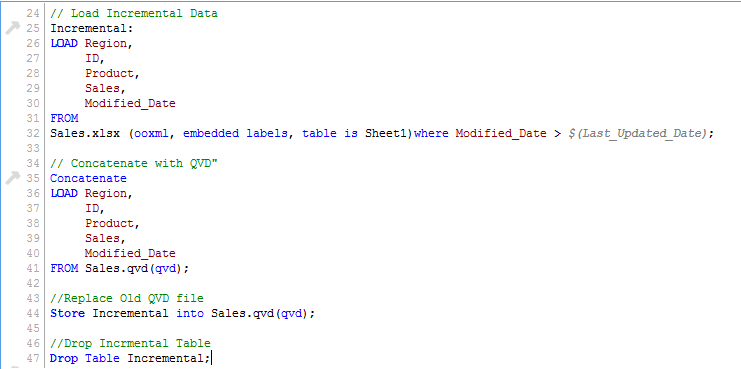
Since we know the date after which the records will be considered as new records, we can Load incremental records of the data set (Where clause in Load statement) and merge them with available QVD (Look at the snapshot below).
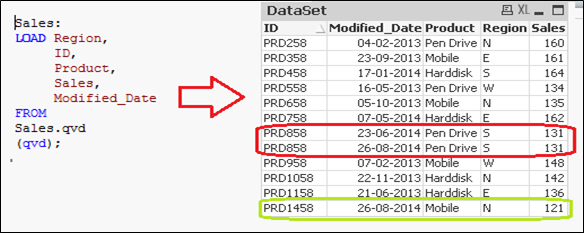
Now, load updated QVD (Sales), it would have incremental records.
As you can see, two records of 26-Aug-14 were added. However, we have inserted a duplicate record also. Now we can say that, an INSERT only method does not validate for duplicate records because we have not accessed the available records.
Also, in this method we can not update value of existing records.
To summarize, following are the steps to load only the incremental records to QVD using INSERT only method:
1) Identify New Records and Load it
2) Concatenate this data with QVD file
3) Replace old QVD file with new concatenated table
As seen in previous example, we are not able to perform check for duplicate records and update existing record. This is where, Insert and Update method comes to help:
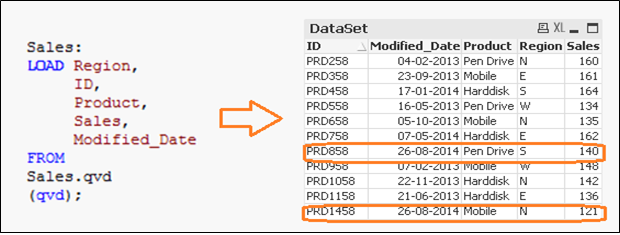
In the data set above (Right table), we have one record (ID = PRD1458) to add and another one (ID = PRD858) to update (value of sales from 131 to 140). Now, to update and check for duplicate records, we need a primary key in our data set.
Let’s assume that ID is the primary key and based on modification date and ID, we should be able to identify & classify the new or modified records.
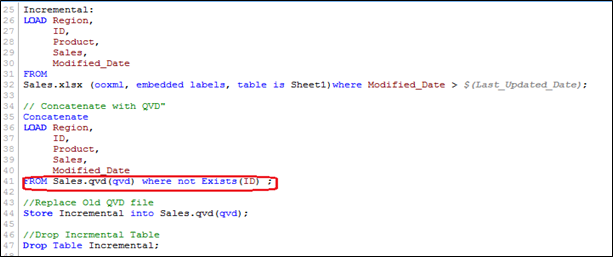
In order to execute this method, follow similar steps to identify the new records as we have done in INSERT only method and while concatenating incremental data with existing one, we apply the check for duplicated records or update the value of existing records.
Here, we have loaded only those records where Primary Key(ID) is new and use of Exists() function stops the QVD from loading the outdated records since the UPDATED version is currently in memory so values of existing records gets updated automatically.
Now, we have all unique records available in QVD with an updated sales value for ID(PRD858).
The Script for this method is very similar to the INSERT & UPDATE, however here we have an additional step needed to remove deleted records.
We will load primary keys of all records from current data set and apply an inner join with concatenated data set (Old+Incremental). Inner join will retain only common records and therefore delete unwanted records. Let’s assume that we want to delete a record of (ID PRD1058) in the previous example.
Here, we have a data set with the addition of one record (ID PRD1458), modification of one record (ID PRD158) and deletion of one record (ID PRD1058).
👁 Incremental Load, QlikView, QVD
In this article, we have discussed how incremental loads are better and provide an efficient way to load data as compared to FULL load. As a good practice, you should have regular backup of data because it may get impacted or a data loss can occur, if there are issues with database server and network.
Depending on your industry and need of the application, you can select, which method works for you. Most of the common applications in BFSI industry are based on Insert & Update. Deletion of records is normally not used.
Have you dealt with similar situation or have another hack to improve efficiency of Qlikview applications under your hat? If so, I’d love to hear your thoughts through comments below as it also benefit someone else trying to handle similar situation.
Sunil Ray is Chief Content Officer at Analytics Vidhya, India's largest Analytics community. I am deeply passionate about understanding and explaining concepts from first principles. In my current role, I am responsible for creating top notch content for Analytics Vidhya including its courses, conferences, blogs and Competitions.
I thrive in fast paced environment and love building and scaling products which unleash huge value for customers using data and technology. Over the last 6 years, I have built the content team and created multiple data products at Analytics Vidhya.
Prior to Analytics Vidhya, I have 7+ years of experience working with several insurance companies like Max Life, Max Bupa, Birla Sun Life & Aviva Life Insurance in different data roles.
Industry exposure: Insurance, and EdTech
Major capabilities: Content Development, Product Management, Analytics, Growth Strategy.
GPT-4 vs. Llama 3.1 – Which Model is Better?
Llama-3.1-Storm-8B: The 8B LLM Powerhouse Surpa...
A Comprehensive Guide to Building Agentic RAG S...
Top 10 Machine Learning Algorithms in 2026
45 Questions to Test a Data Scientist on Basics...
90+ Python Interview Questions and Answers (202...
8 Easy Ways to Access ChatGPT for Free
Prompt Engineering: Definition, Examples, Tips ...
What is LangChain?
What is Retrieval-Augmented Generation (RAG)?
Thanks Sunil, very useful.
Hi, i tried the incremental load but i have a problem because qlikview skips the dates, i.e. it should load 17-18-19 April but it skips 18 April. Date format is 17/04/2015 00..00.00 My script is the following: table1: LOAD ESITO, SERVICE_ID, ERROR_CODE, MONTH, WEEK, DAY, HOUR FROM [C:\Users\qvd\table1.qvd] (qvd); LastUpdate: load Max (DAY) as MaxDate /*Max DAY=17Apr*/ Resident table1; let LastUpdate = peek('MaxDate', 0,'LastUpdate'); ODBC CONNECT TO Report; SQL SELECT * FROM Report.dbo.Table WHERE DAY >=$(LastUpdate); New data are about 18-19Apr, so i expected 17-18-19 in the new file qvd, but Qlikview skips 18 April. What's the problem? Thank you
Edit
Resend OTP
Resend OTP in 45s