|
VOOZH | about |
|
VOOZH | about |
This article was published as a part of the Data Science Blogathon
“DATA IS LIKE SUNSHINE WE KEEP USING IT AND IT KEEP REGENERATING” – Ruth Porat
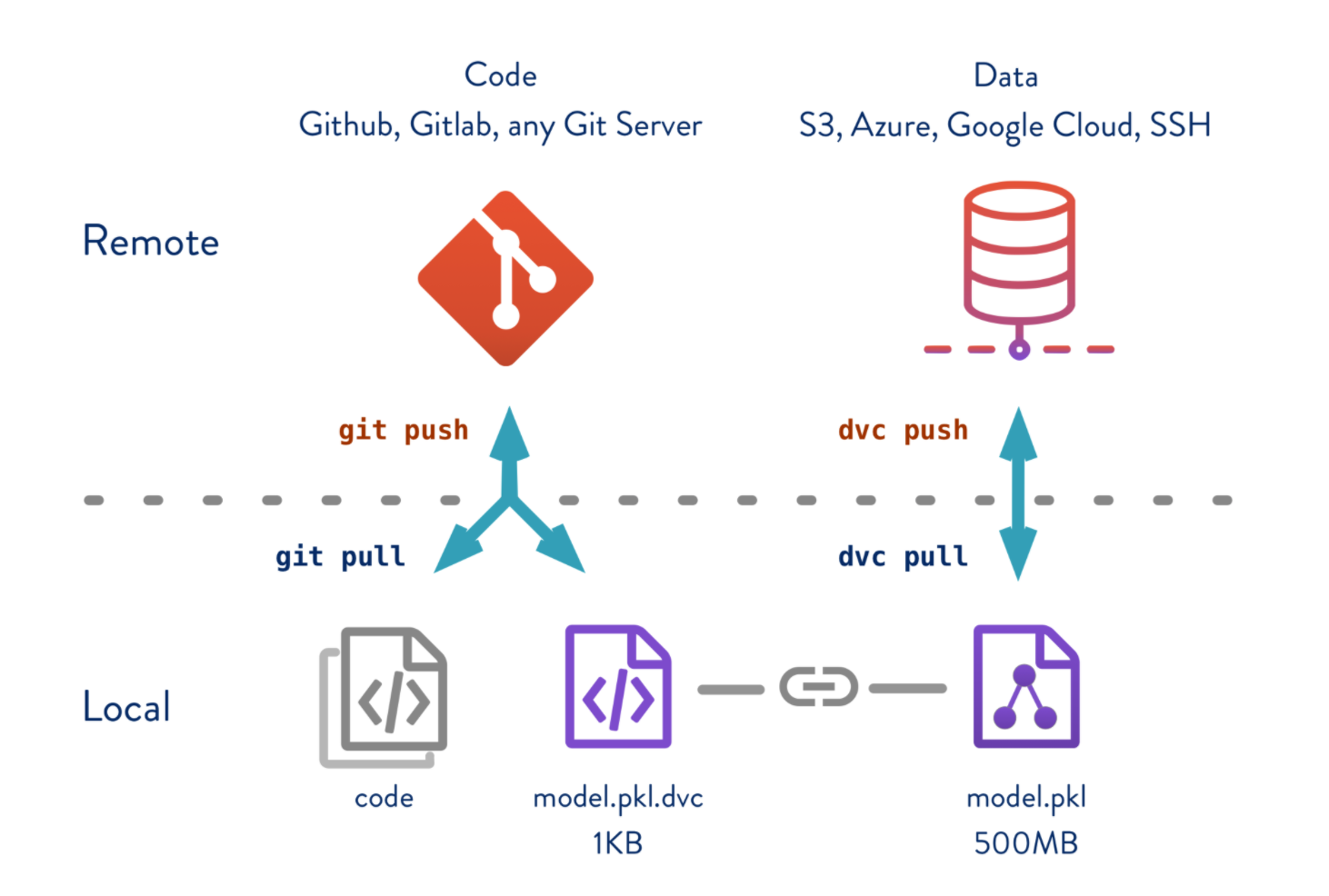
Github uses an application known as Git to apply version control to your code. All the files for a project are stored in a central remote location known as a repository. Its simplistic UI and ease of using commands make it the best fit for versioning the files. But, the data science projects also deal with data files along with code files, and certainly, it is not advisable to maintain let’s say a 50 GB data file and multiple versions on Github. So, is there a way or a workaround to version our data files and keep track of it? Yes, and we achieve this with DVC(Data Version Control).
In this blog, we will explore the below feature:
We will be using Kaggle’s South Africa Heart Disease dataset. Our objective is to predict chd i.e., coronary heart disease (yes=1 or no=0). A simple binary classification model. To start with, our project folder structure is as below. As we process the files in the later sections, each of these folders/files will be updated.
Please refer to the blog – MLOps | Tracking ML Experiments With Data Version Control to set up the project.
DVC setup: If you don’t have DVC Install then install as below. For more information refer install DVC
pip install dvc
To start with, our project folder structure is as below. You can also clone the repository from Github
| .dvcignore
| .gitignore
| cm.csv
| dvc.lock
| dvc.yaml
| exp.txt
| params.yaml
| plots.html
| README.md
| requirements.txt
+---data
| +---processed
| | test_SAHeart.csv
| | train_SAHeart.csv
| ---raw
| SAHeart.csv
+---data_given
| SAHeart.csv
+---report
+---saved_models
| model.joblib
---src
 | get_data.py
 | load_data.py
 | split_data.py
 | train_and_evaluate.py
Data & Model Versioning:
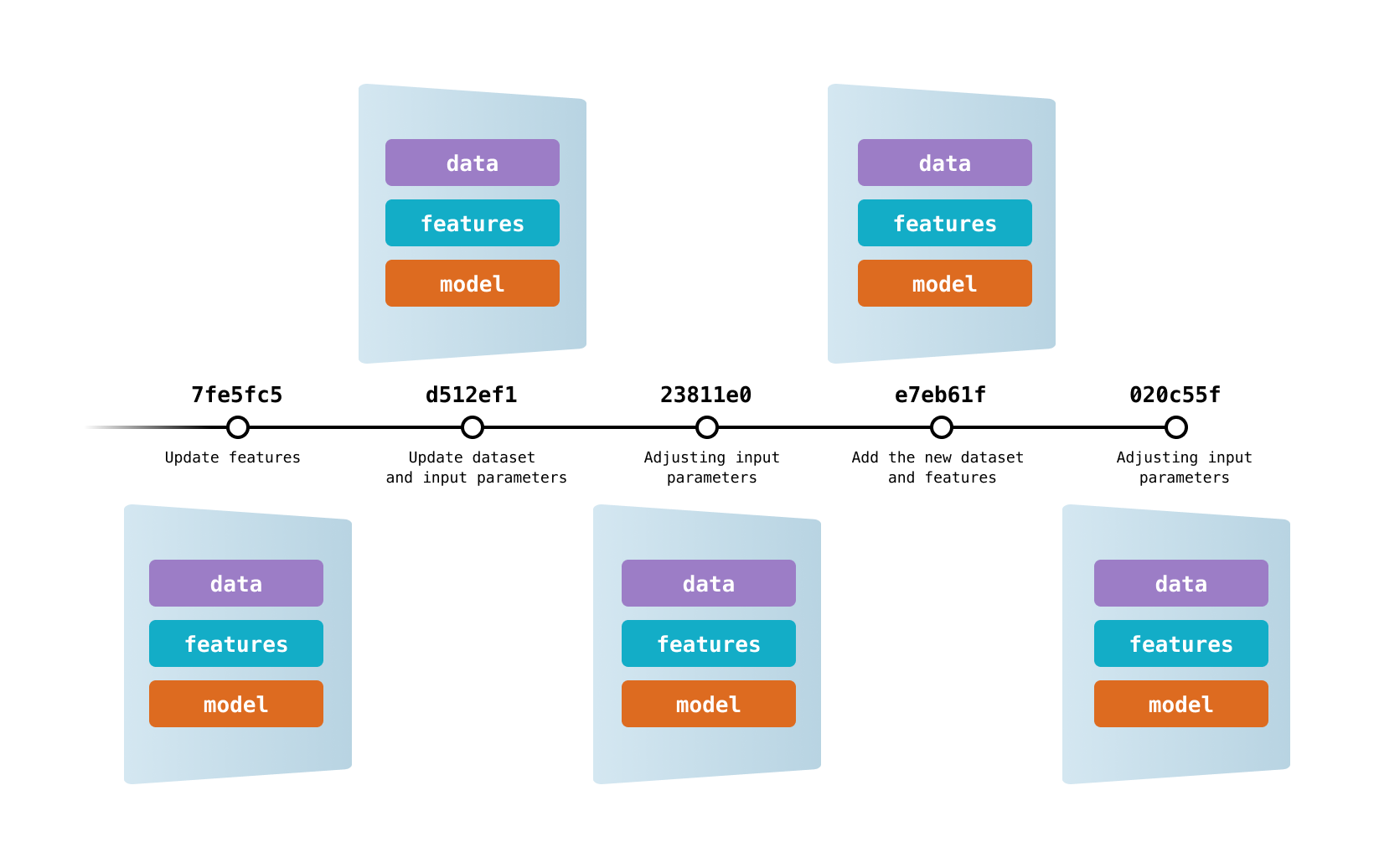
DVC lets capture the versions of your data and models in Git commits, while storing them on-premises or in cloud storage. It also provides a mechanism to switch between these different data contents.
DVC tracks the versions of the data & models
Lets us start with the process:
Step 1: Initiate git and DVC. This would create two folders by name .git and .dvc in your working directory.
Step 2: Add git remote and map the local directory to Github repo.
git remote add origin <your git repo URL>
Step 3: We will add dataset data_given/SAHeart.csv for dvc to track changes. This would generate a file SAHeart.csv.dvc. Please note that the CSV file is of size 615 KB.
dvc add data_given/SAHeart.csv
Step 4: We have let GitHub know that we are tracking our data file with DVC and here is the dvc file. We do this by add the dvc file to git and commit it. Please note that we are adding .dvc file and not .csv.
git add data_given/SAHeart.csv.dvc
git commit -m "Dataset file size 615 KB"
Step 5: We will create a remote repository for storing the dataset and let dvc know the source of the dataset. This can be on Azure, AWS or google drive, etc. In our case, we will keep it on our local machine and map it to dvc.
dvc remote add -d myremote data_given
Step 6: Once the mapping of remote is completed. We can push the dataset to the remote folder.
dvc push
Step 7: let’s check for the git branch before proceeding further
git log --oneline
Step 8: Let’s run the DVC pipeline to check if everything works as expected or not. If we execute the DVC pipeline then the corresponding 615 KB dataset file will be used for model building.
dvc repro
Let’s follow the above steps and create one more branch but this time we will use a data_given/SAHeart.csv is of files size 20 MB. I generated synthetic data to add more records to the previous file. If we execute the DVC pipeline then the corresponding 20 MB dataset file will be used for model building.
Here are the two branches that we have each mapped to different dataset files.
Key points to note:
Is it possible to run a DVC pipeline with code from one branch and dataset from other?
Yes, certainly possible. As the model building is an iterative process, there may be scenarios where a givenbranch has some new features in it and we want to check if those new features have any impact on my current model’s performance in another branch. So instead of replicating the dataset and reproducing the new features, we could switch branches and leverage the existing data versions.
Step 1: Now, let’s do a DVC checkout from 278fcfb which points to a 20 MB dataset file.
git checkout 278fcfb data_given/SAHeart.csv.dvc
Step 2: It’s time for DVC checkout which will update the workspace with the data.
dvc checkout
Step 3: Executing the DVC pipeline.
dvc repro
Key points to note:
We have learnt versioning of data but is it possible to create versions of ML experiments with DVC and keep track it?
Data science and ML are iterative processes that require a large number of attempts to reach a certain level of a metric. Experimentation is part of the development of data features, hyperspace exploration, deep learning optimization, etc. DVC helps you codify and manage all of your experiments.
We will experiment with various parameters params.yaml file eg: test_size, solver, etc and run the experiment
dvc exp run
Once successfully executed, let’s look at the results with the below command.
dvc exp show --no-pager
You can connect with me – Linkedin
You can find the code for reference – Github
https://dvc.org/
https://unsplash.com/
I am a Data Science enthusiast with experience in building predictive models, data processing, and data mining algorithms to solve challenging business problems. Involved in open source community and passionate about building data apps.
GPT-4 vs. Llama 3.1 – Which Model is Better?
Llama-3.1-Storm-8B: The 8B LLM Powerhouse Surpa...
A Comprehensive Guide to Building Agentic RAG S...
Top 10 Machine Learning Algorithms in 2026
45 Questions to Test a Data Scientist on Basics...
90+ Python Interview Questions and Answers (202...
8 Easy Ways to Access ChatGPT for Free
Prompt Engineering: Definition, Examples, Tips ...
What is LangChain?
What is Retrieval-Augmented Generation (RAG)?
Edit
Resend OTP
Resend OTP in 45s