VOOZH about

URL: https://www.geeksforgeeks.org/nextjs/create-contact-cards-component-using-next-js-and-tailwind-css/

⇱ Create Contact Cards Component Using Next.js and Tailwind CSS - GeeksforGeeks


  • Courses
  • Tutorials
  • Interview Prep

Create Contact Cards Component Using Next.js and Tailwind CSS

Last Updated : 5 Aug, 2025

The contact card component can display user information, such as a profile picture, contact details, and links to social media profiles. We will use Tailwind CSS for styling to ensure the card is visually appealing and responsive.

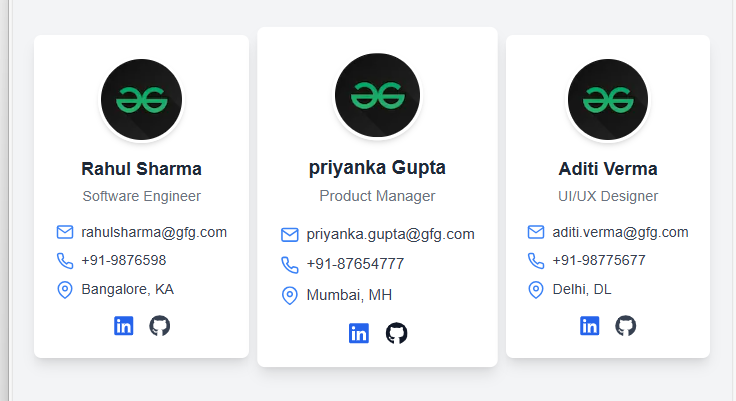
Output Preview: Let us have a look at how the final output will look like.

👁 ss
Project Preview

Prerequisites

Approach To Create Contact Cards Component:

  • Create a functional component named ContactCard that will be responsible for rendering individual contact cards.
  • Utilize Tailwind CSS classes to style the cards for a modern and responsive design. Styles such as setting dimensions for the cards, adding shadows and implementing hover effects.
  • We will use icons from React Icons to represent email, phone and location for better visual appeal.
  • Store contact details in an array of objects. Each object will represent adetails of each contact.
  • Use the .map() method to loop through the array and render a ContactCard for each contact.

Steps to create the Project and Install required modules

Step 1: Create the NextJs App using the following command.

npx create-next-app@latest contact-card
cd contact-card
√ Would you like to use TypeScript? ... No / Yes
√ Would you like to use ESLint? ... No / Yes
√ Would you like to use Tailwind CSS? ... No / Yes
√ Would you like to use `src/` directory? ... No / Yes
√ Would you like to use App Router? (recommended) ... No / Yes
√ Would you like to customize the default import alias (@/*)? ... No / Yes

Step 2:Install the React-icons

npm i react-icons

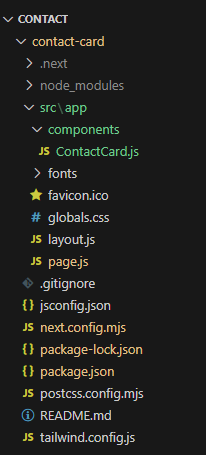
Project Structure

👁 file
Project Structure

Updated dependencies

 "dependencies": {
"next": "14.2.14",
"react": "^18",
"react-dom": "^18",
"react-icons": "^5.3.0"
},
"devDependencies": {
"postcss": "^8",
"tailwindcss": "^3.4.1"
}


Example: In this example we will write the following code in different files(The name of the files is mentioned in the first line of each code block).


Run your app by executing below command.

npm run dev

Output

👁 a2
Create Contact Cards Component Using Next.js
Comment
Article Tags:

Explore