|
VOOZH | about |
|
VOOZH | about |
In this article, we are going to see how we can link one page to another in Next.js. Follow the below steps to set up the linking between pages in the Next.js application:
To create a new NextJs App run the below command in your terminal:
npx create-next-app GFGAfter creating your project folder (i.e. GFG ), move to it by using the following command:
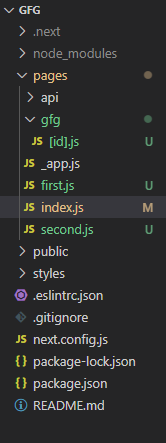
cd GFGProject Structure: It will look like this.
Creating Pages: First, we are going to create two different pages in our Next.js project. For this, create two new JavaScript files named 'first' and 'second' inside the pages folder.
Filename: first.js
Filename: second.js
Linking the Pages: Now to link the pages, we are going to use the 'Link' component from 'next/link'. We can add <a> tag inside our Link component. We can add the below line in our script to import this component.
import Link from 'next/link'To link the 'first' and 'second' page with the Homepage we are going to add the below lines in our index.js file in the pages folder.
Filename: index.js
Filename: first.js Now we are also going to add the 'Link' component in our 'first' and 'second' pages.
Filename: second.js
Step to run the application: Now run the application with the below command:
npm startOutput: