|
VOOZH | about |
|
VOOZH | about |
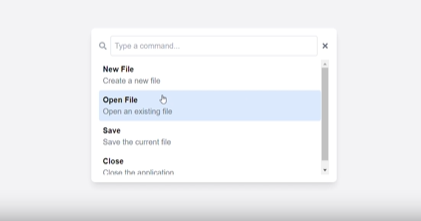
A command palette is a user interface element that allows users to easily access and execute commands or functions in an application. we will build a command palette UI using Next.js as the framework Tailwind CSS for styling and React Icons for adding interactive icons.
A command palette is essentially a search bar that allows users to type in commands and quickly see a list of matching actions that can be executed. This functionality makes it easier for both novice and power users to interact with software and improves usability and overall efficiency.
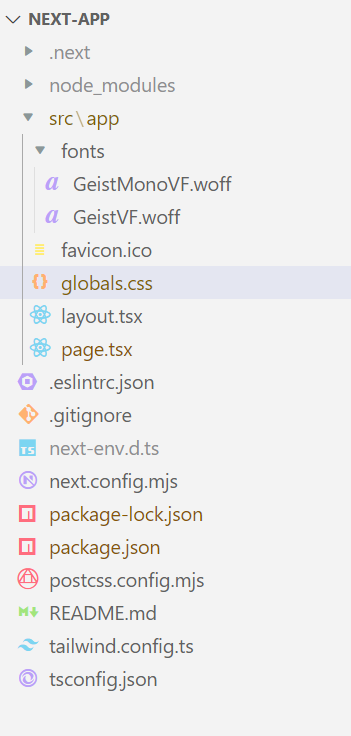
Here we will create a sample Next JS project then we will install Tailwind CSS once it is completed we will start development for Command Palettes UI using Next js and Tailwind CSS. Below are the steps to create and configure the project.
First, create a sample Next JS application by using the mentioned command then navigate to the project folder.
npm create next-app
cd next-app
 "dependencies": {
 "next": "14.2.8",
 "react": "^18",
 "react-dom": "^18",
 "react-icons": "^5.3.0"
 },
Once Project is created successfully Now install and configure the Tailwind css by using below commands in your project.
npm install -D tailwindcss postcss autoprefixer
npx tailwindcss init -p
Once Tailwind css installation and configuration is completed. Now we need to develop user interface for Command Palettes UI using tailwind CSS and for making it responsive.
Example: This demonstrates the creation of Command Palettes UI using Next js and Tailwind CSS:
Once Development is completed Now we need run the next js application by using below command. By default the next js application run on port number 3000.
npm run devOutput: Once Project is successfully running then open the below URL to test the output.
http://localhost:3000/By following this article you have successfully created a command palette UI using Next.js and Tailwind CSS and React Icons. This approach can be further customized with more functionalities like key binding to trigger commands and filtering commands or adding animation. The flexibility of Tailwind CSS and the simplicity of React Icons make it easy to scale and modify the component for other purposes in your projects.