|
VOOZH | about |
|
VOOZH | about |
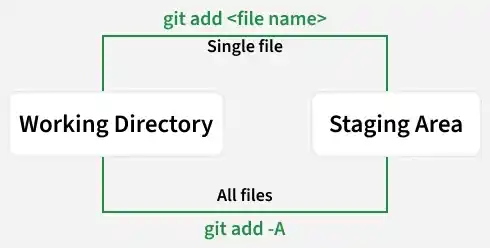
git add is used to move changes from the working directory to the staging area. Different options like -A, -u, and . control how and what changes are staged.
git add is used to move changes from the working directory to the staging area, preparing selected files and updates for the next commit.
git add <file name>Example:
git add readme.mdgit add -A stages all changes in the repository, including new, modified, and deleted files, regardless of the current directory.
git add -A
git add --all
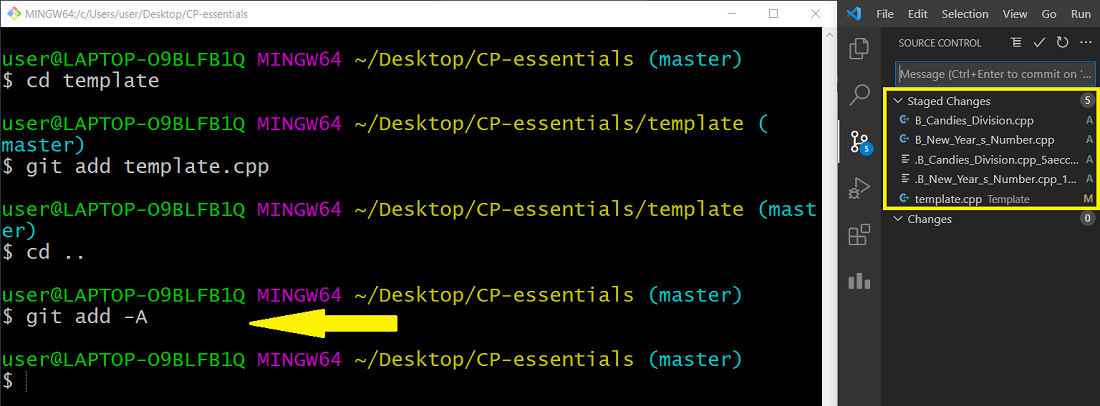
Step 1: Changes are made in multiple files in the working directory.
Step 2: To stage a specific file:
git add <file_name>Step 3: To stage all changes at once:
git add -AComparison of git add and git add -A based on scope and the types of changes they stage.
| git add | git add -A |
|---|---|
| Git add <filename> add any particular file only. | Git add sends all files from the untracked area to the stage area. |
| Git add is more like to be used in big projects where small changes are used to be made. | Git add -a, all the untracked files to the staging area. |
| "Git add" is comparatively less handy. | "Git add -a" is more healthy. |
| Git add doesn't deletion adds stage changes. | Git add stages changes including modification or code deletion. |