|
VOOZH | about |
|
VOOZH | about |
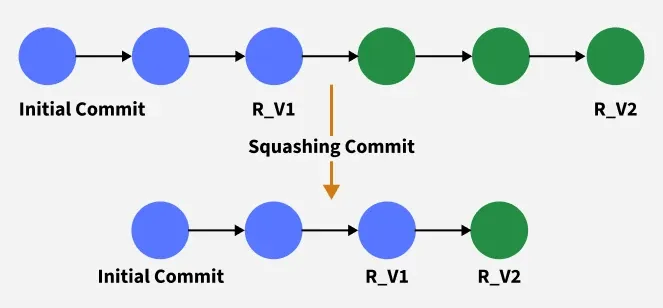
Git squash combines multiple commits into a single commit to simplify and clean up project history, making it more organised and easier to review.
You can combine commits from a feature branch into a single commit and merge it into your current branch using:
git merge --squash feature-branchThis command condenses all commits from the feature branch into one that is applied onto your current branch. After squash merging, the repository history becomes cleaner and more organised.
There are mainly two way:
git rebase -i HEAD~3Steps:
Result: Multiple commits are combined into a single commit.
Steps:
git checkout maingit merge --squash feature-branchgit commit -m "Add group video calls and bug fixes"git rebase -i HEAD~2Steps:
Result: The last two commits are merged into one.
| Git Squash | Git Rebase |
|---|---|
| You can combine multiple commits into a single commit. | Applies commits on top of the different base commits. |
| After using git squash your commit history will be more clean and organized. | You can form a new branch by using previous commits. |
| Must be done on private branches. | Rebasing can be done on a feature branch or shared branch. |
| By using squishing you can maintain clean and logical commit history. | By using rebase command you can keep your branch up to date. |