|
VOOZH | about |
|
VOOZH | about |
NPM is a package manager for Node.js used to install and manage JavaScript packages. It helps in:
Note: npm does not verify or vet packages uploaded to its repository, therefore, one must carefully select only well-maintained, updated, and popular packages, to prevent security risks.
Here are the steps for Git installation using npm package.
Step 1: Search for PowerShell, right-click on it, and select Run as Administrator.
Step 2: Verify if npm is Installed
Type the following command in the PowerShell terminal:
npm👁 Steps-to-Install-Git-by-npm_1
If the output displayed on the console is of the following type:
👁 Steps-to-Install-Git-by-npm_2
Then npm is not installed in your system.
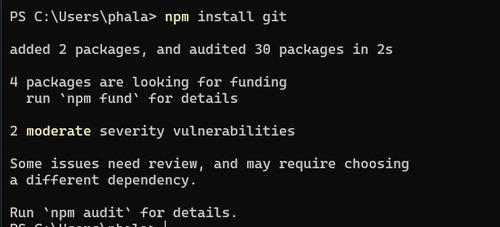
Step 3: Type the following command in the Powershell Terminal.
npm install git👁 Steps-to-Install-Git-by-npm_3
Step 4: To verify if git is installed, check the packages installed under npm by typing the following command in the Powershell Terminal.
npm list👁 Steps-to-Install-Git-by-npm_4