 |
VOOZH | about |
|
VOOZH | about |
A Git alias is a shorthand for a Git command or a sequence of commands, allowing you to use shorter and more convenient abbreviations.
Instead of typing:
git statusYou can create an alias:
git gsGit aliases improve productivity by simplifying and standardizing command usage.
Git aliases are of 2 types:
By default, if you create an alias without the --global flag, it will be local. Using the --global flag stores it in your global configuration so it’s available everywhere.
Creating Git aliases is simple and can be done using configuration commands or by editing config files.
You can create aliases directly from the terminal using:
git config --global alias.<name> <command>Note: --global applies aliases to all repositories. Without --global Alias is local to the repository
You can manually create Git aliases by editing configuration files.
Config File Locations
Adding Aliases
The config file may also contain other details like user name, email, etc.
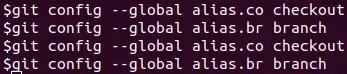
Example: We have a repository Power-Puff-Girls, having 3 branches.
git br is an alias for git branch and aliases can also combine multiple commands.
Creating Custom Alias Commands
You can combine commands to create new shortcuts:
git config --global alias.unstage 'reset HEAD --'Combines reset HEAD into an alias, so git unstage app.css equals git reset HEAD -- app.css.
Git aliases can be used to create custom commands that execute a sequence of Git commands.
git config --global alias.<name> '<command>'Create a shortcut to commit and push in one step:
git config --global alias.gcp '!git commit -m "Work in progress." && git push origin HEAD'Here are some examples of common Git aliases that can enhance your productivity:
Instead of typing git status, you can use:
git config --global alias.st 'status'Now, simply type git st to check your repository status.
Viewing the commit history with git log can be made easier with an alias:
git config --global alias.lg 'log --oneline --graph --all'This alias (git lg) shows a concise, graphical representation of the commit history.
Switching branches frequently? Simplify git checkout with:
git config --global alias.co 'checkout'Now, use git co [branch-name] to switch branches quickly.
For making commits with a short message, use:
git config --global alias.ci 'commit -m'This allows you to commit changes with git ci "your message".
Staging files for commit can be shortened from git add to:
git config --global alias.a 'add'Use git a [file-name] to add files to the staging area.
Pushing changes to the remote repository can be abbreviated from git push to:
git config --global alias.psh 'push'Use git psh to push your changes.
Git aliases improve productivity by reducing repetitive typing and simplifying command usage.

.webp)
.webp)