|
VOOZH | about |
|
VOOZH | about |
GitHub Actions is an automation tool built inside GitHub that helps you automatically run tasks like testing code, deploying applications, formatting files, sending notifications, etc., whenever something happens in your repository.
There are two ways through which we can create the GitHub Actions.
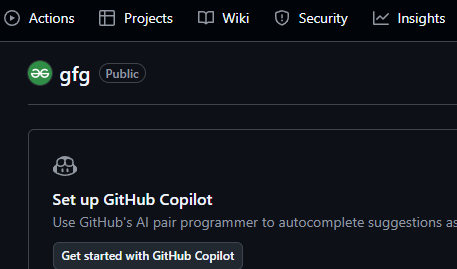
Click on the Action tab to create a GitHub Action. You’ll see the following page:
Step 1: Click on the Action
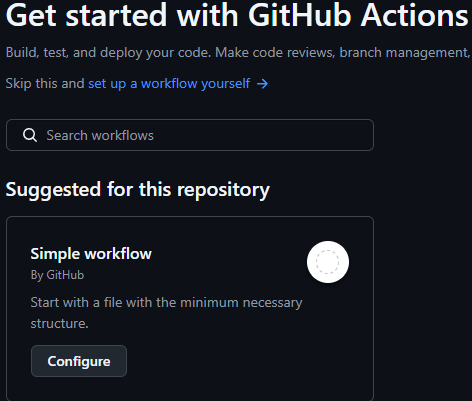
Step 2: Select the workflow action
GitHub suggestions automatically work according to the nature of your project. Select the GitHub workflow and click on the configure button to create your action.
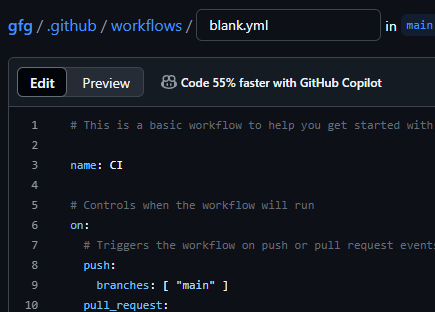
Step 3.Create the GitHub workflow
Here you can edit and create your action. Click on the commit change button to save the action.
Your GitHub Action has been created.
In GitHub Actions, events are the triggers that kick off workflows. These events are specific activities in your repository that lead to the execution of actions. For example, pushing new code or creating a pull request triggers specific events that initiate associated workflows.
Common GitHub Action Event Types
Each event type can be further customized to trigger only for specific actions. For example, a pull_request event can be restricted to occur only when a PR is opened for the 'releases/**' branch.
# .github/workflows/demo.yml

on:
 issues:
 types: [opened, edited, milestoned]

 pull_request:
 types:
 - opened
 branches:
 - "releases/**"
This precise control over event types ensures that your workflow is efficient and minimizes unnecessary resource usage.
Jobs are tasks that run within a GitHub Action workflow. By default, jobs run in parallel, but you can define dependencies so that one job runs after another. This is useful when certain tasks depend on the output of previous ones, such as building an app before running tests.
# .github/workflows/demo.yml

name: Demo Workflows

on:
 push:

jobs:
 build:
 name: Build
 needs: [Development]
 steps:
 - name: Build and deploy on Cloud

 dev:
 name: Development
 steps:
 - name: Run the developer

 Test:
 needs: [build, dev]
 name: Testing
 steps:
 - name: Testing the application
In the above example, the Test job depends on the build and dev jobs. The jobs will run in parallel, but Test will wait until the other two jobs complete.
Runners are the virtual machines or environments where your GitHub Actions workflows execute. GitHub provides runners for various operating systems, such as Ubuntu, Windows, and MacOS.
You can specify the type of runner to use for each job in the workflow by setting the runs-on option.
Defining a Runner:
# .github/workflows/demo.yml

name: Demo workflows

on:
 push:
 branches: ["main"]

jobs:
 build:
 runs-on: ubuntu-latest
This configuration specifies that the build job should run on the latest version of Ubuntu. You can also define multiple runners for a job using an array.
You must never hardcode sensitive values like API keys, passwords, or cloud credentials in your YAML files. GitHub Actions provides Encrypted Secrets for this.
steps:
 - name: Login to Docker Hub
 uses: docker/login-action@v3
 with:
 username: ${{ secrets.DOCKERHUB_USERNAME }}
 password: ${{ secrets.DOCKERHUB_TOKEN }}
While GitHub-hosted runners are easy, self-hosted runners are a key system design choice for many companies.
Why?
CI/CD jobs run in clean environments, meaning they have to download dependencies (like node_modules or Maven packages) every single time. This is slow and wasteful. You can use actions/cache to store these dependencies and restore them on subsequent runs.
steps:
 - uses: actions/checkout@v4

 - name: Cache Node.js modules
 uses: actions/cache@v4
 with:
 path: ~/.npm # The directory to cache
 key: ${{ runner.os }}-npm-${{ hashFiles('**/package-lock.json') }}
 restore-keys: |
 ${{ runner.os }}-npm-

 - name: Install dependencies
 run: npm install
The key is crucial. When the package-lock.json file changes, the key changes, and the cache is invalidated.
To ensure your system is reliable, you might need to test it across multiple platforms, language versions, or configurations. A matrix strategy lets you run the same job multiple times with different parameters.
jobs:
 test:
 runs-on: ubuntu-latest
 strategy:
 matrix:
 node-version: [16.x, 18.x, 20.x]
 os: [ubuntu-latest, windows-latest]

 steps:
 - name: Set up Node.js ${{ matrix.node-version }}
 uses: actions/setup-node@v4
 with:
 node-version: ${{ matrix.node-version }}

 # ... run tests ...
This will trigger 6 jobs in parallel (3 node versions x 2 OSes).
GitHub Actions offers several advantages over traditional CI/CD tools
GitHub Actions can be applied in various scenarios