|
VOOZH | about |
|
VOOZH | about |
GitHub Workflows are a powerful feature of GitHub Actions that automate tasks such as building, testing, and deploying your code directly from your GitHub repository. Workflows are highly customizable, allowing you to create automated processes that fit your specific project needs.
This article provides a detailed overview of GitHub Workflows, explaining what they are, how to create them, and best practices for using them effectively.
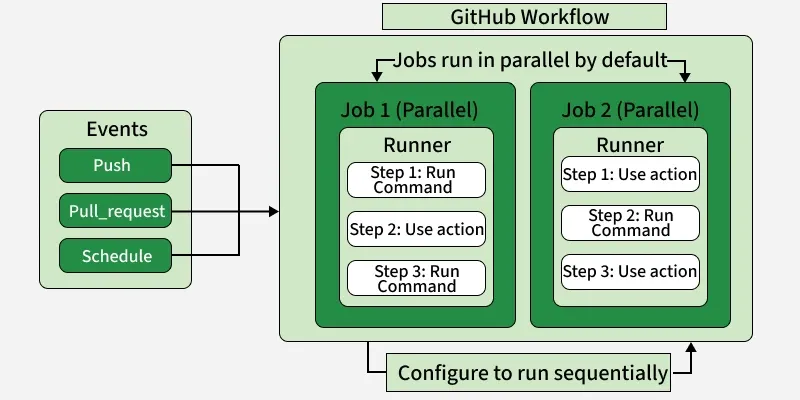
A GitHub Workflow is a configurable automated process made up of one or more jobs that run on GitHub Actions. Workflows are defined in YAML files stored in the .github/workflows/ directory of your repository. Each workflow can be triggered by specific events (like pushing code, opening a pull request, or scheduling times) or manually.
Here’s a step-by-step guide to creating a basic GitHub Workflow:
Go to your GitHub repository where you want to create a workflow.
Create a new file in the .github/workflows/ directory of your repository. For example, you might create a file named ci.yml.
In your new workflow file, define the workflow using YAML syntax. Below is a basic example of a workflow that runs a set of tests whenever code is pushed to the main branch:
name: CI

on:
 push:
 branches:
 - main
 pull_request:
 branches:
 - main

jobs:
 build:
 runs-on: ubuntu-latest

 steps:
 - name: Checkout code
 uses: actions/checkout@v4

 - name: Set up Node.js
 uses: actions/setup-node@v4
 with:
 node-version: "14"

 - name: Install dependencies
 run: npm install

 - name: Run tests
 run: npm test
This workflow is named "CI" and is triggered by push and pull_request events on the main branch. It includes a job named build that runs on the latest version of Ubuntu. The job consists of steps to checkout the code, set up Node.js, install dependencies, and run tests.
Events: These are triggers that start workflows. Common events include:
Jobs: Jobs are sets of steps that run on the same runner. Jobs can run in parallel or can be configured to run sequentially using the needs keyword.
Steps: Steps are individual tasks within a job. Steps can run commands directly or use actions to perform tasks. Actions are reusable units of code that can be used to simplify your workflows.
Runners: These are the servers that run your workflows. GitHub provides hosted runners for various operating systems, including Ubuntu, Windows, and macOS, or you can use self-hosted runners.
strategy:
 matrix:
 node-version: [12, 14, 16]
 os: [ubuntu-latest, windows-latest, macos-latest]
Here’s an example of a more complex workflow that uses a matrix build, cache, and deploys to GitHub Pages:
name: Build and Deploy

on:
 push:
 branches:
 - main

jobs:
 build:
 runs-on: ubuntu-latest
 strategy:
 matrix:
 node-version: [12, 14]
 steps:
 - name: Checkout code
 uses: actions/checkout@v4

 - name: Set up Node.js
 uses: actions/setup-node@v4
 with:
 node-version: ${{ matrix.node-version }}

 - name: Cache node modules
 uses: actions/cache@v4
 with:
 path: node_modules
 key: ${{ runner.os }}-node-${{ hashFiles('**/package-lock.json') }}
 restore-keys: |
 ${{ runner.os }}-node-

 - name: Install dependencies
 run: npm install

 - name: Build project
 run: npm run build

 - name: Deploy to GitHub Pages
 uses: peaceiris/actions-gh-pages@v3
 with:
 github_token: ${{ secrets.GITHUB_TOKEN }}
 publish_dir: ./build
This workflow demonstrates how to: