|
VOOZH | about |
|
VOOZH | about |
In today's digital age, having a strong online presence is key to a successful brand. One important aspect of understanding and improving brand awareness and consumer engagement is analyzing brand mentions on social media. With the massive amount of data generated on various social media platforms, businesses have a golden opportunity to gain valuable insights into consumer behavior, preferences, and how people feel about their brand. But with such a huge amount of data to handle, it can be overwhelming. That's where sophisticated tools like R for data analysis come in. They can make the task much easier by turning raw data into actionable intelligence.
This article aims to give you a step-by-step guide on how to use R to analyze brand mentions on social media. It covers everything from the importance of social media data analysis for businesses and brands to the process of collecting, cleaning, preprocessing, and analyzing data
In the world of R Programming Language there are several packages specifically designed to make data collection and preprocessing from social media platforms easier. These packages not only simplify the process of acquiring data but also enhance the efficiency of cleaning and preparing it. They're like indispensable tools for social media data analysts.
To conduct this analysis, we're turning to the wealth of online content on YouTube, a bustling hub of discussions, tutorials, and community interactions. Specifically, we're using data from GeekforGeeks YouTube videos, a treasure trove of programming tutorials and discussions frequented by enthusiasts and professionals alike.
We load required R packages for data manipulation (dplyr, tidyr), string manipulation (stringr), data visualization (ggplot2), date-time manipulation (lubridate), and additional functionality from the tidyverse package collection.
We reads the dataset stored in the CSV file named "gfg.csv" into a data frame called gfg_data.
Dataset Link: Analyzing Social Media Brand
Output:
'data.frame': 3784 obs. of 9 variables:
 $ video_link : chr "https://www.youtube.com/ijSJMr0lPko" "https://www.youtube.com/
 $ thumbnail_link: chr "https://i.ytimg.com/vi/ijSJMr0lPko/hqdefault.jpg" "https://i.ytimg.com/vi/FbfeCOgNuc
 $ duration : chr "16 minutes, 56 seconds" "46 minutes, 18 seconds" "33 minutes, 40 seconds" "40 minut
 $ title : chr "How I got hired via GFG Job Portal" "Understanding Sorting Techniques in an hour |
 $ views : chr "392" "2,220" "905" "1,051" ...
 $ likes : chr "21" "131" "26" "52" ...
 $ comments : chr "0" "3" "0" "1" ...
 $ date : chr "Streamed live 8 hours ago" "Streamed live on 10 Apr
$ description : chr "In this webinar, Vedant Thakur will talk about their experience of getting hired at........In this we calculates the number of missing values in each column of the gfg_data data frame using the colSums function.
Output:
 video_link thumbnail_link duration title views
 0 0 0 0 0
 likes comments date description
0 0 0 0 Visualize the analysis of social media brand mentions, you typically need to consider various types of data and the appropriate visualization techniques.
Output:
This code creates a histogram to visualize the distribution of video views (views variable) in the gfg_data_clean data frame using ggplot2. The histogram is filled with blue color and has black borders. The x-axis label is set to "Views," the y-axis label is set to "Frequency," and the title of the plot is "Distribution of Video Views."
This one creates a histogram to visualize the distribution of video likes (likes variable) in the gfg_data_clean data frame. The histogram is filled with green color and has black borders. The x-axis label is set to "Likes," the y-axis label is set to "Frequency," and the title of the plot is "Distribution of Video Likes."
Output:
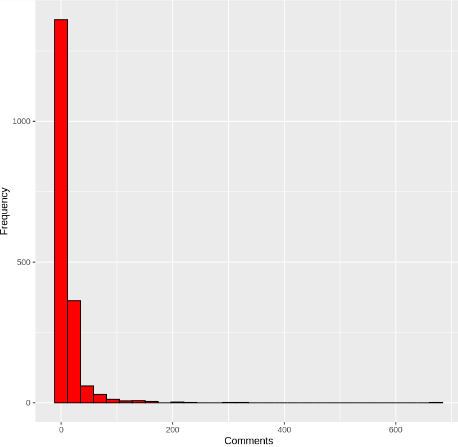
This code creates a histogram to visualize the distribution of video comments (comments variable) in the gfg_data_clean data frame. The histogram is filled with red color and has black borders. The x-axis label is set to "Comments," the y-axis label is set to "Frequency," and the title of the plot is "Distribution of Video Comments."
Output:
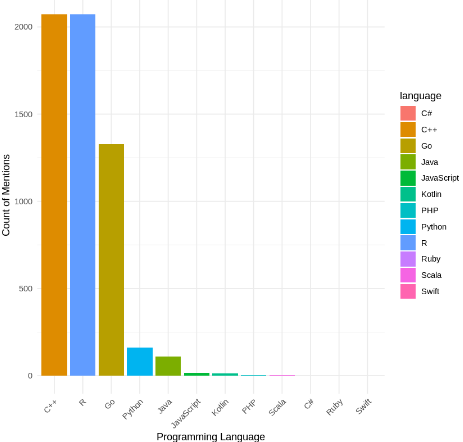
This code creates a bar plot to visualize the counts of mentions for each programming language stored in the language_counts data frame. Each bar represents a programming language, with the height indicating the count of mentions. The bars are sorted in descending order based on the count of mentions. The plot title, axis labels, and theme are customized to enhance readability and aesthetics.
Output:
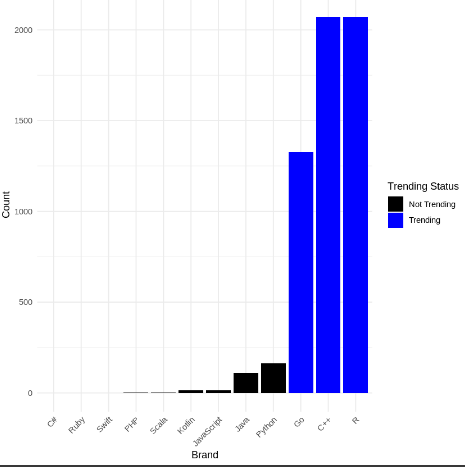
This code sorts the language_counts data frame by the count of mentions in descending order and adds a new column named "trending" to indicate whether a language is trending or not based on its rank. The top 3 languages are labeled as "Trending," while the rest are labeled as "Not Trending." Then, it creates a bar plot to visualize the counts of mentions for each language, with trending and non-trending brands distinguished by different colors. The plot is customized with appropriate axis labels, legend, and theme for clarity and aesthetics.
Output:
To sum it up, our deep dive into social media buzz around programming languages shows a lively scene shaped by community interactions, industry shifts, and cultural vibes. With the help of R and data from platforms like YouTube, we've gotten some real insights into how programming languages are seen as brands. As tech keeps evolving, the stories around these iconic languages will too, driving creativity, teamwork, and community involvement in the digital world.