|
VOOZH | about |
|
VOOZH | about |
subset() function in R Programming Language is used to create subsets of a Data frame. This can also be used to drop columns from a data frame.
subset(df, expr)
Parameters:
Here we will make subsets of dataframe using subset() methods in R language.
We are creating a data frame df with three rows and columns. Then, we use subset() to select only the row2 column and store it in df1. Finally, we print both the original and modified data frames.
Output:
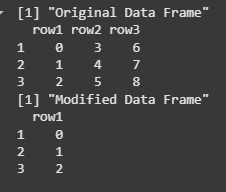
We are creating a data frame df with three columns (row1, row2 and row3). Then, we use the subset() function to remove the row2 and row3 columns from the data frame. The modified data frame, containing only row1, is printed after the operation.
Output:
We are creating a data frame df with three columns: ID, Name and Age. Then, we use the subset() function to create two new subsets:
subset_df filters the data where Age is greater than 25 and ID is less than 4.subset_df2 filters the data where Age is greater than 30 or ID is equal to 2.Output:
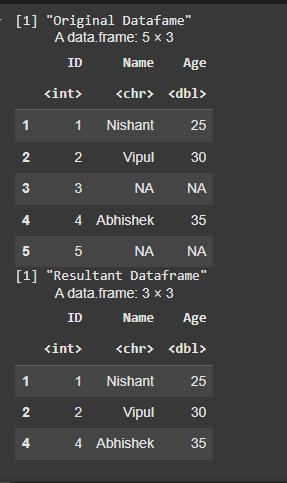
We are creating a data frame df with three columns: ID, Name and Age, where some values are missing (NA). Then, we use the subset() function to filter out rows where the Age column has missing values (NA). The resulting data frame, which contains only rows with non-missing Age values, is printed.
Output:
In this article, we explored how to create subsets of a data frame in R using the subset() function. We also demonstrated how to filter rows based on conditions, select specific columns and handle missing values.