|
VOOZH | about |
|
VOOZH | about |
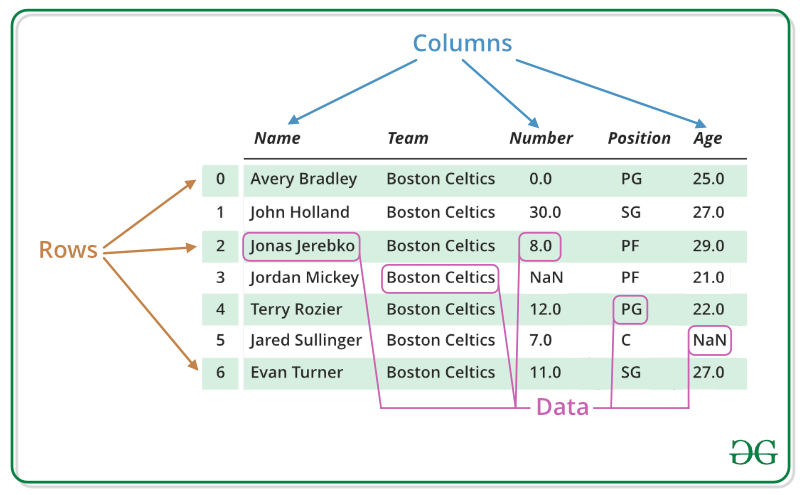
DataFrames are generic data objects of R which are used to store the tabular data. Data frames are considered to be the most popular data objects in R programming because it is more comfortable to analyze the data in the tabular form. Data frames can also be taught as mattresses where each column of a matrix can be of the different data types. DataFrame are made up of three principal components, the data, rows, and columns.
Operations that can be performed on a DataFrame are:
In the real world, a DataFrame will be created by loading the datasets from existing storage, storage can be SQL Database, CSV file, and an Excel file. DataFrame can also be created from the vectors in R. Following are some of the various ways that can be used to create a DataFrame:
Creating a data frame using Vectors: To create a data frame we use the data.frame() function in R. To create a data frame use data.frame() command and then pass each of the vectors you have created as arguments to the function.
Example:
Output:
 Name Language Age
1 Amiya R 22
2 Raj Python 25
3 Asish Java 45
Creating a data frame using data from a file: Dataframes can also be created by importing the data from a file. For this, you have to use the function called 'read.table()'.
Syntax:
newDF = read.table(path="Path of the file")
To create a dataframe from a CSV file in R:
Syntax:
newDF = read.csv("FileName.csv")The syntax for accessing rows and columns is given below,
df[val1, val2]

df = dataframe object
val1 = rows of a data frame
val2 = columns of a data frame
So, this 'val1' and 'val2' can be an array of values such as "1:2" or "2:3" etc. If you specify only df[val2] this refers to the set of columns only, that you need to access from the data frame.
Example: Row selection
Output:
 Name Language Age
1 Amiya R 22
2 Raj Python 25
3 Asish Java 45

Accessing first and second row
 Name Language Age
1 Amiya R 22
2 Raj Python 25
Example: Column selection
Output:
 Name Language Age
1 Amiya R 22
2 Raj Python 25
3 Asish Java 45

Accessing first and second column
 Name Language
1 Amiya R
2 Raj Python
3 Asish Java
A subset of a DataFrame can also be created based on certain conditions with the help of following syntax.
newDF = subset(df, conditions)
df = Original dataframe
conditions = Certain conditions
Example:
Output:
Name Language Age
1 Amiya R 22
2 Raj Python 25
3 Asish Java 45

After Selecting the subset of the data frame
 Name Language Age
1 Amiya R 22
3 Asish Java 45
In R, DataFrames can be edited in two ways:
Editing data frames by direct assignments: Much like the list in R you can edit the data frames by a direct assignment.
Example:
Output:
Before editing the data frame
 Name Language Age
1 Amiya R 22
2 Raj Python 25
3 Asish Java 45

After edited the data frame
 Name Language Age
1 Amiya R 22
2 Raj Python 25
3 Asish Java 30
Editing dataframes using the edit() command:
Follow the given steps to edit a DataFrame:
Step 1: So, what you need to do for this is you have to create an instance of data frame, for example, you can see that here an instance of a data frame is created and named as "myTable" by using the command data.frame() and this creates an empty data frame.
myTable = data.frame()
Step 2: Next we will use the edit function to launch the viewer. Note that "myTable" data frame is passed back to the "myTable" object and this way the changes we make to this module will be saved to the original object.
myTable = edit(myTable)
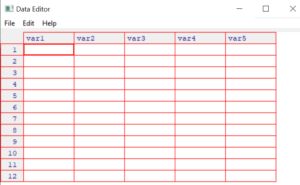
So, when the above command is executed it will pop up a window like this,
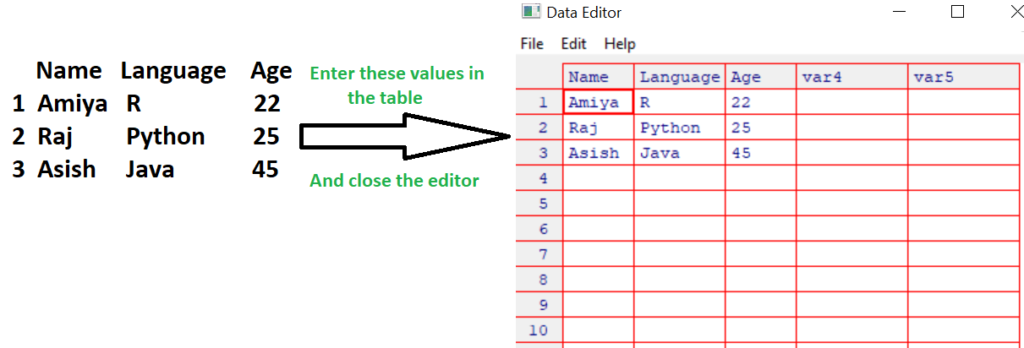
Step 3: Now, the table is completed with this small roster.
Note that, change variable names by clicking on their labels and typing your changes. Variables can also be set as numeric or character. Once the data in the DataFrame looks like the above, close the table. Changes are saved automatically.
Step 4: Check out the resulting data frame by printing it.
> myTable
 Name Language Age
1 Amiya R 22
2 Raj Python 25
3 Asish Java 45
Adding extra rows: We can add extra row using the command rbind(). The syntax for this is given below,
newDF = rbind(df, the entries for the new row you have to add )
df = Original data frame
Note that the entries for the new row you have to add you have to be careful when using rbind() because the data types in each column entry should be equal to the data types that are already existing rows.
Example:
Output:
Before adding row
 Name Language Age
1 Amiya R 22
2 Raj Python 25
3 Asish Java 45

After Added a row
 Name Language Age
1 Amiya R 22
2 Raj Python 25
3 Asish Java 45
4 Sandeep C 23
Adding extra columns: We can add extra column using the command cbind(). The syntax for this is given below,
newDF = cbind(df, the entries for the new column you have to add )
df = Original data frame
Example:
Output:
Before adding column
 Name Language Age
1 Amiya R 22
2 Raj Python 25
3 Asish Java 45

After Added a column
 Name Language Age Rank
1 Amiya R 22 3
2 Raj Python 25 5
3 Asish Java 45 1
In R, we can add new variables to a data frame based on existing ones. To do that we have to first call the dplyr library using the command library() . And then calling mutate() function will add extra variable columns based on existing ones.
Syntax:
library(dplyr)
newDF = mutate(df, new_var=[existing_var])
df = original data frame
new_var = Name of the new variable
existing_var = The modify action you are taking(e.g log value, multiply by 10)
Example:
Output:
Original Dataframe
 Name Language Age
1 Amiya R 22
2 Raj Python 25
3 Asish Java 45

After creating extra variable column
 Name Language Age log_Age
1 Amiya R 22 3.091042
2 Raj Python 25 3.218876
3 Asish Java 45 3.806662
To delete a row or a column, first of all, you need to access that row or column and then insert a negative sign before that row or column. It indicates that you had to delete that row or column.
Syntax:
newDF = df[-rowNo, -colNo]
df = original data frame
Example:
Output:
Before deleting the 3rd row and 2nd column
 Name Language Age
1 Amiya R 22
2 Raj Python 25
3 Asish Java 45
After Deleted the 3rd row and 2nd column
 Name Age
1 Amiya 22
2 Raj 25