|
VOOZH | about |
|
VOOZH | about |
The dplyr package in R programming language provides functions to combine datasets using various types of joins. A full join includes all rows from both data frames, adding NA where there is no match.
To merge two data frames and keep all rows from both, we use the full_join() function from the dplyr package in R. This function is useful when we want to combine data based on a common key, while retaining unmatched rows from both data frames.
Syntax:
full_join(x, y, by = NULL)
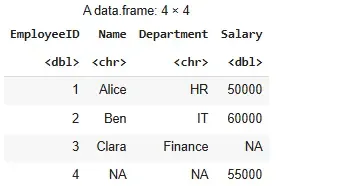
We perform a full join on two data frames that contain employee details and their salaries.
Output:
All employee records from both data frames are included. The row with EmployeeID four appears even though it has no corresponding match in the first data frame. Missing values are filled with NA.
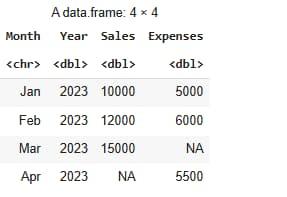
We use multiple columns to match and merge sales and expense data for various months and years.
Month and Year columns.Output:
All rows from both datasets are retained. March has no matching expense record and April has no matching sales record, so NA values are inserted accordingly.
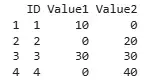
We handle scenarios where missing values are present by replacing them with zeros after the full join.
NA values with 0.Output:
The full join merges all records and introduces NA where there is no match. We replace all NA values with zero using the mutate and across functions from the dplyr package.