|
VOOZH | about |
|
VOOZH | about |
In R we can execute commands efficiently and it is essential for productivity, especially when we want to save time and avoid unnecessary lines of code. Sometimes, we may need and want to run two commands one after the other in a single line. We can do this in R using a semicolon. In this article, we are going to discuss how we can straightforwardly do this. We will also learn the concept of command execution, and how to execute commands sequentially using R Programming Language.
First, we will understand what command execution is in R then we will learn how we can execute commands sequentially. In R, a command is an instruction that we give to the R interpreter to perform a specific task. This could be anything from performing calculations to creating plots or manipulating data. In R, we generally execute one command at a time. However, there are situations where executing multiple commands in one line can be beneficial. This can help us in writing cleaner code, especially in scripts where space and clarity are very important.
We can execute two commands sequentially in R on one line, by using the semicolon (;) to separate the commands. When we write commands like this then R will process the first command, and then immediately execute the second command. This is especially useful when the second command depends on the results of the first one.
The basic syntax for executing two commands in one line is as follows:
command1; command2
Now let's see a simple example code to illustrate this concept. Suppose we want to create a variable and then print its value. Below is code where we can perform this sequentially on one line in R:
Output:
[1] 10x <- 10 assigns the value 10 to the variable x.print(x) prints the value of x.Now in second example suppose we have a data frame, and we want to add a new column and display it.
Output:
 a b
1 1 2
2 2 4
3 3 6
4 4 8
5 5 10
df has two columns: a and b.a contains the values from 1 to 5.b contains the values which are twice those of column a, resulting in 2, 4, 6, 8, and 10.We can also execute function calls sequentially.
Output:
[1] 3mean_val <- mean(c(1, 2, 3, 4, 5)) calculates the mean of the numbers 1 to 5 and stores it in mean_val.print(mean_val) outputs 3Now we will discuss some of the Practical Use Cases for Sequential Command Execution:
When we work with data, preprocessing steps like filtering, selecting columns, or performing transformations can involve multiple commands. For example, suppose we want to modify one column and print the summary of another. We want to execute all this in one go.
Output:
 Min. 1st Qu. Median Mean 3rd Qu. Max.
 26.0 28.5 31.0 31.0 33.5 36.0
In above example, the first command increases the value of the age column by 1, while the second command prints the summary of the age column. We can use one line to makes it faster and saves space in our script.
Suppose if we are cleaning or manipulating a dataset, then we may want to apply a transformation and check the results immediately.
Output:
 name salary
1 Ayush 55000
2 Antima 66000
3 Smrita 60500
In above code example, the salary of employees is increased by 10%, and the updated data is shown in the console with the head() function.
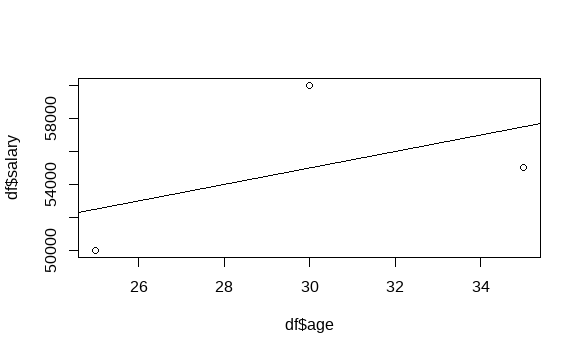
When we are working on visualizations, sometimes we may want to quickly create a plot and make adjustments to it without running separate lines for each step. We can do this easily.
Output:
In above example code we can see plots age vs. salary and adds a linear regression line in one step. Instead of running these commands separately, we can combine them and can make our plotting workflow faster.
For more complex workflows, R provides many different ways to execute commands sequentially, which can be more readable and maintainable. Some of these methods include:
%>%) from the dplyr PackageThe pipe operator allows for chaining commands together in a clean and readable way, especially useful when performing multiple data transformations.
Output:
 mean_salary
1 55000
This example increases the age by 1 and then calculates the mean salary. It is far more readable than putting multiple commands on the same line.
with() FunctionThe with() function allows us to evaluate commands within the scope of a data frame without repeating the data frame name.
Output:
 Min. 1st Qu. Median Mean 3rd Qu. Max.
 50000 52500 55000 55000 57500 60000
In above example code, we can execute multiple commands on the data frame df without needing to reference it multiple times. This makes the code cleaner and easier to understand.
We can easily execute two commands sequentially on one line in R. It is simple and also useful technique. We can use the the semicolon (;) to separate commands, we can streamline our workflow and make our scripts cleaner. However, it is necessary to keep in mind the importance of readability and debugging ease.