|
VOOZH | about |
|
VOOZH | about |
Word Cloud is a data visualization technique used for representing text data in which the size of each word indicates its frequency or importance. Significant textual data points can be highlighted using a word cloud. Word clouds are widely used for analyzing data from social network websites.
Why Word Cloud?
The reasons one should use word clouds to present the text data are:
Here are steps to create a word cloud in R Programming.
Step 1: Create a Text File
Copy and paste the text in a plain text file (e.g:file.txt) and save the file.
Step 2: Install and Load the Required Packages
Step 3: Text Mining
Load the Text: The text is loaded using Corpus() function from text mining(tm) package. Corpus is a list of a document.
Start by importing text file created in step 1: To import the file saved locally in your computer, type the following R code. You will be asked to choose the text file interactively.
</p><pre><code class="language-python3">text = readLines(file.choose())
</code></pre><p></p><p dir="ltr"><b><strong>Load the data as a corpus:</strong></b><br><gfg-tabs data-run-ide="false" data-mode="light"><gfg-tab slot="tab">Python
# VectorSource() function creates a corpus of character vectors
docs = Corpus(VectorSource(text))
Text transformation: Transformation is performed using tm_map() function to replace, for example, special characters from the text like "@", "#", "/".
Cleaning the Text: The tm_map() function is used to remove unnecessary white space, to convert the text to lower case, to remove common stopwords. Numbers can be removed using removeNumbers.
</p><pre><code class="language-python3"># Convert the text to lower case
docs1 = tm_map(docs1,
 content_transformer(tolower))

# Remove numbers
docs1 = tm_map(docs1, removeNumbers)

# Remove white spaces
docs1 = tm_map(docs1, stripWhitespace)
</code></pre><p></p><p dir="ltr"><b><strong>Step 4: Build a term-document Matrix</strong></b></p><p dir="ltr"><span>Document matrix is a table containing the frequency of the words. Column names are words and row names are documents. The function </span><b><strong>TermDocumentMatrix()</strong></b><span> from text mining package can be used as follows. </span><br><span> </span></p><gfg-tabs data-run-ide="false" data-mode="light"><gfg-tab slot="tab">Python</gfg-tab><gfg-panel slot="panel" data-code-lang="python3"><pre><code class="language-python3">dtm = TermDocumentMatrix(docs1)
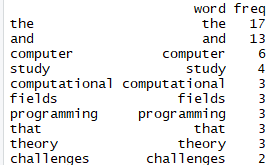
m = as.matrix(dtm)
v = sort(rowSums(m), decreasing = TRUE)
d = data.frame(word = names(v), freq = v)
head(d, 10)
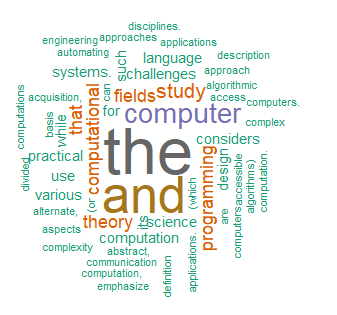
Step 5: Generate the Word Cloud
The importance of words can be illustrated as a word cloud as follows.
The complete code for the word cloud in R is given below.
Output:
Advantages of Word Clouds