|
VOOZH | about |
|
VOOZH | about |
It is a frequent requirement to save our dataframe for portability after working on it on the auxiliary memory of the computer system using R Programming Language. In this article, we will be using writexl package to export our dataframe to excel(.xlsx). The write_xlsx() function of the writexl package is used to export our dataframe to an Excel file.
The writexl is a simple package that contains a function write_xlsx() function which is used to write a dataframe to an Excel (.xlsx) file.
Packages are installed in R by using the install.packages() function. To install a package pass the name of the package/library to the install.packages() function.
We can install the writexl package by running the command below in the R console.
install.packages("writexl")Example 1: In the first line of the code below, we have used library("writexl") function to load the package named -> "writexl". We have then used write_xlsx() function of the writexl library to export the dataframe to an Excel file. In the below example, our write_xlsx() function takes 2 arguments, the first argument is the dataframe itself which is to be converted to an Excel file, the second argument is the path with "file_name.xlsx" which specifies the location where our Excel file will be saved with specified file_name.
To create a ".xlsx" with (multiple) named sheets, simply set "df" to a named list of data frames.
Syntax: write_xlsx(dataframe_name, "path\\file_name.xlsx")
Code:
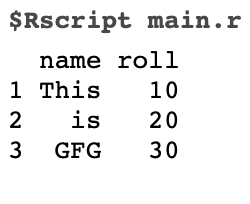
Output:
👁 ImageOur dataframe gets exported in the form of an Excel file to the specified location or path.
Example 2:
The only difference in this example from the previous examples is the arguments, in the example code below we have passed 2 extra arguments which help us have more control over the formatting of the Excel file. Those arguments and their usage are:
Syntax:
write_xlsx(
 df,
 "path\\file_name.xlsx"),
 col_names = TRUE,
 format_headers = TRUE
)
Code:
Output:
👁 ImageOur dataframe gets exported in the form of an excel file to the specified location or path.
The write.csv() is an inbuilt function in R, we do not require installing any additional library for using this function.
In the code below, our write.csv() function takes 2 arguments, the first argument is the dataframe itself which is to be converted to a CSV file, the second argument is the path with "file_name.csv" which specifies the location where our CSV file will be saved with specified file_name.
Syntax: write.csv(dataFrame_name, "path\\file_name.csv")
Code:
Output:
👁 Image