VOOZH about

URL: https://www.geeksforgeeks.org/r-language/how-to-export-dataframe-to-csv-in-r/

⇱ How to Export DataFrame to CSV in R ? - GeeksforGeeks


  • Courses
  • Tutorials
  • Interview Prep

How to Export DataFrame to CSV in R ?

Last Updated : 26 Mar, 2021

R Programming language allows us to read and write data into various files like CSV, Excel, XML, etc. In this article, we are going to discuss how to Export DataFrame to CSV file in R Programming Language.

Approach: 

  • Write Data in column wise format
  • Create DataFrame for these data
  • Write Data to the CSV file
  • Print the success message

Function used:

  • dataframe() is used to create data frame

Syntax:

data.frame(column1, column2, column3)

  • write.csv() function is used create csv file from the data set.

Syntax:

 write.csv(dataframe, path) 

Example:

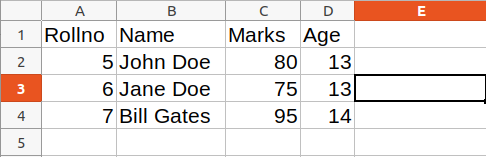
Output: 

👁 Image

Example:

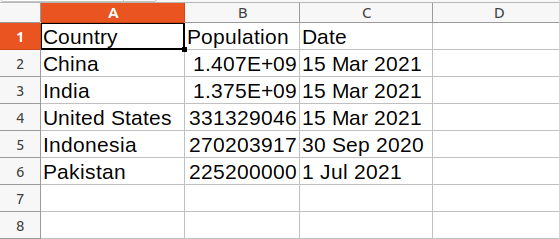
Output: 

👁 Image
Comment
Article Tags:

Explore