|
VOOZH | about |
|
VOOZH | about |
In this article, we will look into what is Interaction, and should we use interaction in our model to get better results or not.
Let's say X1 and X2 are features of a dataset and Y is the class label or output that we are trying to predict. Then, If X1 and X2 interact, this means that the effect of X1 on Y depends on the value of X2 and vice versa then where is the interaction between features of the dataset. Now that we know that if our dataset contains interaction or not. We should also know when to take interaction into account in our model for better precision or accuracy. We are going to implement this using the R language.
There are two questions you should ask before including interaction in your model:
Let's look at the interaction in the linear regression model through an example.
Step 1: Load the Data Set
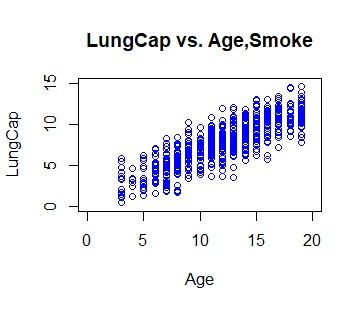
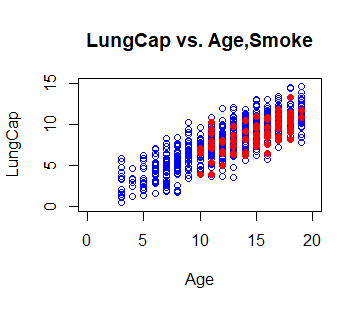
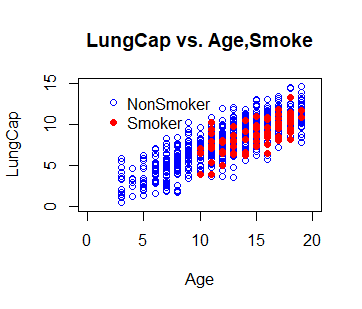
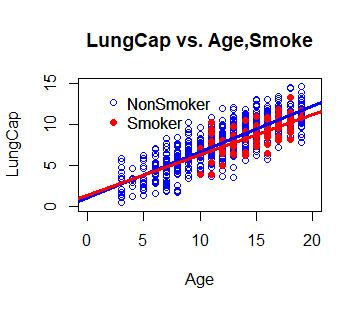
Step 2: Plot the data, using different colors for smoke(red) / non-smoker (blue)
Output:
👁 ImageOutput:
👁 OutputOutput:
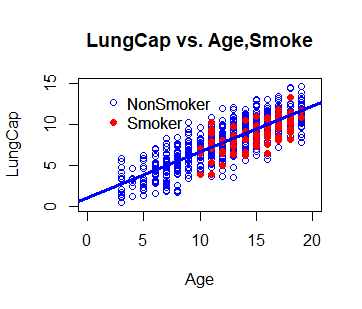
👁 OutputStep 3. Fit a Reg Model, using Age, Smoke, and their INTERACTION and Add in the regression lines
Output:
(Intercept) Age Smokeyes Age:Smokeyes
 1.05157244 0.55823350 0.22601390 -0.05970463
Output:
Call:
lm(formula = LungCap ~ Age + Smoke + Age:Smoke)
Residuals:
Min 1Q Median 3Q Max
-4.8586 -1.0174 -0.0251 1.0004 4.1996
Coefficients:
Estimate Std. Error t value Pr(>|t|)
(Intercept) 1.05157 0.18706 5.622 2.7e-08 ***
Age 0.55823 0.01473 37.885 < 2e-16 ***
Smokeyes 0.22601 1.00755 0.224 0.823
Age:Smokeyes -0.05970 0.06759 -0.883 0.377
---
Signif. codes: 0 ‘***’ 0.001 ‘**’ 0.01 ‘*’ 0.05 ‘.’ 0.1 ‘ ’ 1
Residual standard error: 1.515 on 721 degrees of freedom
Multiple R-squared: 0.6776, Adjusted R-squared: 0.6763
F-statistic: 505.1 on 3 and 721 DF, p-value: < 2.2e-16
Step 4: Let's add in the regression lines from our model using the abline command
Output:
👁 OutputOutput:
👁 OutputOutput:
> summary(model1)

Call:
lm(formula = LungCap ~ Age + Smoke + Age:Smoke)

Residuals:
 Min 1Q Median 3Q Max
-4.8586 -1.0174 -0.0251 1.0004 4.1996

Coefficients:
 Estimate Std. Error t value Pr(>|t|)
(Intercept) 1.05157 0.18706 5.622 2.7e-08 ***
Age 0.55823 0.01473 37.885 < 2e-16 ***
Smokeyes 0.22601 1.00755 0.224 0.823
Age:Smokeyes -0.05970 0.06759 -0.883 0.377
---
Signif. codes: 0 ‘***’ 0.001 ‘**’ 0.01 ‘*’ 0.05 ‘.’ 0.1 ‘ ’ 1

Residual standard error: 1.515 on 721 degrees of freedom
Multiple R-squared: 0.6776, Adjusted R-squared: 0.6763
F-statistic: 505.1 on 3 and 721 DF, p-value: < 2.2e-16

> summary(model2)

Call:
lm(formula = LungCap ~ Age + Smoke)

Residuals:
 Min 1Q Median 3Q Max
-4.8559 -1.0289 -0.0363 1.0083 4.1995

Coefficients:
 Estimate Std. Error t value Pr(>|t|)
(Intercept) 1.08572 0.18299 5.933 4.61e-09 ***
Age 0.55540 0.01438 38.628 < 2e-16 ***
Smokeyes -0.64859 0.18676 -3.473 0.000546 ***
---
Signif. codes: 0 ‘***’ 0.001 ‘**’ 0.01 ‘*’ 0.05 ‘.’ 0.1 ‘ ’ 1

Residual standard error: 1.514 on 722 degrees of freedom
Multiple R-squared: 0.6773, Adjusted R-squared: 0.6764
F-statistic: 757.5 on 2 and 722 DF, p-value: < 2.2e-16