|
VOOZH | about |
|
VOOZH | about |
Transposing means converting rows to columns and columns to rows of a data frame. Transposing can be useful for various purposes, such as reshaping data or preparing it for specific analyses.
Here we are using t() function which stands for transpose to Transpose a Data Frame in R.
t(df)
Where :
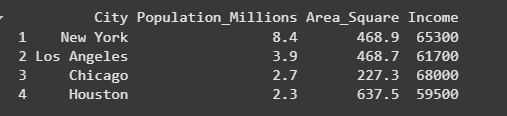
We will create a sample data frame namedcities_data that contains information about four major U.S. cities. We are including columns for the city name, population in millions, area in square miles, and average income. We are then printing this data frame to display the structured information.
Output:
We are transposing the cities_data data frame using thet() function, which switches rows and columns. We are effectively turning the cities into column headers and the attributes (Population, Area, Income) into rows for easier comparison across cities.
Output:
Here we are using data.table data structure to transpose the dataframe, we are using transpose() method to do this
transpose(df)
Where:
We will install and load the data.table package, which provides tools for handling and transforming tabular data in R.
We are converting the existing cities_data data frame into a data.table object called cities_dt so that we can perform data operations using data.table features.
We are using the transpose() function to flip the rows and columns of cities_dt. This helps us view cities as columns and their attributes as rows for better comparative visualization.
We are printing the original cities_dt table to display the city-wise data in its standard format, where each row represents a city and columns hold attributes like population, area, and income.
Output:
We are printing the transposed version of the data table so we can observe how the structure has changed (cities now become columns, and the attributes are presented as rows).
Output:
In this article, we discussed how to Transpose a Data Frame in R Programming Language.