|
VOOZH | about |
|
VOOZH | about |
In this article, we will discuss how to use Is Not NA in R Programming Language.
NA is a value that is not a number. The is.na() method is used to check whether the given value is NA or not, we have to use the function for this. Inorder to use is NOT NA, then we have to add the "!" operator to the is.na() function
Syntax:
!is.na(data)
where, data can be a vector/list, etc
Here we can use this filter to get the values excluding NA values.
Syntax:
vector[!is.na(vector)]
where, vector is the input vector
Example:
Output:
[1] 1 2 3 NA 34 56 78 NA NA 34 NA
[1] 1 2 3 34 56 78 34
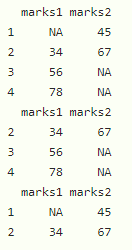
If we want to exclude NA values in dataframe columns, then we can use the dataframe similarly to the vector.
Syntax:
dataframe[!(is.na(dataframe$column_name)), ]
where
Output:
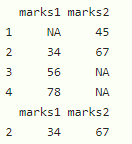
👁 ImageHere we can filter in multiple columns using & operator.
dataframe[!(is.na(dataframe$column1)) & !(is.na(dataframe$column2)),]
Example:
Output:
👁 ImageHere we are going to remove NA's in the entire dataframe by using na.omit() function
Syntax:
na.omit(dataframe)
Example:
Output:
👁 Image