|
VOOZH | about |
|
VOOZH | about |
In this article, we will discuss NOT IN Operator in R Programming Language.
NOT IN Operator is used to check whether the element in present or not. The symbol used for IN operator is "%in%". For NOT IN operator we have to add " ! " operator before that , so the symbol for NOT IN operator is "! %in%".
Here we are going to use this operator in a vector to select the elements that are not in particular elements.
Syntax:
vector[!(vector %in% c(values))]
where,
Example:
Output:
[1] 23 34 56 23 16 78 56 4 5 6 7 8
[1] 16 78 4 8
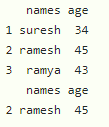
Here we are going to use this filter in dataframe. We can select the values based on the column using this operator using subset function.
Syntax:
subset(dataframe, !(column_name %in% c(values)))
Where,
Example:
Output:
👁 Image