VOOZH about

URL: https://www.geeksforgeeks.org/r-language/import-and-merge-multiple-csv-files-in-r/

⇱ Import and Merge Multiple CSV Files in R - GeeksforGeeks


  • Courses
  • Tutorials
  • Interview Prep

Import and Merge Multiple CSV Files in R

Last Updated : 23 Jul, 2025

In this article, we will be looking at the approach to merge multiple CSV files in the R programming language.

Modules Used

  • dplyr: This is a structure of data manipulation that provides a uniform set of verbs, helping to resolve the most frequent data manipulation hurdles.
  • plyr: plyr is an R package that makes it simple to split data apart, do stuff to it, and mash it back together.
  • readr: This provides a fast and friendly way to read rectangular data (like 'csv', 'tsv', and 'fwf').

Functions Used

  • list.files() function: This function produces a character vector of the names of files or directories in the named directory.

Syntax: list.files(path = ".", pattern = NULL, all.files = FALSE,full.names = FALSE, recursive = FALSE, ignore.case = FALSE, include.dirs = FALSE, no.. = FALSE)

  • lapply() function: This function returns a list of the same length as X, each element of which is the result of applying FUN to the corresponding element of X.

Syntax: lapply(X, FUN, …)

  • bind_rows() function: This function is an efficient implementation of the common pattern of do.call(rbind, dfs) or do.call(cbind, dfs) for binding many data frames into one.

Syntax:

bind_rows(..., .id = NULL)

Parameter:

...: Data frames to combine.

.id: Data frame identifier.

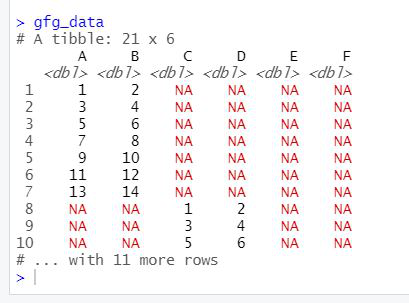
To merge multiple CSV files, the user needs to install and import dplyr,plyr, and readr packages in the R console to call the functions which are list.files(), lapply(), and bind_rows() from these packages and pass the required parameters to these functions to merge the given multiple CSV files to a single data frame in the R programming language.

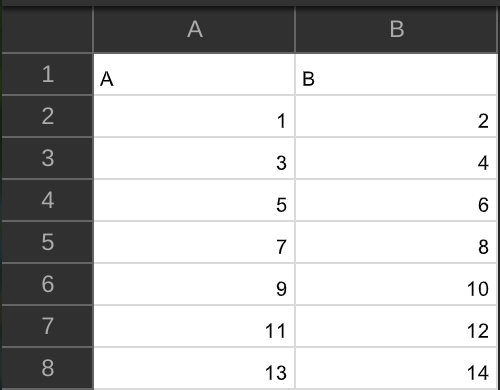
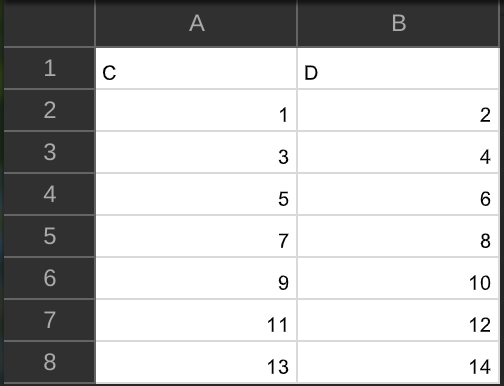
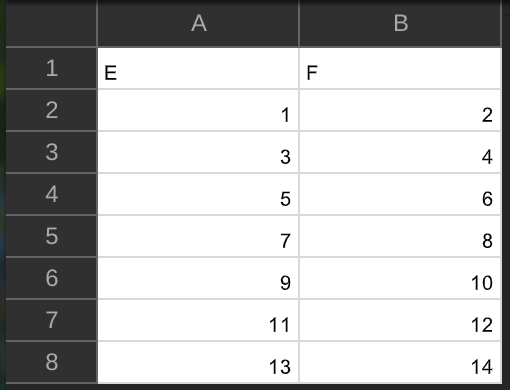
Data in Use:

👁 Image
👁 Image
👁 Image

Example:

 Output:

👁 Image
Comment
Article Tags:
Article Tags:

Explore