|
VOOZH | about |
|
VOOZH | about |
In this article, we are going to see how to insert multiple rows in the dataframe in R Programming Language. First, let's create a DataFrame
To create a data frame we need to use vectors. We need to create vectors with some values and pass the vectors into data.frame() function as parameter. Thus, a data frame is created. Let us see an example that demonstrates the above statement.
Example 1:
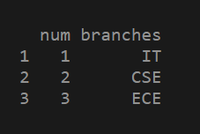
Output:
In the above example, we have created a data frame with vectors directly as parameters. We can create data frames with already created vectors. Let us see an example.
Implementation :
The predefined function used to add multiple rows is rbind(). We have to pass a data frame and a vector having rows of data. So, let see the example code.
Indexing for a dataframe in R:
variable = df([ row,column ])
If we want to extract multiple rows we can put row numbers in a vector and pass that vector as a row or column. If we want to extract 3 rows and all columns we can put row numbers in a vector and leave the column empty. The below example demonstrates the above statement.
Example :
a = df1([ c(1,2,3) , ]) # here we left column as empty which means we want extract all columns
If we want to extract specific columns then we can put column numbers in a vector and pass as a parameter. The below example demonstrates the above statement.
Example :
b = df1( [ c(1,2,3) , c(1,2) ] )
This is how indexing works. Let us see rbind() function introduction and implementation for inserting multiple rows into a dataframe.
rbind() method: rbind means row bind. Joining multiple rows with dataframe.
Syntax: rbind(a, b)
Parameters:
- a = data frame
- b = data to be binded with data frame
Example 1 :
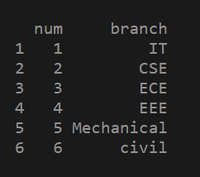
Output:
👁 ImageExample 2: Adding rows from 3 dataframe.
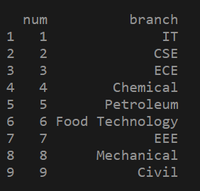
Output: