|
VOOZH | about |
|
VOOZH | about |
read.csv() function in R Language is used to read "comma separated value" files. It imports data in the form of a data frame. The read.csv() function also accepts a number of optional arguments that we can use to modify the import procedure. we can choose to treat the first row as column names, select the delimiter character, and more. For additional information on these options, consult the read.csv() documentation.
read.csv(file, header, sep, dec)
Parameters:
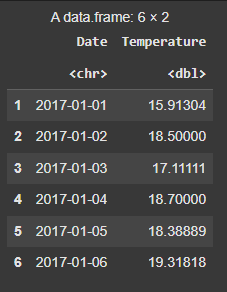
The data variable will hold the contents of the CSV file once we have used the read.csv() function, though you are free to use another variable. Ensure that the file is in the correct CSV format with the correct delimiters and quotation characters by giving the read.csv() method the correct file path or URL. We will be using this CSV file .
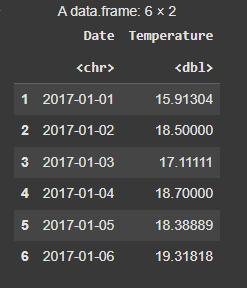
Output:
Output:
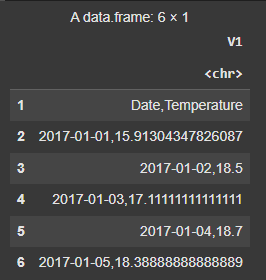
The sep option is set to ";" in this example, which indicates that the CSV file is utilizing the semicolon (;) as the delimiter rather than the standard comma (,).
Output:
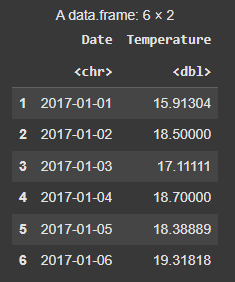
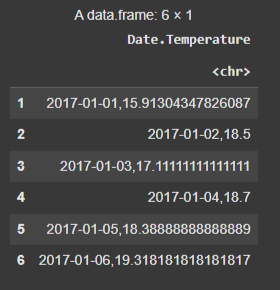
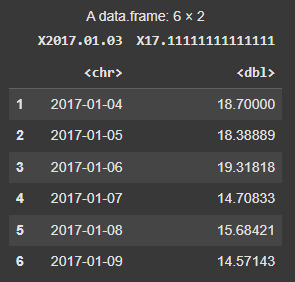
The first row of the CSV file is handled as the column names by default because the header argument is set to TRUE. If the first row of our CSV file does not contain column names, we can import the data without them by setting header = FALSE.
Output:
We can define the classes for each column in the CSV file using the colClasses option. For the sake of this illustration, the first column will be interpreted as a character, the second as a number, and the third as an integer. When we want to manage the data types of particular columns.
Output:
We can skip a specific number of rows at the CSV file's beginning by using the skip argument. The first three rows in this illustration will be omitted. The values that should be considered as missing values (NA) are specified by the an. strings argument. The string "NA" and empty strings are both recognized as missing values in this situation.
Output:
In this article, we learned how to use the read.csv() function in R with various options to read and customize CSV file imports for effective data handling.