|
VOOZH | about |
|
VOOZH | about |
The rename() function in R Programming Language is used to rename the column names of a data frame, based on the older names.
rename(x, names)
Parameters:
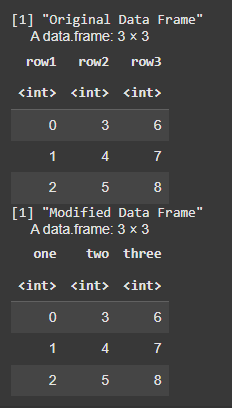
We are using the plyr package to rename the columns of a data frame. After creating a data frame with columns row1, row2, and row3, we use the rename() function to change these column names to one, two, and three. Since rename() returns a modified copy of the data frame, we assign it back to the original variable, df, and then print the modified data frame.
Output:
We are using the plyr package to rename the columns of a data frame. After creating a data frame with columns col1, col2, and col3, we use the rename() function to change these column names to Name, Language, and Age. The modified data frame is returned with the updated column names.
Output:
We are using the rename() function from the plyr package to rename the columns of the iris dataset. After loading the iris data, we change the column names Sepal.Length, Sepal.Width, Petal.Length, and Petal.Width to iris1, iris2, iris3, and iris4, respectively. The modified dataset is then returned with the updated column names.
Output:
In this article, we explored how to rename columns in a data frame in R using the rename() function from the plyr package