In R programming language , we can change (replace) certain values in a dataset only when a condition is true. This is called replacing values based on a condition.
Method 1: Replacing value based on a Single condition We replace values in a column when a single condition is true.
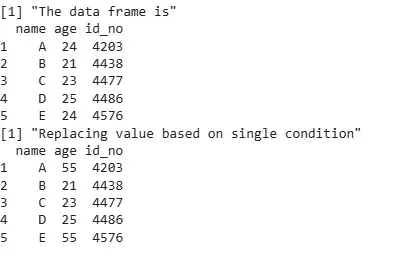
Example 1: We will replace values in the age column where age == 24.
df : The data frame with columns name, age and id_no. df$age == 24 : Condition - selects rows where age is 24. df$age[...] <- 55 : Replaces those values with 55. Output:
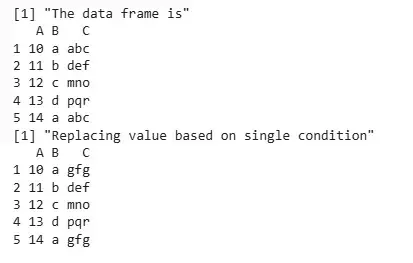
👁 Screenshot-2025-07-16-152435 Output Example 2: We will replace values in the C column where C == "abc".
df : The data frame with columns A , B and C . df$C == "abc" : Condition - selects rows where C is "abc". df$C[...] <- "gfg" : Replaces those values with "gfg". Output:
👁 dataframe Output Method 2: Replacing value based on Multiple Conditions We replace values in a column only when two or more conditions are true.
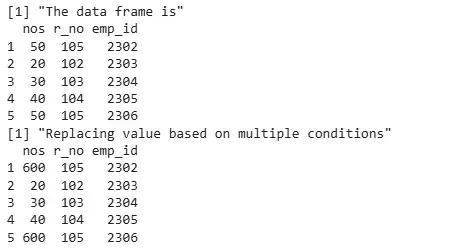
Example 1: We will replace values in the nos column where nos == 50 and r_no == 105.
df : The data frame with columns nos, r_no and emp_id. df$nos == 50 : First condition – selects rows where nos is 50. df$r_no == 105 : Second condition – selects rows where r_no is 105. & : Combines both conditions (AND condition). df$nos[...] <- 600 : Replaces matching nos values with 600. Output:
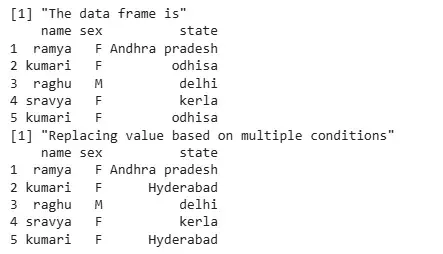
👁 data_frame Output Example 2: We will replace values in the state column where state == "odhisa" and name == "kumari".
df : The data frame with columns name , sex and state . df$state == "odhisa" : First condition - selects rows where state is "odhisa". df$name == "kumari" : Second condition - selects rows where name is "kumari". & : Combines both conditions. df$state[...] <- "Hyderabad" : Replaces matched values in state with "Hyderabad". Output:
👁 data_frame Output The output shows that the value "odhisa" is replaced with "Hyderabad" only for rows where the name is "kumari". All other rows remain unchanged.